PostgreSQL Course — 02 · Joins, Aggregation and Window Functions
Everything in this post is what separates "can write SELECT" from "can answer the question the business actually asked". Joins combine rows across tables; aggregation collapses rows into summaries; window functions compute across a set of rows without collapsing them, which is the capability people most often reach for a reporting tool or an application loop to fake. Add CTEs and recursion and a very large class of problems that look like they need procedural code become a single declarative statement. Examples target PostgreSQL 17/18, with the version noted wherever behaviour changed.
Series map: 00 Foundations & Setup → 01 SQL Fundamentals & Data Types → 02 Joins, Aggregation & Window Functions (this post) → 03 Indexes & the Query Planner → 04 Query Optimization & Statistics → 05 Transactions, MVCC, Isolation & Locking → 06 Schema Design, Normalization & JSONB → 07 Operations, Backup, Replication & Security.
Learning Outcome
- Predict the exact row output of
INNER,LEFT,RIGHT,FULL,CROSS, andLATERALjoins on given inputs. - Write anti-joins correctly and explain why
NOT INis aNULLtrap whileNOT EXISTSis not. - Use
GROUP BY,HAVING, theFILTERclause, andGROUPING SETS/ROLLUP/CUBE. - Solve greatest-n-per-group with
DISTINCT ONand know when a window function is the better tool. - Use window functions in depth:
PARTITION BY,ORDER BY, and frame clauses inROWS,RANGE, andGROUPSmode. - Compute running totals, moving averages, rankings, and row-to-row deltas.
- Write CTEs, control inlining with
MATERIALIZED/NOT MATERIALIZED, and traverse trees withWITH RECURSIVE.
Chapter 1 — The join family, worked row by row
Terminology
- Join — a combination of rows from two relations according to a predicate.
- Join predicate — the
ONcondition. Distinct from theWHEREfilter, and the distinction matters for outer joins. - Semi-join — returns rows of the left relation that have at least one match, with no duplication.
EXISTS,IN. - Anti-join — returns rows of the left relation that have no match.
NOT EXISTS. - Lateral — a subquery on the right of a join that may reference columns from the left.
The fixture
Every result in this chapter comes from these exact rows. Create them and follow along.
1
2
3
4
5
6
7
8
9
10
11
12
13
14
15
16
17
18
19
20
CREATE TABLE customers (
id int PRIMARY KEY,
name text NOT NULL,
country char(2) NOT NULL
);
INSERT INTO customers VALUES
(1,'Ada','GB'), (2,'Grace','US'), (3,'Kat','US'), (4,'Alan','GB');
CREATE TABLE orders (
id int PRIMARY KEY,
customer_id int, -- deliberately nullable
status text NOT NULL,
total numeric(10,2) NOT NULL
);
INSERT INTO orders VALUES
(10, 1, 'paid', 120.00),
(11, 1, 'pending', 35.50),
(12, 2, 'paid', 899.99),
(13, NULL, 'paid', 10.00); -- orphan: no customer
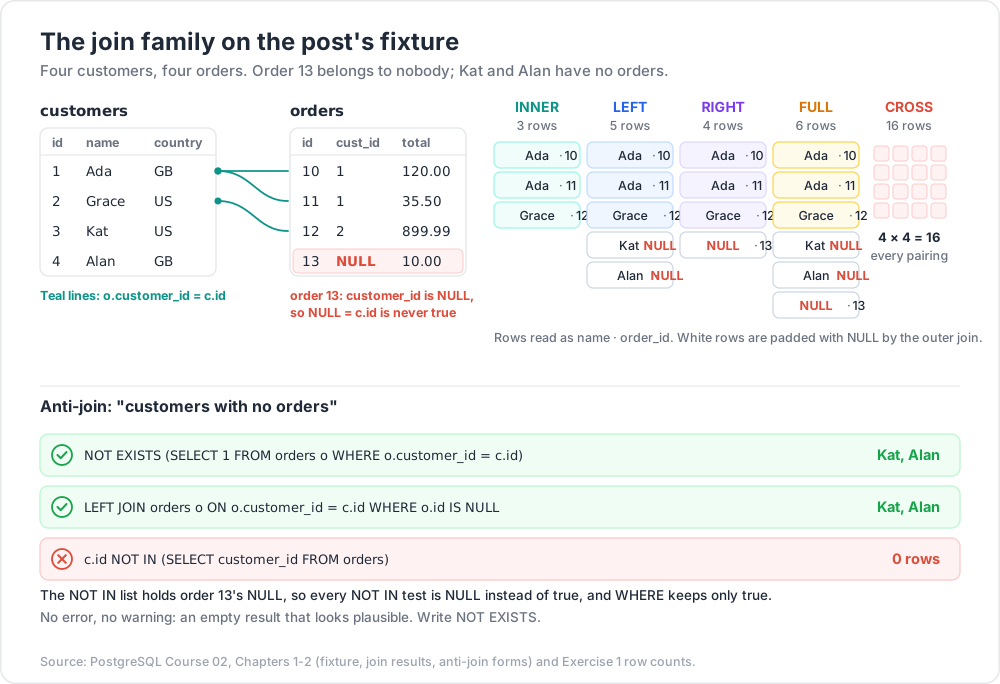
Four customers. Four orders, one of which belongs to nobody. Customers 3 and 4 have no orders. This shape exposes every join behaviour.
INNER JOIN — matches only
1
2
3
4
5
SELECT c.name, o.id AS order_id, o.total
FROM customers c
INNER JOIN orders o ON o.customer_id = c.id
ORDER BY o.id;
1
2
3
4
5
6 name  | order_id | total
-------+----------+--------
 Ada   |       10 | 120.00
 Ada   |       11 |  35.50
 Grace |       12 | 899.99
Three rows. Ada appears twice (one row per matching order — joins multiply). Kat and Alan vanish because they have no orders. Order 13 vanishes because NULL = c.id is never true.
LEFT JOIN — keep every left row
1
2
3
4
5
SELECT c.name, o.id AS order_id, o.total
FROM customers c
LEFT JOIN orders o ON o.customer_id = c.id
ORDER BY c.id, o.id;
1
2
3
4
5
6
7
8 name  | order_id | total
-------+----------+--------
 Ada   |       10 | 120.00
 Ada   |       11 |  35.50
 Grace |       12 | 899.99
 Kat   |   (null) | (null)
 Alan  |   (null) | (null)
Five rows. Every customer survives; unmatched ones get NULL for all right-side columns. This is the workhorse join for "all X, with their Y if any".
RIGHT JOIN — keep every right row
1
2
3
4
5
SELECT c.name, o.id AS order_id
FROM customers c
RIGHT JOIN orders o ON o.customer_id = c.id
ORDER BY o.id;
1
2
3
4
5
6
7 name  | order_id
-------+----------
 Ada   |       10
 Ada   |       11
 Grace |       12
 (null)|       13     ← the orphan surfaces
RIGHT JOIN is LEFT JOIN with the tables written in the other order. Most codebases standardise on LEFT for readability; the one place RIGHT earns its keep is when a long chain of joins would otherwise need reordering.
FULL OUTER JOIN — keep everything
1
2
3
4
5
SELECT c.name, o.id AS order_id
FROM customers c
FULL OUTER JOIN orders o ON o.customer_id = c.id
ORDER BY c.id, o.id;
1
2
3
4
5
6
7
8
9 name  | order_id
-------+----------
 Ada   |       10
 Ada   |       11
 Grace |       12
 Kat   |   (null)
 Alan  |   (null)
 (null)|       13
Six rows: the three matches, the two unmatched customers, the one unmatched order. FULL JOIN is the reconciliation tool — "which rows exist on one side but not the other" is a FULL JOIN with WHERE a.id IS NULL OR b.id IS NULL.
CROSS JOIN — every pairing
1
2
SELECT count(*) FROM customers CROSS JOIN orders; -- 4 × 4 = 16
The legitimate use is generating a dense grid so that empty combinations appear as rows rather than going missing — every customer crossed with every calendar day, so zero-revenue days show up as zeroes instead of gaps:
1
2
3
4
5
6
7
SELECT c.name, d::date, coalesce(sum(o.total), 0) AS revenue
FROM customers c
CROSS JOIN generate_series('2026-06-01'::date, '2026-06-30', interval '1 day') d
LEFT JOIN orders o ON o.customer_id = c.id
AND o.created_at >= d AND o.created_at < d + interval '1 day'
GROUP BY c.name, d;
The day condition belongs in the ON clause; without it, every day would repeat the customer's all-time total. (The fixture's orders has no timestamp, so this query assumes a created_at column.)
Any accidental cross join is a missing ON clause, and shows up in EXPLAIN as a Nested Loop with no join condition and a wildly large row estimate.
ON vs WHERE in an outer join
The single most common outer-join bug:
1
2
3
4
5
6
7
8
9
10
11
-- WRONG: silently becomes an inner join
SELECT c.name, o.id
FROM customers c
LEFT JOIN orders o ON o.customer_id = c.id
WHERE o.status = 'paid'; -- NULL = 'paid' is NULL → Kat and Alan filtered out
-- RIGHT: the condition belongs to the join
SELECT c.name, o.id
FROM customers c
LEFT JOIN orders o ON o.customer_id = c.id AND o.status = 'paid';
ON decides what matches; WHERE decides what survives. In an outer join, any WHERE predicate on the nullable side removes the padded NULL rows and degrades the outer join to an inner one. For an inner join the two are interchangeable and the planner treats them identically.
USING and NATURAL
1
2
3
SELECT * FROM orders JOIN customers USING (id); -- merges the equally-named column
SELECT * FROM orders NATURAL JOIN customers; -- joins on ALL equally-named columns
USING (col) is fine and produces one merged output column. NATURAL JOIN should be treated as forbidden: it silently changes meaning when someone adds a column named created_at to both tables.
Self-join
A table joined to itself — for hierarchies, adjacency, and pairwise comparison. Aliases become mandatory.
1
2
3
4
5
6
7
8
9
10
11
CREATE TABLE employees (id int PRIMARY KEY, name text, manager_id int REFERENCES employees(id));
SELECT e.name AS employee, m.name AS manager
FROM employees e
LEFT JOIN employees m ON m.id = e.manager_id;
-- pairwise, without duplicate mirrored pairs
SELECT a.name, b.name
FROM customers a
JOIN customers b ON a.country = b.country AND a.id < b.id;
The a.id < b.id idiom is how you get unordered pairs exactly once instead of twice plus the self-pair.
LATERAL — a correlated subquery in the FROM clause
Normally a subquery in FROM cannot see the other FROM items. LATERAL (PostgreSQL 9.3+) lifts that restriction, which makes "top N per group" and "most recent per group" natural to express.
1
2
3
4
5
6
7
8
9
10
11
-- the two most recent orders per customer
SELECT c.name, o.id, o.total
FROM customers c
CROSS JOIN LATERAL (
SELECT o.id, o.total
FROM orders o
WHERE o.customer_id = c.id
ORDER BY o.id DESC
LIMIT 2
) o;
Use LEFT JOIN LATERAL (...) ON true instead of CROSS JOIN LATERAL if customers with no orders must still appear.
LATERAL is often the fastest greatest-n-per-group formulation when an index supports the inner ORDER BY … LIMIT, because it performs one small index scan per outer row rather than sorting the whole table. Set-returning functions in FROM are implicitly lateral:
1
2
SELECT p.id, t.tag FROM posts p, unnest(p.tags) AS t(tag);
Chapter 2 — Semi-joins, anti-joins, and the NOT IN trap
Semi-join: "has at least one"
1
2
3
4
5
-- all three are semi-joins; the planner produces the same shape
SELECT * FROM customers c WHERE EXISTS (SELECT 1 FROM orders o WHERE o.customer_id = c.id);
SELECT * FROM customers c WHERE c.id IN (SELECT customer_id FROM orders);
SELECT DISTINCT c.* FROM customers c JOIN orders o ON o.customer_id = c.id;
Prefer EXISTS. It expresses the intent, never duplicates rows, and needs no DISTINCT to clean up afterwards. The JOIN … DISTINCT form is the one to avoid: it materialises the duplicates and then sorts them away.
Anti-join: "has none"
1
2
3
4
5
6
7
8
9
10
11
12
13
-- (a) NOT EXISTS — correct, and plans as an Anti Join
SELECT * FROM customers c
WHERE NOT EXISTS (SELECT 1 FROM orders o WHERE o.customer_id = c.id);
-- (b) LEFT JOIN ... IS NULL — also correct, also plans as an Anti Join
SELECT c.* FROM customers c
LEFT JOIN orders o ON o.customer_id = c.id
WHERE o.id IS NULL;
-- (c) NOT IN — BROKEN on our data
SELECT * FROM customers c
WHERE c.id NOT IN (SELECT customer_id FROM orders);
(a) and (b) both return Kat and Alan. (c) returns zero rows, because order 13 has customer_id IS NULL, so every NOT IN comparison evaluates to NULL rather than true, and WHERE keeps only true. No error, no warning — just an empty result that looks plausible.
The correctness argument is the important one, but there is a performance argument too: because NOT IN must preserve those NULL semantics, the planner cannot use a hash anti-join. It typically produces a Filter over a hashed SubPlan instead:
1
2
3
4
5
6
7
8
-- NOT EXISTS
Hash Anti Join (cost=… rows=2 …)
Hash Cond: (c.id = o.customer_id)
-- NOT IN
Seq Scan on customers c (cost=… rows=2 …)
Filter: (NOT (hashed SubPlan 1))
| Form | NULL-safe? |
Plans as anti-join? | Verdict |
|---|---|---|---|
NOT EXISTS (…) |
Yes | Yes | Default choice |
LEFT JOIN … WHERE right.pk IS NULL |
Yes | Yes | Fine; slightly noisier to read |
NOT IN (subquery) |
No | No | Avoid unless the column is provably NOT NULL |
EXCEPT |
Yes (treats NULLs as equal) |
Sorts/hashes both sides | Whole-row set difference only |
Common pitfall: "the column is
NOT NULLsoNOT INis safe" is true today. It survives until someone makes the column nullable, or the subquery grows aLEFT JOINthat introducesNULLs. WriteNOT EXISTSand stop thinking about it.
Chapter 3 — Aggregation
GROUP BY and HAVING
1
2
3
4
5
6
7
8
9
10
11
12
SELECT c.country,
count(*) AS order_count,
sum(o.total) AS revenue,
round(avg(o.total), 2) AS avg_order,
min(o.total) AS smallest,
max(o.total) AS largest
FROM customers c
JOIN orders o ON o.customer_id = c.id
GROUP BY c.country
HAVING sum(o.total) > 100
ORDER BY revenue DESC;
The rule that explains most GROUP BY errors: every column in the select list must be either in the GROUP BY or inside an aggregate. PostgreSQL relaxes this in exactly one case — if you group by a table's primary key, every other column of that table is functionally dependent and may be selected bare:
1
2
3
4
SELECT c.id, c.name, c.country, count(o.id) -- legal: c.id is the PK
FROM customers c LEFT JOIN orders o ON o.customer_id = c.id
GROUP BY c.id;
WHERE filters rows before grouping; HAVING filters groups after. Putting a non-aggregate condition in HAVING works but forces the aggregation to process rows it will then discard — move it to WHERE.
The aggregate list worth knowing
| Aggregate | Returns |
|---|---|
count(*) / count(col) |
All rows / non-NULL values |
count(DISTINCT col) |
Distinct non-NULL values (expensive: sorts or hashes) |
sum, avg, min, max |
The obvious; all skip NULL inputs |
bool_and, bool_or |
Boolean conjunction / disjunction over a group |
string_agg(col, ', ' ORDER BY col) |
Concatenated string |
array_agg(col ORDER BY col) |
Array — keeps NULL elements |
json_agg / jsonb_agg / jsonb_object_agg |
JSON aggregation |
stddev_samp, var_samp, corr, regr_slope |
Statistics |
percentile_cont(0.5) WITHIN GROUP (ORDER BY col) |
Interpolated median |
percentile_disc(0.95) WITHIN GROUP (ORDER BY col) |
Actual value at the 95th percentile |
mode() WITHIN GROUP (ORDER BY col) |
Most frequent value |
range_agg, range_intersect_agg |
Range aggregation (PG 14+) |
1
2
3
4
5
6
SELECT c.country,
string_agg(c.name, ', ' ORDER BY c.name) AS people,
percentile_cont(0.5) WITHIN GROUP (ORDER BY o.total) AS median_order
FROM customers c LEFT JOIN orders o ON o.customer_id = c.id
GROUP BY c.country;
FILTER — conditional aggregation done properly
1
2
3
4
5
6
7
8
SELECT c.country,
count(*) AS orders_total,
count(*) FILTER (WHERE o.status = 'paid') AS orders_paid,
sum(o.total) FILTER (WHERE o.status = 'paid') AS revenue_paid,
sum(o.total) FILTER (WHERE o.status = 'pending') AS revenue_pending
FROM customers c JOIN orders o ON o.customer_id = c.id
GROUP BY c.country;
FILTER (SQL:2003, PostgreSQL 9.4+) replaces the sum(CASE WHEN … THEN … ELSE 0 END) idiom. It is clearer, and unlike the CASE form it produces NULL rather than 0 for an empty set — which is usually more honest. It composes with window functions too.
GROUPING SETS, ROLLUP, CUBE
One query, several grouping levels, one pass over the data.
1
2
3
4
5
SELECT c.country, o.status, sum(o.total) AS revenue
FROM customers c JOIN orders o ON o.customer_id = c.id
GROUP BY GROUPING SETS ((c.country, o.status), (c.country), (o.status), ())
ORDER BY c.country NULLS LAST, o.status NULLS LAST;
1
2
3
4
5
6
7
8
9
10
11 country | status  | revenue
---------+---------+---------
 GB      | paid    |  120.00
 GB      | pending |   35.50
 GB      | (null)  |  155.50    ← subtotal for GB
 US      | paid    |  899.99
 US      | (null)  |  899.99    ← subtotal for US
 (null)  | paid    | 1019.99    ← subtotal for paid
 (null)  | pending |   35.50
 (null)  | (null)  | 1055.49    ← grand total
Shorthands:
ROLLUP (a, b, c)= the hierarchical sets(a,b,c), (a,b), (a), ()— for drill-down along a hierarchy such as country → region → city.CUBE (a, b)= every combination:(a,b), (a), (b), ()— for cross-tabulation.
The NULLs in subtotal rows are indistinguishable from genuine NULL data. GROUPING() disambiguates — it returns 1 when the column was aggregated away:
1
2
3
4
5
6
SELECT CASE WHEN GROUPING(c.country) = 1 THEN 'ALL' ELSE c.country END AS country,
CASE WHEN GROUPING(o.status) = 1 THEN 'ALL' ELSE o.status END AS status,
sum(o.total)
FROM customers c JOIN orders o ON o.customer_id = c.id
GROUP BY ROLLUP (c.country, o.status);
Chapter 4 — DISTINCT ON
PostgreSQL-specific, and one of the reasons people miss PostgreSQL on other databases. It keeps the first row of each group, where "first" is defined by ORDER BY.
1
2
3
4
5
6
-- the most expensive order per customer
SELECT DISTINCT ON (o.customer_id)
o.customer_id, o.id, o.total, o.status
FROM orders o
ORDER BY o.customer_id, o.total DESC;
1
2
3
4
5
6 customer_id | id | total  | status
-------------+----+--------+--------
           1 | 10 | 120.00 | paid
           2 | 12 | 899.99 | paid
      (null) | 13 |  10.00 | paid
Two hard rules:
ORDER BYmust begin with exactly theDISTINCT ONexpressions. Otherwise PostgreSQL raises an error, because "first" would be undefined.- The remaining
ORDER BYterms choose which row within the group wins.
If the final output needs a different order, wrap it:
1
2
3
4
5
6
SELECT * FROM (
SELECT DISTINCT ON (customer_id) * FROM orders
ORDER BY customer_id, total DESC
) t
ORDER BY total DESC;
DISTINCT ON vs window function vs LATERAL
All three solve greatest-n-per-group:
| Approach | Best when |
|---|---|
DISTINCT ON |
n = 1, concise, and a matching index makes the sort free |
row_number() OVER (PARTITION BY … ORDER BY …) = n |
n > 1, or you need the rank value itself |
LATERAL (SELECT … ORDER BY … LIMIT n) |
Few outer rows, many inner rows, and an index serves the inner ORDER BY … LIMIT |
With an index on (customer_id, total DESC), DISTINCT ON can walk the index and skip within each group rather than sorting the table. With a small customers table and a huge orders table, LATERAL usually wins. Measure with EXPLAIN (ANALYZE, BUFFERS) — Post 03.
Chapter 5 — Window functions
An aggregate collapses many rows into one. A window function computes over a set of related rows and returns one value per input row, leaving the row count untouched. That single property solves running totals, rankings, row-to-row deltas, and percent-of-total without a self-join.
Anatomy
1
2
3
4
5
6
function(args) OVER (
PARTITION BY expr, … -- split rows into independent groups (optional)
ORDER BY expr, … -- order within each partition (optional)
frame_clause -- which rows in the partition are visible (optional)
)
1
2
3
4
5
6
7
SELECT o.id, o.customer_id, o.total,
sum(o.total) OVER (PARTITION BY o.customer_id) AS customer_total,
o.total / sum(o.total) OVER () AS pct_of_all,
row_number() OVER (PARTITION BY o.customer_id ORDER BY o.total DESC) AS rn
FROM orders o
ORDER BY o.customer_id, rn;
OVER () with nothing inside means "the whole result set as one partition" — the standard way to get a percent-of-total column.
Reuse a definition with the WINDOW clause:
1
2
3
4
5
6
7
SELECT id, total,
rank() OVER w,
sum(total) OVER w,
lag(total) OVER w
FROM orders
WINDOW w AS (PARTITION BY customer_id ORDER BY id);
The function catalogue
| Function | Returns |
|---|---|
row_number() |
1, 2, 3, 4 — no ties, arbitrary tiebreak |
rank() |
1, 2, 2, 4 — ties share a rank, then a gap |
dense_rank() |
1, 2, 2, 3 — ties share a rank, no gap |
percent_rank() |
(rank - 1) / (rows - 1), in [0, 1] |
cume_dist() |
Cumulative distribution, in (0, 1] |
ntile(n) |
Bucket number, splitting the partition into n roughly equal parts |
lag(expr, offset, default) |
Value from offset rows back (default 1) |
lead(expr, offset, default) |
Value from offset rows forward |
first_value(expr) |
First value in the frame |
last_value(expr) |
Last value in the frame — see the trap below |
nth_value(expr, n) |
The nth value in the frame |
Any aggregate (sum, avg, count, array_agg, …) |
Aggregated over the frame |
Frames: ROWS vs RANGE vs GROUPS
The frame decides which rows of the partition the function can see for the current row. This is where most window-function surprises live.
1
2
3
4
5
6
7
frame_mode BETWEEN frame_start AND frame_end [ frame_exclusion ]
frame_mode: ROWS | RANGE | GROUPS
frame_start: UNBOUNDED PRECEDING | n PRECEDING | CURRENT ROW | n FOLLOWING
frame_end: n PRECEDING | CURRENT ROW | n FOLLOWING | UNBOUNDED FOLLOWING
exclusion: EXCLUDE CURRENT ROW | EXCLUDE GROUP | EXCLUDE TIES | EXCLUDE NO OTHERS
| Mode | n PRECEDING counts |
Use for |
|---|---|---|
ROWS |
Physical rows | Moving averages over the last N rows |
RANGE |
A value offset in the ORDER BY column |
"Last 7 days" regardless of how many rows fall in it |
GROUPS |
Peer groups (rows with equal ORDER BY values) |
"The previous 3 distinct dates" |
RANGE with an offset and GROUPS mode, plus the EXCLUDE clauses, arrived in PostgreSQL 11. Before that only ROWS accepted offsets.
The default frame, and why it bites
- With no
ORDER BY: the frame is the entire partition.sum()gives the partition total for every row. - With an
ORDER BY: the default frame isRANGE BETWEEN UNBOUNDED PRECEDING AND CURRENT ROW— which inRANGEmode includes all peers of the current row, not just the rows up to it.
1
2
3
4
5
-- three orders with total = 100, 100, 200, ordered by total
SELECT total, sum(total) OVER (ORDER BY total) AS range_default,
sum(total) OVER (ORDER BY total ROWS UNBOUNDED PRECEDING) AS rows_frame
FROM (VALUES (100),(100),(200)) v(total);
1
2
3
4
5
6 total | range_default | rows_frame
-------+---------------+------------
   100 |           200 |        100
   100 |           200 |        200
   200 |           400 |        400
The two tied rows both see the full peer group under RANGE. If you want a strict row-by-row running total, say ROWS explicitly.
The last_value trap
1
2
3
4
5
6
7
-- returns the CURRENT row's value, because the default frame ends at CURRENT ROW
last_value(total) OVER (PARTITION BY customer_id ORDER BY id)
-- what you actually meant
last_value(total) OVER (PARTITION BY customer_id ORDER BY id
ROWS BETWEEN UNBOUNDED PRECEDING AND UNBOUNDED FOLLOWING)
first_value does not have this problem because the default frame starts at UNBOUNDED PRECEDING. An alternative that avoids the whole issue: first_value(total) OVER (… ORDER BY id DESC).
Running totals, moving averages, deltas
1
2
3
4
5
6
7
8
9
10
11
12
13
14
15
16
17
18
19
20
21
22
23
24
25
26
27
28
29
CREATE TABLE daily_sales (day date PRIMARY KEY, revenue numeric(12,2));
SELECT day, revenue,
-- cumulative running total
sum(revenue) OVER (ORDER BY day ROWS UNBOUNDED PRECEDING) AS running_total,
-- 7-row centred moving average
round(avg(revenue) OVER (ORDER BY day ROWS BETWEEN 3 PRECEDING AND 3 FOLLOWING), 2)
AS ma7_centred,
-- 7-day trailing average by DATE, correct even with missing days
round(avg(revenue) OVER (ORDER BY day
RANGE BETWEEN interval '6 days' PRECEDING AND CURRENT ROW), 2) AS ma7_calendar,
-- day-over-day change
revenue - lag(revenue) OVER (ORDER BY day) AS delta,
-- percentage change, guarding division by zero
round(100.0 * (revenue - lag(revenue) OVER (ORDER BY day))
/ nullif(lag(revenue) OVER (ORDER BY day), 0), 1) AS pct_change,
-- share of the month
round(100.0 * revenue
/ sum(revenue) OVER (PARTITION BY date_trunc('month', day)), 2) AS pct_of_month
FROM daily_sales
ORDER BY day;
The ma7_calendar column is the reason RANGE with an interval offset exists: a ROWS BETWEEN 6 PRECEDING frame silently reaches further back than seven days whenever a day has no row.
Where window functions sit in evaluation order
1
2
FROM → WHERE → GROUP BY → HAVING → WINDOW functions → SELECT list → DISTINCT → ORDER BY → LIMIT
Two consequences:
- A window function cannot appear in
WHERE,GROUP BY, orHAVING— those run first. To filter on one, wrap the query:
1
2
3
4
5
6
SELECT * FROM (
SELECT o.*, row_number() OVER (PARTITION BY customer_id ORDER BY total DESC) AS rn
FROM orders o
) t
WHERE rn <= 2;
- Window functions run after aggregation, so they can operate on aggregate results directly:
1
2
3
4
5
SELECT c.country, sum(o.total) AS revenue,
rank() OVER (ORDER BY sum(o.total) DESC) AS country_rank
FROM customers c JOIN orders o ON o.customer_id = c.id
GROUP BY c.country;
Trick: the "gaps and islands" problem — grouping consecutive runs — is
row_number()minus a secondrow_number().SELECT grp, min(day), max(day) FROM (SELECT day, day - (row_number() OVER (ORDER BY day))::int AS grp FROM active_days) t GROUP BY grp;collapses consecutive dates into ranges. Worth memorising; it appears constantly in streak, session, and uptime calculations.
Chapter 6 — CTEs and recursion
Basic CTEs
1
2
3
4
5
6
7
8
9
10
WITH paid AS (
SELECT * FROM orders WHERE status = 'paid'
),
by_customer AS (
SELECT customer_id, sum(total) AS revenue FROM paid GROUP BY customer_id
)
SELECT c.name, b.revenue
FROM by_customer b JOIN customers c ON c.id = b.customer_id
ORDER BY b.revenue DESC;
CTEs make a long query readable by naming its stages, and they can be referenced multiple times. Data-modifying CTEs are a PostgreSQL strength:
1
2
3
4
5
WITH archived AS (
DELETE FROM orders WHERE status = 'cancelled' RETURNING *
)
INSERT INTO orders_archive SELECT * FROM archived;
All sub-statements of one query see the same snapshot and execute atomically.
The PostgreSQL 12 fencing change
Before PostgreSQL 12, every WITH clause was an optimisation fence: it was always materialised into a temporary result, and predicates from the outer query could never be pushed into it. That made CTEs a manual planner hint — sometimes helpful, often a performance trap.
From PostgreSQL 12, a CTE that is non-recursive, side-effect-free, and referenced exactly once is inlined by default, exactly like a subquery. Two keywords give explicit control:
1
2
3
4
5
6
7
8
9
10
WITH heavy AS MATERIALIZED ( -- force the old behaviour: compute once, fence
SELECT * FROM huge_table WHERE expensive_function(x)
)
SELECT * FROM heavy WHERE id = 42; -- filter applied AFTER materialisation
WITH cheap AS NOT MATERIALIZED ( -- force inlining even when referenced many times
SELECT id, total FROM orders
)
SELECT * FROM cheap WHERE id = 42; -- filter pushed down into the CTE
| Situation | Choose |
|---|---|
| Expensive CTE referenced several times | MATERIALIZED — compute once |
| CTE contains a volatile function you must call exactly once | MATERIALIZED |
| Small CTE whose result you filter afterwards | NOT MATERIALIZED or the default |
| Data-modifying CTE | Always materialised; the keyword is irrelevant |
Common pitfall: code written against PostgreSQL 11 or earlier sometimes uses a CTE deliberately as a fence, with a comment saying so or with no comment at all. Upgrading to 12+ inlines it and the plan changes. If a query regresses after a major upgrade, a CTE that lost its fence is a prime suspect — add
MATERIALIZEDto test the hypothesis.
Recursive CTEs
1
2
3
4
5
6
7
WITH RECURSIVE name (cols) AS (
<non-recursive term> -- the seed
UNION [ALL]
<recursive term> -- references `name`
)
SELECT * FROM name;
Execution is iterative, not truly recursive: run the seed, put its rows in a working table, repeatedly run the recursive term against the working table until it produces no rows.
Tree traversal
1
2
3
4
5
6
7
8
9
10
11
12
13
14
15
16
17
18
19
20
21
22
23
24
25
26
27
28
29
30
31
CREATE TABLE employees (
id int PRIMARY KEY,
name text NOT NULL,
manager_id int REFERENCES employees(id)
);
INSERT INTO employees VALUES
(1,'Root CEO', NULL),
(2,'VP Eng', 1),
(3,'VP Sales', 1),
(4,'Eng Manager', 2),
(5,'Engineer A', 4),
(6,'Engineer B', 4),
(7,'Sales Rep', 3);
WITH RECURSIVE org AS (
-- seed: everyone with no manager
SELECT id, name, manager_id, 1 AS depth, ARRAY[id] AS path
FROM employees
WHERE manager_id IS NULL
UNION ALL
-- step: everyone reporting to someone already in `org`
SELECT e.id, e.name, e.manager_id, o.depth + 1, o.path || e.id
FROM employees e
JOIN org o ON e.manager_id = o.id
)
SELECT repeat(' ', depth - 1) || name AS org_chart, depth, path
FROM org
ORDER BY path;
1
2
3
4
5
6
7
8
9
10      org_chart      | depth |    path
---------------------+-------+-------------
 Root CEO            |     1 | {1}
   VP Eng            |     2 | {1,2}
     Eng Manager     |     3 | {1,2,4}
       Engineer A    |     4 | {1,2,4,5}
       Engineer B    |     4 | {1,2,4,6}
   VP Sales          |     2 | {1,3}
     Sales Rep       |     3 | {1,3,7}
The path array does double duty: it produces correct depth-first ordering when used as the ORDER BY key, and it is the natural cycle guard.
Cycle protection
A cycle in the data — employee A managing B managing A — makes a naive UNION ALL recursion run until it exhausts memory. Three defences:
1
2
3
4
5
6
7
8
9
10
11
12
13
14
15
16
17
18
19
20
21
-- 1. UNION instead of UNION ALL: duplicate rows terminate the iteration
WITH RECURSIVE r AS (SELECT … UNION SELECT …) …
-- 2. manual path check
WITH RECURSIVE org AS (
SELECT id, ARRAY[id] AS path, false AS cycle FROM employees WHERE manager_id IS NULL
UNION ALL
SELECT e.id, o.path || e.id, e.id = ANY(o.path)
FROM employees e JOIN org o ON e.manager_id = o.id
WHERE NOT o.cycle
)
SELECT * FROM org;
-- 3. the CYCLE clause (PostgreSQL 14+) — does the same thing declaratively
WITH RECURSIVE org AS (
SELECT id, name, manager_id FROM employees WHERE manager_id IS NULL
UNION ALL
SELECT e.id, e.name, e.manager_id FROM employees e JOIN org o ON e.manager_id = o.id
) CYCLE id SET is_cycle USING cycle_path
SELECT * FROM org;
PostgreSQL 14 also added SEARCH DEPTH FIRST BY id SET ord / SEARCH BREADTH FIRST BY id SET ord, which generates the ordering column for you instead of the manual path array.
Watch out: always put a bound on a recursive CTE running against user-supplied data — a
WHERE depth < 100in the recursive term, or theCYCLEclause. An unbounded recursion is a denial-of-service vector, andstatement_timeoutis a blunt second line of defence, not a first one.
Beyond trees: graph reachability
1
2
3
4
5
6
7
8
-- everything reachable from node 1, over a cyclic graph
WITH RECURSIVE reach AS (
SELECT dst FROM edges WHERE src = 1
UNION -- UNION dedups, terminating on cycles
SELECT e.dst FROM edges e JOIN reach r ON e.src = r.dst
)
SELECT DISTINCT dst FROM reach;
Modelling note: deep hierarchies queried constantly are a case where the document model's nested-array or materialised-path patterns start to look attractive. The SQL → MongoDB migration post covers that trade-off; Post 06 covers the relational alternatives (adjacency list, materialised path, nested sets, and the
ltreeextension) before you consider changing databases over it.
Practice Exercises
Exercise 1 — Predict the row counts
Using the fixture from Chapter 1, state the number of rows returned by each without running it: INNER JOIN, LEFT JOIN, RIGHT JOIN, FULL JOIN, CROSS JOIN. Then verify.
Solution
3, 5, 4, 6, 16.
1
2
3
4
5
6
SELECT count(*) FROM customers c JOIN orders o ON o.customer_id = c.id; -- 3
SELECT count(*) FROM customers c LEFT JOIN orders o ON o.customer_id = c.id; -- 5
SELECT count(*) FROM customers c RIGHT JOIN orders o ON o.customer_id = c.id; -- 4
SELECT count(*) FROM customers c FULL JOIN orders o ON o.customer_id = c.id; -- 6
SELECT count(*) FROM customers CROSS JOIN orders; -- 16
Exercise 2 — The NOT IN trap, demonstrated
Write "customers with no orders" as NOT IN, NOT EXISTS, and LEFT JOIN … IS NULL. Run all three against the fixture. Explain the discrepancy, then delete order 13 and re-run.
Solution
NOT IN returns 0 rows; the other two return Kat and Alan. Order 13 has customer_id IS NULL, so the NOT IN list contains NULL and every comparison yields NULL, which WHERE discards. After DELETE FROM orders WHERE id = 13, all three agree.
1
2
3
4
SELECT name FROM customers WHERE id NOT IN (SELECT customer_id FROM orders);
SELECT name FROM customers c WHERE NOT EXISTS (SELECT 1 FROM orders o WHERE o.customer_id = c.id);
SELECT c.name FROM customers c LEFT JOIN orders o ON o.customer_id = c.id WHERE o.id IS NULL;
Exercise 3 — Conditional aggregation
Produce one row per country with: total orders, paid orders, paid revenue, and the paid share as a percentage. Use FILTER, not CASE.
Solution
1
2
3
4
5
6
7
8
SELECT c.country,
count(*) AS orders_total,
count(*) FILTER (WHERE o.status = 'paid') AS orders_paid,
coalesce(sum(o.total) FILTER (WHERE o.status = 'paid'), 0) AS revenue_paid,
round(100.0 * count(*) FILTER (WHERE o.status = 'paid') / count(*), 1) AS pct_paid
FROM customers c JOIN orders o ON o.customer_id = c.id
GROUP BY c.country;
Exercise 4 — Greatest-n-per-group, three ways
Return the two highest-value orders per customer using (a) a window function, (b) LATERAL, (c) DISTINCT ON for the single highest. Compare the plans with EXPLAIN (ANALYZE, BUFFERS).
Solution
1
2
3
4
5
6
7
8
9
10
11
12
13
14
15
-- (a)
SELECT * FROM (
SELECT o.*, row_number() OVER (PARTITION BY customer_id ORDER BY total DESC) rn
FROM orders o
) t WHERE rn <= 2;
-- (b)
SELECT c.id, o.* FROM customers c
LEFT JOIN LATERAL (
SELECT * FROM orders o WHERE o.customer_id = c.id ORDER BY o.total DESC LIMIT 2
) o ON true;
-- (c)
SELECT DISTINCT ON (customer_id) * FROM orders ORDER BY customer_id, total DESC;
Exercise 5 — Running total and moving average
Build a daily_sales(day, revenue) table with 60 days of data (use generate_series and random()). Add a cumulative running total, a 7-day calendar-based trailing average, and a day-over-day percentage change. Delete a few days first so the ROWS vs RANGE difference is visible.
Exercise 6 — Org chart
Using the employees fixture, write a recursive CTE that returns every employee with their depth, the full path from the root, and the name of their top-level manager. Then add a cycle (UPDATE employees SET manager_id = 6 WHERE id = 1) and make the query terminate safely.
Exercise 7 — Gaps and islands
Given a table of dates on which a user was active, collapse consecutive days into (start_date, end_date, length) streak rows.
Solution
1
2
3
4
5
6
7
8
9
10
WITH grouped AS (
SELECT day,
day - (row_number() OVER (ORDER BY day))::int AS grp
FROM active_days
)
SELECT min(day) AS start_date, max(day) AS end_date, count(*) AS length
FROM grouped
GROUP BY grp
ORDER BY start_date;
Consecutive dates share a constant day - row_number(); a break in the sequence changes it.
Cheat-sheet
| What | How |
|---|---|
| Keep all left rows | LEFT JOIN b ON … |
| Filter the nullable side | Put the condition in ON, not WHERE |
| Reconcile two sets | FULL OUTER JOIN … WHERE a.id IS NULL OR b.id IS NULL |
Correlated subquery in FROM |
LEFT JOIN LATERAL (…) ON true |
| "Has at least one" | WHERE EXISTS (SELECT 1 FROM … WHERE …) |
| "Has none" | WHERE NOT EXISTS (…) — never NOT IN |
| Conditional aggregate | count(*) FILTER (WHERE cond) |
| Median / p95 | percentile_cont(0.5) WITHIN GROUP (ORDER BY x) |
| Concatenate a group | string_agg(x, ', ' ORDER BY x) |
| Subtotals + grand total | GROUP BY ROLLUP (a, b) |
| Top 1 per group | SELECT DISTINCT ON (k) … ORDER BY k, sort_col DESC |
| Top N per group | row_number() OVER (PARTITION BY k ORDER BY …) in a subquery |
| Percent of total | x / sum(x) OVER () |
| Running total | sum(x) OVER (ORDER BY d ROWS UNBOUNDED PRECEDING) |
| Calendar moving average | avg(x) OVER (ORDER BY d RANGE BETWEEN interval '6 days' PRECEDING AND CURRENT ROW) |
| Previous / next row | lag(x) / lead(x) |
| Filter on a window result | Wrap in a subquery or CTE |
| Force / prevent CTE inlining | AS MATERIALIZED / AS NOT MATERIALIZED (PG 12+) |
| Tree traversal | WITH RECURSIVE … UNION ALL … JOIN cte |
| Cycle guard | CYCLE id SET is_cycle USING path (PG 14+) |
What's next
Post 03 covers indexes and the query planner: B-tree internals at a working level, the six index types and a decision table for choosing between them, multicolumn column order and the leading-column rule, covering indexes with INCLUDE, partial and expression indexes, CREATE INDEX CONCURRENTLY, and — most importantly — how to read EXPLAIN (ANALYZE, BUFFERS) and decide whether the plan you got is the plan you wanted.
References
- Table Expressions — joins — including
LATERAL. - Aggregate Functions — the full list plus
FILTERand ordered-set aggregates. GROUPING SETS,CUBE,ROLLUP- Window Functions tutorial and the window function reference.
SELECT— the authoritative grammar forDISTINCT ON, frame clauses, andWITH.WITHqueries — inlining rules,SEARCH, andCYCLE.
Note: this post is in progress. Planned additions: a
crosstab/pivot section usingtablefunc, workedEXPLAINoutput for each anti-join form, and a performance comparison ofDISTINCT ONagainstrow_number()on a million-row table.