Three.js Course — 13 · AI-Assisted 3D, NavMesh Pathfinding, Procedural
The final base post covers the territory that "barely existed" when the prior posts' patterns were stabilising and is now front-of-mind: AI-generated 3D assets (text-to-3D and image-to-3D in seconds), NavMesh + pathfinding for AI-driven characters, Gaussian Splatting for photoreal scanned environments, and the procedural generation techniques (noise, L-systems, wave-function collapse) that complement or replace authored assets. None of these are exclusive to Three.js, but they all show up in production Three.js pipelines today.
Series map: 00 Foundations → 01 Geometry & Materials → 02 Cameras & Controls → 03 Lighting & Shadows → 04 Textures & PBR → 05 Asset Pipeline → 06 Animation → 07 Instancing & Batching → 08 Low-End Perf → 09 Shaders → 10 Post-Processing → 11 Physics → 12 R3F → 13 AI 3D + NavMesh + Procedural (this post — final in the base series).
Learning Outcome
- Use AI tools (Meshy, Tripo, Luma Genie, TripoSR, Hunyuan3D, CSM) to generate 3D models from text or images.
- Clean up + optimise AI-generated meshes for production.
- Generate a NavMesh from your scene with recast-navigation-js.
- Pathfind across a NavMesh with Detour.
- Display Gaussian Splatting captures in Three.js.
- Generate procedural terrain with Perlin / Simplex noise.
- Recognise where each technique fits in a pipeline.
Chapter 1 — Text-to-3D + image-to-3D (the 2026 landscape)
In 2026, a usable 3D model from a text prompt or single reference image takes about a minute and costs a few cents. None of these tools fully replace a 3D artist for hero work, but they're production-ready for backgrounds, props, prototypes, and indie / mid-tier projects.
| Tool | Inputs | Outputs | Notes |
|---|---|---|---|
| Meshy | text, image | textured glTF / FBX / USDZ; auto-rig; 500+ animation presets | most-complete pipeline; web + API |
| Tripo | text, image | textured glTF | fast; web + API; cheaper than Meshy |
| Luma Genie | text | glTF | strong geometric reasoning; web |
| TripoSR | single image | mesh in < 0.5 s on an A100 | open-source (Stability AI + Tripo); self-hostable |
| Hunyuan3D (Tencent) | text, image | high-quality textured mesh | open-source, top-tier quality |
| CSM (Common Sense Machines) | concept art / character sheet | proportion-faithful character mesh | designer-friendly |
| Spline AI | text | scenes within Spline (Three.js compatible export) | designer tool with AI assist |
| Rodin | text | high quality | newer, gaining traction |
Workflow for AI-generated mesh → Three.js
- Generate at the tool's UI. Iterate on prompt + reference images until happy.
- Download glTF.
- Clean up in Blender — fix the inevitable issues:
- Floating / disconnected geometry → merge by distance.
- Hyper-dense topology → decimate.
- Wrong scale / orientation → fix root transform.
- Inverted normals → recalculate.
- Texture seams or bake noise → repaint patches.
- Optimise with
gltf-transform optimize(Post 05). - Drop into your Three.js scene with
GLTFLoader.
Trick: AI-generated meshes look right at "hero camera" angles and wrong from close-up. Always test from your actual camera. For backgrounds it doesn't matter; for player-inspected props, plan to clean up.
Production readiness in 2026
- Prototype quality is trivial — minutes from prompt to scene.
- Production quality still needs human review for: hero characters, branded assets, anything inspected closely, manufacturing geometry, anything with text on it (still flaky in 2026).
- Round-trip test always — export from AI tool, import into your engine, render at production camera, before committing.
Chapter 2 — API integration
For automated pipelines (user-generated content sites, game asset farms, procedural batches):
1
2
3
4
5
6
7
8
9
10
11
12
13
14
15
16
17
18
19
20
// Meshy API example (text-to-3D)
const r = await fetch('https://api.meshy.ai/v2/text-to-3d', {
method: 'POST',
headers: { 'Authorization': `Bearer ${MESHY_API_KEY}`, 'Content-Type': 'application/json' },
body: JSON.stringify({
mode: 'preview',
prompt: 'a low-poly mushroom, vibrant colours',
art_style: 'cartoon',
})
});
const { result: taskId } = await r.json();
// poll until ready
const model = await pollUntilReady(taskId);
const glbUrl = model.model_urls.glb;
// load into Three.js
const gltf = await new GLTFLoader().loadAsync(glbUrl);
scene.add(gltf.scene);
Tripo, Luma, Hunyuan have similar REST + polling APIs. TripoSR runs entirely on your own GPU — no external API.
Self-hosting TripoSR
1
2
3
4
5
git clone https://github.com/VAST-AI-Research/TripoSR.git
cd TripoSR
pip install -r requirements.txt
python run.py --input image.png --output out/
Requires a CUDA GPU (A100 ideal, RTX 3060 / 4070 viable). ~0.5-3 seconds per mesh. Self-host when you need privacy, batch volume, or zero per-call cost.
Chapter 3 — NavMesh + pathfinding
For AI-driven characters that need to walk around obstacles, NavMesh (Navigation Mesh) is the standard. A NavMesh is a polygon graph of the walkable surface; pathfinding queries return a sequence of polygons + a straight path inside them.
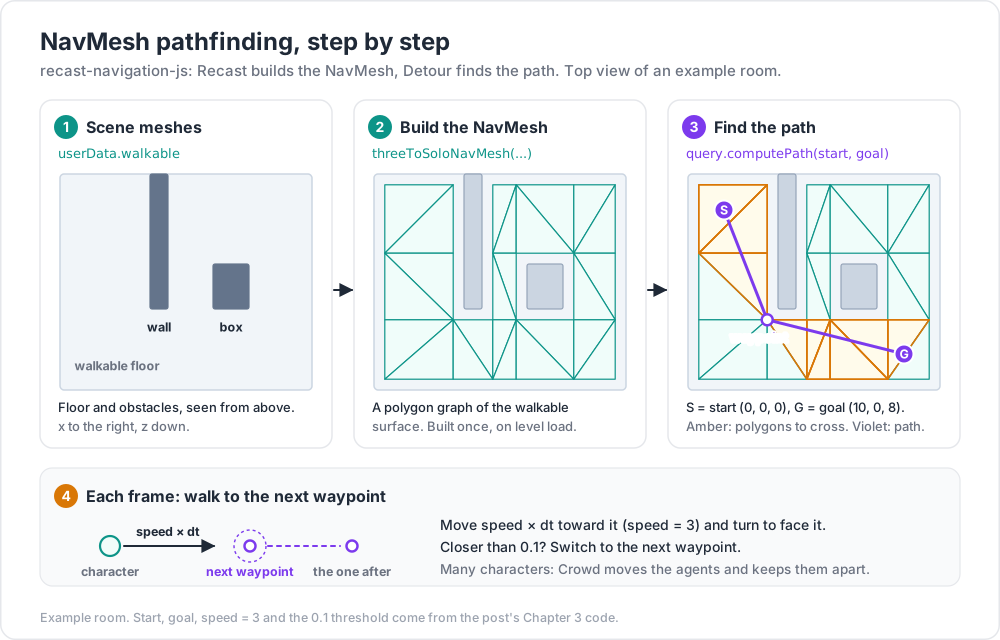
The canonical library for JS is recast-navigation-js — a WASM port of the C++ Recast (NavMesh construction) + Detour (pathfinding) libraries used in Unreal, Unity, and most game engines.
Install
1
2
npm install recast-navigation @recast-navigation/three
Generate a NavMesh from a Three.js scene
1
2
3
4
5
6
7
8
9
10
11
12
13
14
15
16
17
18
19
20
21
22
23
import { init, threeToSoloNavMesh } from '@recast-navigation/three';
await init(); // load WASM
// gather meshes that the NavMesh should consider as ground / obstacles
const sources = [];
scene.traverse((c) => { if (c.isMesh && c.userData.walkable) sources.push(c); });
const { navMesh, success } = threeToSoloNavMesh(sources, {
cs: 0.2, // cell size (smaller = more detail, slower build)
ch: 0.2, // cell height
walkableSlopeAngle: 60,
walkableHeight: 2,
walkableClimb: 0.9,
walkableRadius: 0.6,
maxEdgeLen: 12,
maxSimplificationError: 1.3,
minRegionArea: 8,
mergeRegionArea: 20,
});
if (!success) throw new Error('NavMesh build failed');
Pathfind
1
2
3
4
5
6
7
8
9
10
import { NavMeshQuery } from 'recast-navigation';
const query = new NavMeshQuery({ navMesh });
const start = { x: 0, y: 0, z: 0 };
const goal = { x: 10, y: 0, z: 8 };
const { path, success } = query.computePath(start, goal);
// path = array of waypoints
Visualise the path:
1
2
3
4
const geo = new THREE.BufferGeometry().setFromPoints(path.map(p => new THREE.Vector3(p.x, p.y, p.z)));
const line = new THREE.Line(geo, new THREE.LineBasicMaterial({ color: 0xff00ff }));
scene.add(line);
Move a character along the path
Each frame, advance toward the next waypoint at walking speed; pop the waypoint when reached.
1
2
3
4
5
6
7
8
9
10
11
12
13
let pathIdx = 0;
const speed = 3;
useFrame ((s, dt) => {
if (pathIdx >= path.length) return;
const target = new THREE.Vector3(path[pathIdx].x, path[pathIdx].y, path[pathIdx].z);
const dir = target.clone().sub(character.position);
const d = dir.length();
if (d < 0.1) { pathIdx++; return; }
character.position.add(dir.normalize().multiplyScalar(speed * dt));
character.lookAt(target);
});
Crowds
For many AI characters, Detour Crowd handles avoidance between them:
1
2
3
4
5
6
7
8
9
10
11
12
13
import { Crowd } from 'recast-navigation';
const crowd = new Crowd({ maxAgents: 200, maxAgentRadius: 0.6, navMesh });
const agent = crowd.addAgent({ x: 0, y: 0, z: 0 }, {
radius: 0.6, height: 2, maxAcceleration: 8, maxSpeed: 4,
});
agent.requestMoveTarget({ x: 10, y: 0, z: 0 });
useFrame((s, dt) => {
crowd.update(dt);
character.position.copy(agent.position());
});
For dynamic scenes (rebuild NavMesh as the world changes), use tiled NavMesh via threeToTiledNavMesh — only rebuild affected tiles.
Chapter 4 — Procedural generation
When you can't or don't want to author every prop, generate procedurally.
Perlin / Simplex noise (the workhorse)
1
2
npm install simplex-noise
1
2
3
4
5
6
7
8
9
10
11
12
13
14
15
16
17
18
19
20
21
22
23
import { createNoise2D } from 'simplex-noise';
const noise2D = createNoise2D();
const SIZE = 100;
const SEG = 200;
const geo = new THREE.PlaneGeometry(SIZE, SIZE, SEG, SEG);
const pos = geo.attributes.position;
for (let i = 0; i < pos.count; i++) {
const x = pos.getX(i);
const y = pos.getY(i);
const h = noise2D(x * 0.05, y * 0.05) * 5
+ noise2D(x * 0.2, y * 0.2) * 1
+ noise2D(x * 1.0, y * 1.0) * 0.25;
pos.setZ(i, h);
}
geo.computeVertexNormals();
const mesh = new THREE.Mesh(geo, new THREE.MeshStandardMaterial({ color: 0x668866, flatShading: true }));
mesh.rotation.x = -Math.PI / 2;
scene.add(mesh);
Layering noise at multiple frequencies + amplitudes (fractal Brownian motion) gives natural-looking terrain.
L-systems for plants / fractals
1
2
3
4
5
6
7
// L-system rules (very simplified)
let s = 'F';
for (let i = 0; i < 4; i++) {
s = s.replaceAll('F', 'FF+[+F-F-F]-[-F+F+F]');
}
// interpret s as turtle commands → draw cylinders/branches in 3D
Useful for plants, branches, trees.
Wave Function Collapse (WFC)
Generate tile-based maps from a small example. Libraries: wavefunctioncollapse (npm). Use for dungeons, city blocks, decorative patterns.
Voronoi / Delaunay
Cell partitioning — useful for procedural ground textures, cracked surfaces, cell-shaded foliage clumps. Library: d3-delaunay.
Marching cubes
Convert a 3D scalar field (e.g., from noise) into a triangle mesh — generates caves, blob shapes, organic terrain. Three.js has MarchingCubes in addons.
Trick: "looks too perfect / too repetitive" is the procedural-generation tell. Layer multiple techniques (noise + WFC + hand-placed accents). Add small artist-authored variation on top to break uniformity.
Chapter 5 — Gaussian Splatting (3DGS)
Gaussian Splatting (2023) is a new way to represent and render 3D scenes — a cloud of millions of view-dependent ellipsoids ("splats") rather than a triangle mesh. Captured from photos with tools like Luma AI, Polycam, PostShot. Renders extremely fast even on mobile.
Status in 2026:
- Three.js doesn't yet ship a built-in 3DGS renderer.
- Use
@mkkellogg/gaussian-splats-3dorluma-webto render.splat/.plyfiles in a Three.js scene.
1
2
npm install @mkkellogg/gaussian-splats-3d
1
2
3
4
5
6
7
8
9
10
import { Viewer as SplatViewer } from '@mkkellogg/gaussian-splats-3d';
const viewer = new SplatViewer({
cameraUp: [0, 1, 0],
initialCameraPosition: [0, 1, 5],
initialCameraLookAt: [0, 0, 0],
});
await viewer.addSplatScene('/scans/livingroom.splat');
viewer.start();
Use cases: virtual scans of real places, e-commerce showroom captures, AR scene reconstruction. Limitations: editing is hard (no triangle mesh to nudge); animation harder still.
Chapter 6 — Pipeline integration
Putting it all together — a realistic mixed pipeline for a game / interactive experience:
1
2
3
4
5
6
7
8
9
10
11
1. Concept — designer sketches, mood boards.
2. Hero assets — human-authored in Blender (player character, key items).
3. Background — AI-generated (Meshy/Tripo) + light human cleanup.
4. Terrain — procedural noise + hand-painted layers.
5. Environment — Gaussian Splat of a real location (for hero scenes).
6. Materials — PBR maps, KTX2-compressed.
7. NavMesh — recast-navigation-js, built once on level load.
8. AI characters — pathfind on the NavMesh, animate with mixed authored + procedural motion.
9. Optimise — gltf-transform, LOD, instancing.
10. Ship — adaptive quality on mobile.
Three.js (or R3F) sits in the middle, integrating all of it through GLTFLoader, custom loaders, NavMesh queries, and the patterns from posts 00-12.
Chapter 7 — Ethical + legal notes
AI-generated 3D models:
- Licensing of training data is contested. Most commercial tools (Meshy, Tripo, Luma) claim model output is yours to use; check current ToS.
- Open-source models (TripoSR, Hunyuan3D) have permissive licences for output but may have non-commercial training-data caveats.
- Brand / IP prompts ("a Star Wars X-wing") will produce IP-infringing outputs; you carry the legal risk, not the tool.
- Disclose AI-generated content where required by platform rules (App Store, Steam, etc.).
- Workflow auditability — log prompts + tool + version per asset for future review.
NavMesh + procedural generation aren't ethically loaded; standard library licensing applies (most are MIT / Apache-2.0).
Gaussian Splat captures of real places — same as photography: respect private property, get model releases for people, follow GDPR / local rules for identifiable people.
Practice Exercises
Exercise 1 — Generate + import
Generate a model on Meshy (free tier) of "a stylised mushroom". Download glTF. Load into a Three.js scene. Add Environment + OrbitControls. Note quality and what you'd need to fix.
Exercise 2 — Optimise the AI mesh
Run gltf-transform inspect then optimize. Compare file size + draw calls + visual quality.
Exercise 3 — NavMesh on a room
Build a simple "room" scene: floor + several walls + a couple of obstacles. Generate a NavMesh via recast-navigation-js. Visualise it (the NavMesh has a .getDebugTriangles() method or similar).
Exercise 4 — Click-to-walk
Click anywhere on the floor → pathfind from character position to click target → move character along the path.
Exercise 5 — Procedural terrain
Generate a 100×100 terrain with layered Simplex noise. Add an LOD swap for distant chunks. Tile with a grass texture (Post 04).
Exercise 6 — Gaussian Splat viewer
Find a free .splat file on luma.com/featured or download one. Display it in a Three.js scene via @mkkellogg/gaussian-splats-3d. Add OrbitControls.
Exercise 7 — Full mini-pipeline
Build a 30-second prototype scene: AI-generated mushroom forest (5 species via Meshy/Tripo), procedural noise terrain, recast-navigation crowd of 20 agents wandering between waypoints, R3F + Drei + Rapier for the engine, deployed on Vercel. Note the friction at each step.
Cheat-sheet
| What | How |
|---|---|
| Text-to-3D | Meshy, Tripo, Luma Genie, CSM, Spline AI, Rodin |
| Image-to-3D | TripoSR (open-source), Meshy, Tripo |
| Open-source self-host | TripoSR, Hunyuan3D |
| Round-trip test | always render in your engine at your camera before committing |
| Cleanup after AI | Blender: merge by distance, decimate, normals, scale |
| NavMesh library | recast-navigation-js + @recast-navigation/three |
| Build NavMesh | threeToSoloNavMesh(meshes, params) |
| Pathfind | new NavMeshQuery({ navMesh }).computePath(start, goal) |
| Many agents + avoidance | Crowd from recast-navigation |
| Dynamic world | tiled NavMesh, rebuild affected tiles |
| Noise terrain | simplex-noise layered as fBm |
| L-system / WFC | for plants / tiled maps |
| Marching cubes | scalar field → mesh (caves, blobs) |
| Gaussian Splat viewer | @mkkellogg/gaussian-splats-3d |
| Legal | check tool ToS; disclose AI; respect IP |
Course base complete
This concludes the 14-post base series. You've covered:
- Foundations (00).
- Geometry + materials (01).
- Cameras + controls (02).
- Lighting + shadows (03).
- Textures + PBR (04).
- Asset pipeline + glTF (05).
- Animation (06).
- Instancing + batching (07).
- Low-end performance (08).
- Custom shaders (09).
- Post-processing + colour (10).
- Physics + interactivity (11).
- React Three Fiber + Drei (12).
- AI + NavMesh + procedural (13).
That covers ~95 % of what working Three.js engineers touch week-to-week.
Planned future extensions
| # | Topic | Why follow |
|---|---|---|
| 14 | WebXR — VR + AR + handheld | needed for immersive 3D |
| 15 | WebGPU compute deep dive | particle sims, GPU pathfinding, ML |
| 16 | Networked 3D — Yjs / Colyseus / Hathora | collaborative scenes |
| 17 | Cloth, soft body, fluid | advanced physics |
| 18 | Audio-reactive scenes | Web Audio API + Three.js |
| 19 | Theatre.js / cinematic cameras | timeline-based animation |
| 20 | Three.js + Spline + Houdini integrations | designer pipelines |
| 21 | Production-grade asset CI/CD | gltf-transform in pipelines |
| 22 | Benchmarks + tuning case studies | real-world performance investigations |
References
- Meshy — text-to-3D + auto-rig.
- Tripo — fast text-to-3D.
- Luma Genie — text-to-3D.
- TripoSR (open-source)
- Hunyuan3D (open-source)
- CSM — concept-faithful character mesh.
- recast-navigation-js
- @recast-navigation/three
- @mkkellogg/gaussian-splats-3d
- simplex-noise
- Best AI 3D model generators 2026 (comparison)
- Best AI Tools for 3D Game Assets 2026 (Meshy)
Note: this post — and the base course — is in progress. Planned additions: full AI pipeline walkthrough; tiled NavMesh + dynamic obstacles; Gaussian Splat editing tooling; Houdini PDG → Three.js batch generation.