Dev Essentials — 22 · Design Docs and READMEs People Actually Read
Code says how. Documents say why, what for, and how to start. This post covers three kinds of writing developers do all the time: design docs (think before you build), Architecture Decision Records (remember why you chose something), and READMEs (help a stranger get started in five minutes). It also gives a map for all other docs (Diátaxis), a short style guide, and text-based diagrams. Every template is copy-ready. It follows the Estimating post in Part E.
Series map: 01 Text Encoding → … → 21 Estimating → 22 Design Docs (this post) → 23 Money Basics → 24 Desk Health. Part E · Growth outside code.
Learning Outcome
- Explain what a design doc is for, and when to skip it.
- Write a design doc with context, goals and non-goals, proposal, alternatives, risks and rollout.
- Record a decision as an ADR in Michael Nygard's format.
- Learn from real RFC processes: Rust RFCs and Python PEPs.
- Structure a README so a new user succeeds in minutes.
- Sort documentation into Diátaxis's four types.
- Write in plain language and draw diagrams as text with Mermaid and the C4 model.
Chapter 1 — Why write design docs
A design doc is a short document written before coding that describes the plan and, most of all, the trade-offs. Changing a paragraph is cheaper than changing a service.
Malte Ubl's article "Design Docs at Google" (2020) describes the practice there:
- Design docs are informal documents. Authors write them before coding starts, to record the high-level plan and key design decisions, with a focus on trade-offs.
- Common sections: context and scope, goals and non-goals, the actual design (including system-context diagrams, APIs, data storage), alternatives considered, and cross-cutting concerns such as security, privacy and observability.
- Length: about 10-20 pages for a larger project; "mini design docs" of 1-3 pages for smaller, incremental work.
- A lifecycle: write and iterate quickly, get a wider review, update the doc during implementation when reality differs, then keep it as a record.
- Skip it when the solution is obvious and there are no real trade-offs to discuss, or when fast prototyping matters more.
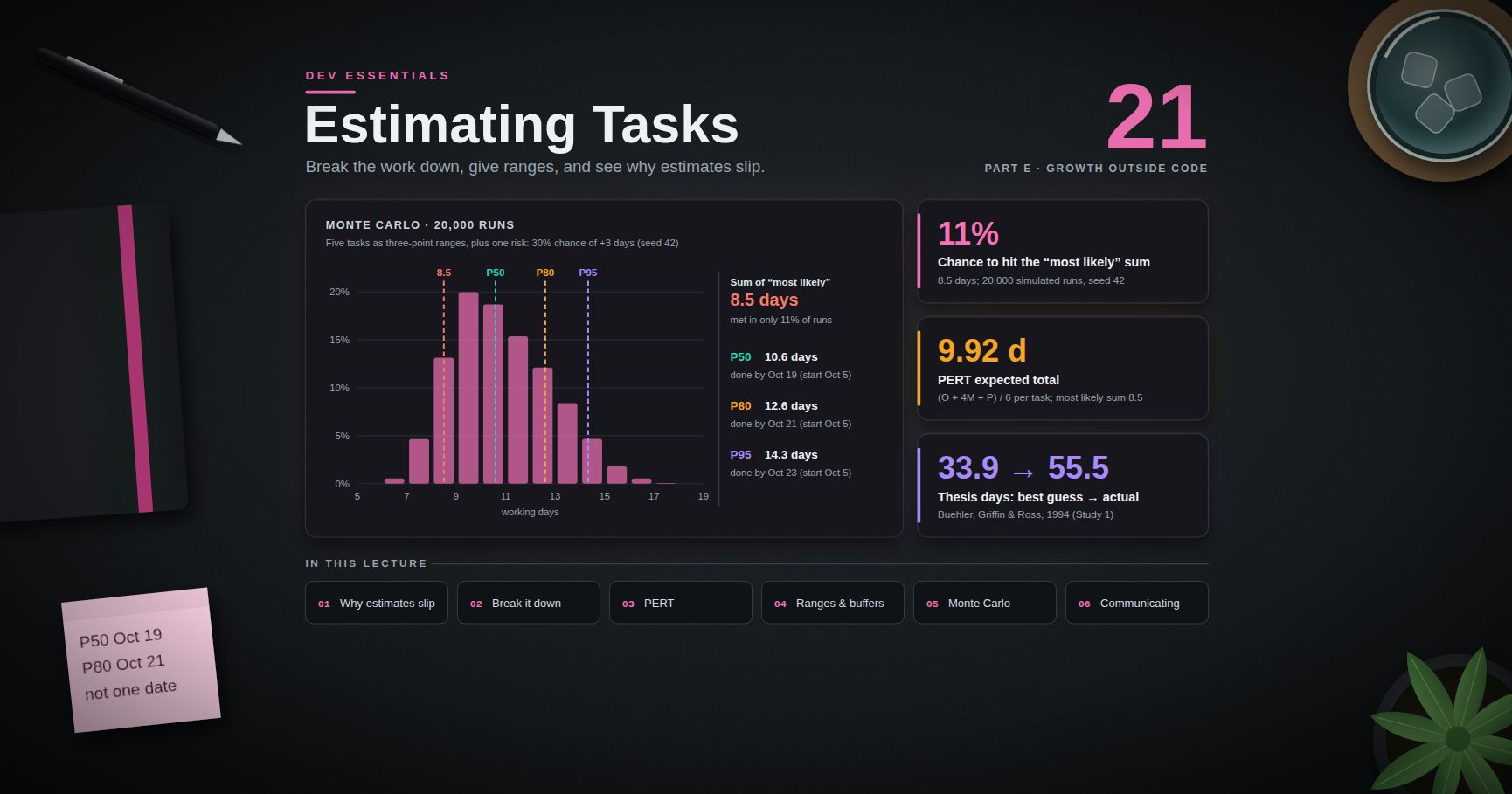
What it buys you: colleagues find the flaw before you write 3,000 lines; everyone reads the same plan; non-goals stop the scope from growing in secret; six months later the "why" is still written down; and the breakdown and risks feed straight into an estimate (see Dev Essentials 21 · Estimating).
Terminology
| Term | Meaning |
|---|---|
| Design doc | A plan for a change, with trade-offs, written before building |
| Non-goal | Something the project will deliberately not do |
| ADR | Architecture Decision Record — one short file per significant decision |
| RFC | "Request for Comments" — a public proposal process, e.g. Rust RFCs |
| PEP | Python Enhancement Proposal — Python's design-document process |
| Diátaxis | A framework that splits docs into tutorials, how-to guides, reference, explanation |
| C4 model | Simon Brown's four zoom levels for architecture diagrams |
Chapter 2 — The design doc template
Typical sections, in reading order:
| Section | Answers | Tip |
|---|---|---|
| Summary | What are you proposing, in 3 sentences? | Conclusion first — many readers stop here |
| Context | What exists today, and what is the problem? | Facts only, no solution yet |
| Goals / non-goals | What counts as success? What is out of scope? | Measurable goals; explicit non-goals |
| Proposal | How will it work? | Diagram, API shape, data model |
| Alternatives considered | What else did you look at, and why not? | At least one real alternative, plus "do nothing" |
| Trade-offs | What do you give up? | Be honest; reviewers will find them anyway |
| Risks | What could go wrong? | Likelihood, impact, mitigation |
| Rollout / migration | How do you ship it safely and undo it? | Feature flag, phases, rollback plan |
| Open questions | What is still undecided? | Name who decides, and by when |
Copy-ready template:
1
2
3
4
5
6
7
8
9
10
11
12
13
14
15
16
17
18
19
20
21
22
23
24
25
26
27
28
29
30
31
32
33
34
35
36
37
38
39
40
41
42
43
44
45
46
47
48
49
50
51
52
53
# Design: <short name>
| | |
|---|---|
| Author(s) | <names> |
| Status | Draft / In review / Approved / Implemented / Superseded |
| Last updated | YYYY-MM-DD |
| Reviewers | <names> |
## Summary
<3 sentences: the problem, the proposal, the main trade-off.>
## Context
<What exists today. Numbers if you have them. Link to tickets and incidents.>
## Goals
- <Measurable: "p95 search latency under 300 ms at 200 req/s">
## Non-goals
- <Out of scope, on purpose: "No multi-language search in this phase">
## Proposal
### Overview
<Diagram + one paragraph.>
### API
<Endpoints or function signatures.>
### Data
<Schema, storage, retention.>
### Cross-cutting concerns
<Security, privacy, observability, cost.>
## Alternatives considered
| Option | Pros | Cons | Why not |
|--------|------|------|---------|
| Do nothing | | | |
| <Option B> | | | |
## Trade-offs
<What we give up and why it is acceptable.>
## Risks
| Risk | Likelihood | Impact | Mitigation |
|------|-----------|--------|------------|
## Rollout and migration
1. <Phase 1 behind a feature flag>
2. <Backfill / dual-write>
3. <Switch reads, then remove old path>
Rollback: <how to undo each step>
## Open questions
- <Question> — owner: <name>, decide by: <date>
Common pitfall: a design doc that describes only the chosen solution. Without alternatives and trade-offs it is a manual, not a design doc, and reviewers cannot tell if it is the best option.
Trick: state goals as numbers where you can. "Fast search" cannot be tested; "p95 under 300 ms" can.
Chapter 3 — ADRs: one decision, one file
A design doc covers a project. An Architecture Decision Record covers one decision. Michael Nygard proposed the format in "Documenting Architecture Decisions" (2011):
- Title — a short noun phrase, numbered: "ADR 7: Use PostgreSQL for billing records".
- Status — proposed, accepted, deprecated, or superseded (with a link to the replacement).
- Context — the forces at play, described as neutral facts.
- Decision — in active voice, starting with "We will…".
- Consequences — everything that follows, good and bad.
Other points from the same article:
- Keep ADRs in the repository, for example
doc/arch/adr-NNN.md, numbered in order. Numbers are never reused. - Each ADR is one or two pages, in full sentences.
- When a decision is reversed, do not delete the old ADR. Mark it superseded and keep it — the history is the point.
1
2
3
4
5
6
7
8
9
10
11
12
13
14
15
16
17
# ADR NNN: <Decision as a short noun phrase>
Status: Proposed | Accepted | Deprecated | Superseded by ADR-MMM
Date: YYYY-MM-DD
## Context
<The situation and the forces at play: requirements, constraints, team skills,
deadlines, costs. Neutral facts, no decision yet.>
## Decision
We will <do X>.
## Consequences
- Good: <what becomes easier>
- Bad: <what becomes harder, new risks, new work>
- Follow-up: <tasks this decision creates>
Trick: write the ADR when you make the decision, not later. It takes 20 minutes then; it takes a day of archaeology in a year.
Chapter 4 — Real-world RFC processes
Big open-source projects run design docs in public. They are free lessons in how to argue for a change.
Rust RFCs. Substantial changes to Rust go through an RFC in the rust-lang/rfcs repository. The template's sections are: Summary, Motivation, Guide-level explanation, Reference-level explanation, Drawbacks, Rationale and alternatives, Prior art, Unresolved questions, Future possibilities. Note the two explanation levels: one for users ("how would I teach this?"), one for implementers.
Python PEPs. PEP 1 defines a PEP as a design document that gives information to the Python community or describes a new feature, process or environment change. There are three types: Standards Track, Informational and Process. The Python Steering Council makes the final decision, or a PEP-Delegate it approves. A PEP's sections include Abstract, Motivation, Rationale, Specification, Backwards Compatibility, Security Implications, How to Teach This, Reference Implementation, Rejected Ideas and Open Issues.
Both map onto the Chapter 2 template: Motivation → context and goals; Specification / reference-level explanation → proposal; Rationale, Rejected Ideas, alternatives → alternatives considered; Drawbacks, Backwards Compatibility → trade-offs and risks; Open Issues / Unresolved questions → open questions.
Trick: before writing your first design doc, read one accepted PEP and one accepted Rust RFC end to end. Notice how much space goes to alternatives and drawbacks.
Chapter 5 — READMEs
A README is the front door of a repository. GitHub's docs say a README typically covers what the project does, why it is useful, how to get started, where to get help, and who maintains it. GitHub looks for the file in .github/, then the repository root, then docs/.
A structure that works:
- Name + one-line description — what it is.
- Why — the problem it solves, in 2-3 sentences.
- Quickstart — the shortest path to a working result. Copy-paste commands.
- Usage — common tasks with examples.
- Configuration — every option, its default, and an example.
- Troubleshooting — the top 3-5 errors and their fixes.
- Contributing — how to set up, test and send changes.
- License.
1
2
3
4
5
6
7
8
9
10
11
12
13
14
15
16
17
18
19
20
21
22
23
24
25
26
27
28
29
30
31
32
33
34
35
36
37
38
39
40
# <project-name>
<One line: what it is and who it is for.>
## Why
<The problem, in 2-3 sentences. What makes this tool different.>
## Quickstart
Requires <runtime + version>.
~~~bash
git clone <repo-url>
cd <project-name>
<install command>
<run command>
~~~
Expected output:
~~~text
<what success looks like>
~~~
## Usage
<The 3-5 most common tasks, each with a command and its output.>
## Configuration
| Setting | Default | Description |
|---------|---------|-------------|
| `<NAME>` | `<value>` | <what it does> |
## Troubleshooting
**<Exact error message>** — <cause>. Fix: <steps>.
## Contributing
See `CONTRIBUTING.md`. Run tests with `<test command>`.
## License
<License name> — see `LICENSE`.
Watch out: a quickstart that nobody has run from a clean machine is usually broken. Test it in a fresh clone (or a container) before every release. On Windows, check both Git Bash and PowerShell commands if your users use both.
Chapter 6 — Diátaxis: four kinds of docs
A README cannot hold everything. Diátaxis, created by Daniele Procida, says documentation serves four different needs, and each needs its own kind of page:
| Type | Oriented to | Reader is… | Example for a CSV tool |
|---|---|---|---|
| Tutorial | Learning | New, following along | "Clean your first CSV in 5 minutes" |
| How-to guide | A task | Working, has a goal | "How to clean every file in a folder" |
| Reference | Information | Looking something up | "All command-line options" |
| Explanation | Understanding | Thinking, wants the why | "Why encoding is detected before parsing" |
The four sit on two axes: learning vs doing (study vs work) and action vs cognition (practical steps vs theory). The most common mistake is mixing them — a tutorial that stops to explain theory, or a reference page that tries to teach. Keep each page one type, and link between them.
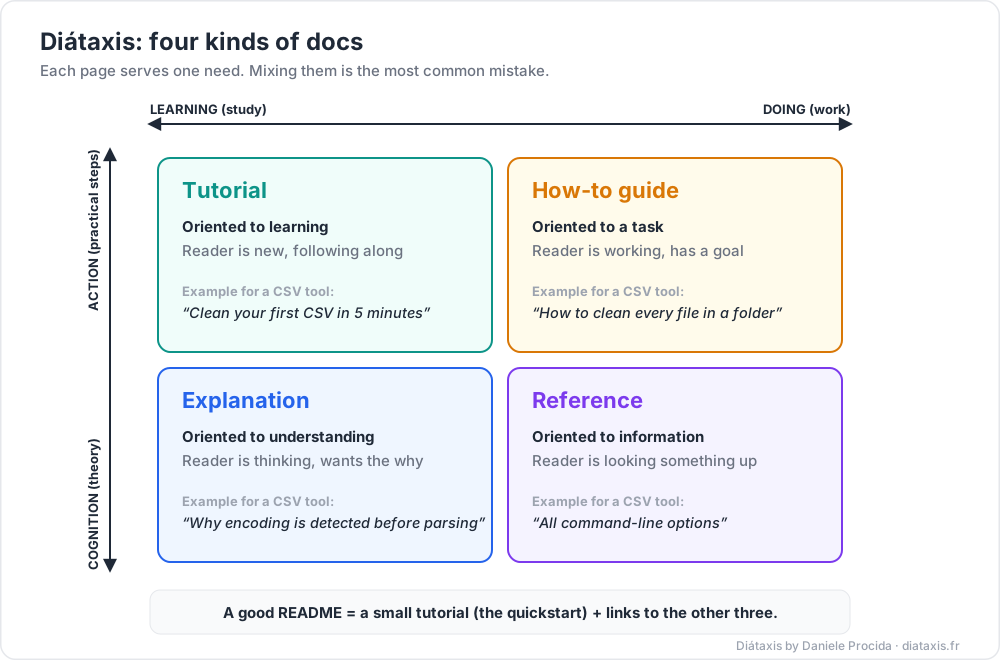
A good README is a small tutorial (quickstart) plus links to the other three.
Chapter 7 — Writing clearly
Two useful public guides:
- The Google developer documentation style guide. Its highlights include: be conversational without being frivolous; use second person ("you"); use active voice; put conditions before instructions; use sentence case for headings; use numbered lists for steps; write descriptive link text.
- The US government's plain-language guidance.
plainlanguage.govnow redirects to a set of plain language guides on digital.gov, adapted from the old site. They advise: write for your audience, summarise long documents up front, use active voice and present tense, prefer short words and short sections, and avoid "hidden verbs" (say "we analyse", not "we conduct an analysis").
Rules with before/after examples:
| Rule | Before | After |
|---|---|---|
| Conclusion first | "After evaluating several options over two weeks, and considering…, we propose Redis." | "We propose Redis for sessions. It cuts login latency from 180 ms to 20 ms. Details below." |
| Active voice | "The config file is read by the server at startup." | "The server reads the config file at startup." |
| Short sentences | One 45-word sentence with three commas and a semicolon | Three sentences of 15 words |
| Condition first | "Run setup.ps1 if you are on Windows." |
"On Windows, run setup.ps1." |
| No hidden verbs | "Perform an installation of the package." | "Install the package." |
| Descriptive links | "Click here for the API." | "See the API reference." |
| Concrete | "The system is slow." | "p95 latency is 2.4 s; the goal is 300 ms." |
Trick: read your text aloud. Wherever you run out of breath or stumble, split the sentence.
Chapter 8 — Diagrams as text
Diagrams in image files go stale because nobody can edit them. Diagrams as text live next to the code, get reviewed in pull requests, and show clean diffs.
Mermaid
Mermaid turns text into flowcharts, sequence diagrams and more. GitHub renders a fenced code block with the mermaid language tag as a diagram in Markdown files, issues, pull requests, discussions and wikis. A sequence diagram of an order request (Exercise 6 draws a flowchart):
1
2
3
4
5
6
7
8
9
sequenceDiagram
participant C as Client
participant A as API
participant D as Database
C->>A: POST /orders (Idempotency-Key)
A->>D: INSERT order
D-->>A: ok
A-->>C: 201 Created
(If this blog shows those as code, paste them into GitHub or the Mermaid live editor to see the drawing.)
The C4 model
Simon Brown's C4 model is a set of zoom levels for software architecture, like a map app:
| Level | Diagram | Shows | Audience |
|---|---|---|---|
| 1 | System context | Your system as one box, its users, and other systems it talks to | Everyone |
| 2 | Container | Apps and data stores inside the system (web app, API, database, queue) | Developers, ops |
| 3 | Component | Main parts inside one container | Developers |
| 4 | Code | Classes or functions (often generated, often skipped) | Developers |
C4 is notation- and tool-independent. Mermaid has C4 diagram syntax (C4Context, C4Container, …), but its docs mark it experimental, so the syntax may change. A plain flowchart with clear labels is often enough.
Trick: a design doc usually needs a level 1 (context) and a level 2 (container) diagram. Level 3 only where the change is.
Practice Exercises
Exercise 1 — Rewrite a bad README
Rewrite this README using the Chapter 5 template. The tool is a Python CLI called csvclean that fixes encodings and trims spaces in CSV files. It needs Python 3.10+. Config lives in csvclean.toml.
1
2
3
4
5
6
7
8
# proj2
This is my project. It uses python and some other stuff. To run it you need to
install things and set up the env and then run main. There might be bugs lol.
Config is in the config file. Ask me if something doesnt work.
TODO: write docs
Solution
1
2
3
4
5
6
7
8
9
10
11
12
13
14
15
16
17
18
19
20
21
22
23
24
25
26
27
28
29
30
31
32
33
34
35
36
37
38
39
40
41
42
43
44
45
46
47
48
49
50
51
52
53
54
55
56
57
58
# csvclean
A command-line tool that fixes text encoding and stray spaces in CSV files.
## Why
CSV exports arrive in mixed encodings with padded cells. `csvclean` converts
every file to UTF-8 and trims each cell, so the files load cleanly anywhere.
## Quickstart
Requires Python 3.10 or newer.
Git Bash / macOS / Linux:
~~~bash
python -m venv .venv
source .venv/Scripts/activate # macOS/Linux: source .venv/bin/activate
pip install -e .
csvclean samples/orders.csv -o clean/orders.csv
~~~
Windows PowerShell:
~~~powershell
python -m venv .venv
.venv\Scripts\Activate.ps1
pip install -e .
csvclean samples\orders.csv -o clean\orders.csv
~~~
Expected output:
~~~text
orders.csv: detected cp1252 -> wrote UTF-8, 1,204 rows, 37 cells trimmed
~~~
## Usage
- Clean one file: `csvclean in.csv -o out.csv`
- Clean a folder: `csvclean data/ -o clean/`
- Preview without writing: `csvclean in.csv --dry-run`
## Configuration
Settings are read from `csvclean.toml` in the current folder.
| Setting | Default | Description |
|---------|---------|-------------|
| `output_encoding` | `"utf-8"` | Encoding of written files |
| `trim` | `true` | Strip spaces around each cell |
## Troubleshooting
**`UnicodeDecodeError`** — the encoding could not be detected. Fix: pass it
explicitly, e.g. `--input-encoding cp1252`.
## Contributing
Run the tests with `pytest`. Open an issue before large changes.
## License
MIT — see `LICENSE`.
What changed: a one-line purpose, a "why", a quickstart for both shells with expected output, a settings table, one real error with its fix, and a license.
Exercise 2 — Write an ADR
A team is building a billing service that stores invoices, payments and refunds. Finance needs SQL reports that join these with customer data. The team knows PostgreSQL well. The product catalogue elsewhere uses MongoDB. Write an ADR for the billing database.
Solution
1
2
3
4
5
6
7
8
9
10
11
12
13
14
15
16
17
18
19
20
21
22
23
24
25
26
# ADR 007: Use PostgreSQL for billing records
Status: Accepted
Date: 2026-09-24
## Context
The billing service stores invoices, payments and refunds. These records are
strongly related (an invoice has many payments and refunds) and must stay
consistent. Finance runs ad-hoc SQL reports joining billing data with customer
data, using tools that connect over SQL. The team has years of PostgreSQL
experience. The product catalogue already runs on MongoDB, whose flexible
documents suit products with very different attributes. MongoDB also supports
multi-document transactions, so both options can keep billing consistent.
## Decision
We will store billing records in PostgreSQL, with foreign keys and CHECK
constraints on money columns. Amounts are stored as integer minor units
(see Dev Essentials 08 · Floating Point).
## Consequences
- Good: finance can query directly with SQL; the schema enforces relations.
- Good: the team can operate it with existing skills and runbooks.
- Bad: we now run two database technologies, with two backup and monitoring setups.
- Bad: schema changes need migrations; we will use a migration tool in CI.
- Follow-up: revisit if billing needs to embed catalogue documents often.
Notice the context is fair to the rejected option. A good ADR says why this choice fits this situation, not that one database is better in general. (For the move in the other direction, see MongoDB Course 23 · Migrating from SQL / Postgres to MongoDB.)
Exercise 3 — Goals and non-goals
A team plans "a new search for the help centre". Write two measurable goals and two non-goals.
Solution
Goals: "p95 search latency under 300 ms at 50 requests/s"; "the right article is in the top 3 results for at least 80% of the 100 most common queries (measured on a labelled set)". Non-goals: "no search across the community forum in this phase"; "no personalised ranking".
Exercise 4 — Sort into Diátaxis
Which type is each page? (a) "All environment variables and their defaults"; (b) "Build your first plugin, step by step"; (c) "How to rotate the API key"; (d) "Why we chose event sourcing".
Solution
(a) Reference. (b) Tutorial. (c) How-to guide. (d) Explanation.
Exercise 5 — Fix the sentences
Rewrite in plain, active language: (a) "It is recommended that the cache be cleared by the user prior to the upgrade being performed." (b) "Click here to see the migration guide." (c) "Run migrate.sh if you have an existing database."
Solution
(a) "Clear the cache before you upgrade." (b) "See the migration guide." (c) "If you have an existing database, run migrate.sh."
Exercise 6 — Draw it
Draw a Mermaid flowchart for: a browser calls a web app; the web app calls an API; the API reads from Redis and falls back to PostgreSQL on a miss.
Solution
1
2
3
4
5
6
flowchart LR
B[Browser] --> W[Web app]
W --> A[API]
A -->|1. get| R[(Redis)]
A -->|2. on miss| P[(PostgreSQL)]
Cheat-sheet
| Need | Use | Key sections |
|---|---|---|
| Plan a change with trade-offs | Design doc (1-3 pages mini, ~10-20 large) | Summary, context, goals/non-goals, proposal, alternatives, risks, rollout, open questions |
| Remember one decision | ADR (1-2 pages) | Title, status, context, decision ("We will…"), consequences |
| Reverse a decision | New ADR | Mark the old one superseded; never delete |
| Help a stranger start | README | What, why, quickstart, usage, config, troubleshooting, contributing, license |
| Organise all docs | Diátaxis | Tutorial, how-to, reference, explanation — one type per page |
| Write clearly | Google style guide, digital.gov guides | Conclusion first, active voice, "you", short sentences, condition first |
| Diagram | Mermaid in Markdown; C4 levels | Context + container diagrams for most designs |
| Learn by example | Rust RFCs, Python PEPs | Motivation, alternatives, drawbacks, open questions |
What's next
Dev Essentials 23 · Money Basics steps away from code: budgeting, an emergency fund, compound interest and index funds, explained for engineers.
References
- Malte Ubl — Design Docs at Google (2020)
- Michael Nygard — Documenting Architecture Decisions (2011)
- Rust RFCs — repository and template
- PEP 1 — PEP Purpose and Guidelines
- GitHub Docs — About READMEs
- Diátaxis
- Google developer documentation style guide — Highlights
- Digital.gov — Plain language guide series
- GitHub Docs — Creating diagrams (Mermaid)
- Mermaid — C4 diagrams (experimental)
- The C4 model
Note: this post is in progress. Planned additions: a review checklist for design docs, a worked mini design doc end to end, and API reference docs generated from code (OpenAPI, docstrings).