3D Printing Course — 07 · Strength, Failure Modes and Functional Parts
The base course closes where it should: with the question of whether the part actually works. Posts 00–03 covered the process, Post 04 the materials, Post 05 whether the part is the right size, and Post 06 how to model it. This post covers whether it survives being used. That requires a working vocabulary of mechanics, an honest treatment of the anisotropy that makes a printed part fundamentally different from a moulded one, a correctly-ordered list of which print settings actually matter for strength, a catalogue mapping observed failures to their causes, and — the section most 3D printing material omits — a clear-eyed account of when the right answer is not to print the part at all.
Series map: 00 How 3D Printing Works → 01 First Print and Calibration → 02 Slicing in Depth → 03 Orientation, Supports and Design for Printing → 04 Materials → 05 Dimensional Accuracy and Tolerances → 06 CAD for Printing → 07 Strength, Failure Modes and Functional Parts (this post).
Learning Outcome
- Use the mechanics vocabulary correctly: stress, strain, stiffness, strength, toughness, yield, ultimate, ductile, brittle, fatigue, creep.
- Explain why creep — not strength — is what quietly destroys loaded PLA parts, and design around it.
- Describe printed-part anisotropy correctly, and run a test that measures your Z-strength ratio rather than quoting someone else's number.
- Rank the print-profile levers on strength in the correct order, and explain why infill density sits far lower than beginners assume.
- Argue the perimeters-versus-infill case from where bending stress actually acts.
- Design out stress concentrations, and use fillets as the cheapest strength upgrade available.
- Diagnose a broken part from the fracture surface and map symptom to root cause to fix.
- Build a repeatable comparative test rig and test the actual part rather than a coupon.
- Decide when machining, moulding, sheet metal, or simply buying the part is the better answer.
Chapter 1 — The mechanics you actually need
Terminology
- Stress (σ) — force per unit area, in pascals (N/m²) or MPa. What the material experiences, independent of the part's size.
- Strain (ε) — deformation per unit length, dimensionless. How much the material stretched relative to its original length.
- Stiffness (elastic modulus, E) — the slope of stress against strain in the elastic region. How much it deflects under load. A stiff material barely moves.
- Strength — the stress at which the material fails, whether by yielding or by fracturing. How much load it takes before something goes wrong. Stiffness and strength are independent properties: a material can be stiff and weak (glass), or compliant and strong (many elastomers).
- Yield strength — the stress at which deformation stops being elastic and becomes permanent. Past yield the part is bent, even after the load comes off.
- Ultimate tensile strength (UTS) — the maximum stress the material carries before fracture.
- Toughness — the energy absorbed before fracture; the area under the stress-strain curve. How much abuse it takes before breaking. A tough material bends, absorbs and survives.
- Ductile failure — the material yields, stretches, necks and then tears. It gives warning. PETG, ABS, nylon, TPU.
- Brittle failure — the material fractures suddenly at or near its elastic limit, with little permanent deformation and no warning. PLA, standard photopolymer resin, and most fibre-filled composites.
- Fatigue — failure from repeated cycles of load well below the static strength. A part that survives a 100 N pull once may fail after 10,000 cycles at 30 N.
- Creep — slow, continuous deformation under a constant load over time, without any increase in load. It accelerates dramatically as temperature approaches Tg.
- Stress concentration — a local multiplication of stress at a geometric discontinuity (a sharp internal corner, a notch, a hole edge, a sudden change of section).
- Neutral axis — in a beam under bending, the surface where the stress is zero; material on one side is in tension, on the other in compression.
The distinction beginners get wrong most often
Stiff ≠ strong ≠ tough. These are three different questions and different materials win each:
| Question | Property | The common filament that wins |
|---|---|---|
| How much does it bend under load? | stiffness | PLA is the stiffest common filament — genuinely |
| How much load until it breaks? | strength | depends heavily on direction; PLA is competitive in-plane |
| Does it survive being dropped or shocked? | toughness | PLA is poor; PETG, ABS, PC and nylon are far better |
This is why PLA feels great on the bench (stiff, holds shape, precise) and disappoints in service (brittle, notch-sensitive, creeps). It is not a bad material. It is a material with a specific and well-known profile.
Creep — the quiet killer
Creep deserves its own treatment because it is the failure mode most often misdiagnosed as "the print was weak".
Polymers are viscoelastic: under sustained load they behave partly like solids and partly like very stiff liquids. Hold a constant load on a printed bracket and it will slowly, continuously deform. Not fail — deform. Over hours, days, months, depending on the material, the stress level and the temperature.
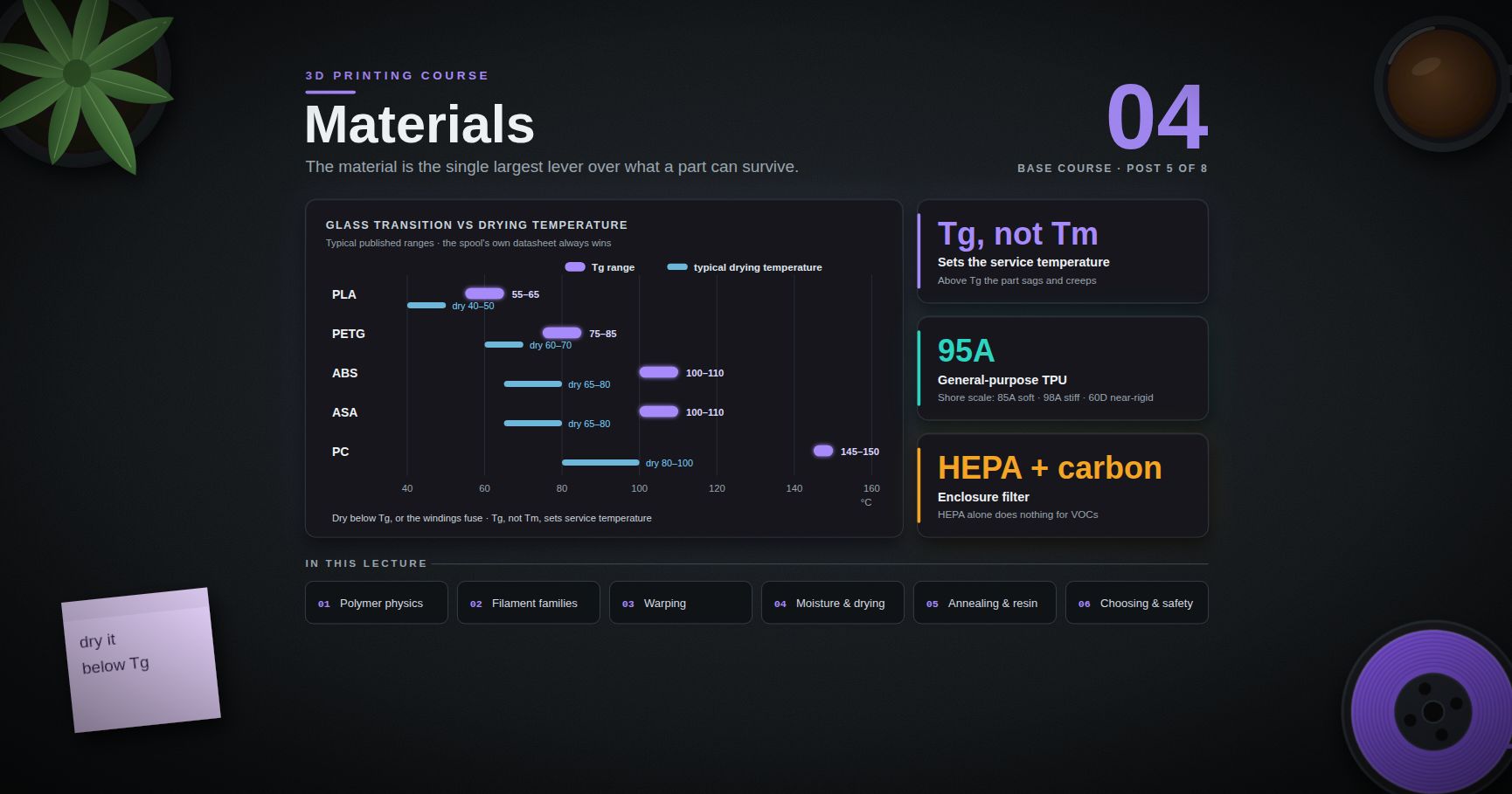
The temperature dependence is the sting. Creep rate rises sharply as the material approaches Tg (Post 04). A PLA part at 20 °C creeps slowly enough to be irrelevant for many uses. The same part at 50 °C — a closed car in summer, a sunlit window sill, a shelf above a radiator, next to a stepper motor — is within striking distance of PLA's Tg of roughly 55–65 °C, and creeps fast enough to be visible in a day.
The canonical failure: a PLA phone mount, wall hook, or shelf bracket that was perfectly fine for weeks and one day is simply drooping. Nothing broke. It flowed.
Design responses, in order of effectiveness:
- Don't use PLA for a sustained load in a warm place. PETG is a large improvement, ABS/ASA more, PC more again, and a fibre-filled grade of any of them better still.
- Reduce the stress. Creep rate is strongly stress-dependent; halving the stress helps disproportionately. Thicker sections, more perimeters, a shorter moment arm.
- Put the load into compression rather than bending. Compressive creep in a well-supported column is far less troublesome than bending creep in a cantilever.
- Carry the sustained load in metal. A printed body with a steel screw, rod or bracket taking the actual load is a robust pattern.
- Anneal (Post 04) if the part is PLA and must be warm — increased crystallinity meaningfully raises creep resistance. Then re-check the fit, because the dimensions changed.
Watch out: static strength tests tell you nothing about creep. Hanging a weight on a bracket for thirty seconds and declaring it strong is not a test of a load it will carry for a year. If the part carries a sustained load, the only meaningful test is a sustained one.
Chapter 2 — Anisotropy, honestly
What is actually going on
A moulded part is essentially isotropic: the polymer is a continuous mass and its properties are the same in every direction. A printed part is not. It is a stack of extruded beads bonded to their neighbours, and the bond between beads is not the same as the bulk material.
- In-plane (X/Y), along and across the extrusion direction, load is carried mostly by continuous polymer within beads and by side-to-side welds between adjacent beads laid down while both were hot.
- Through-thickness (Z), across layers, load is carried entirely by the interlayer weld: the region where a new bead was deposited onto a layer that had already partly cooled, and the polymer chains had a limited time and a limited temperature at which to diffuse across the interface and entangle.
That diffusion process is the entire mechanism. The strength of the Z direction is the strength of that weld, and the weld is imperfect: it forms in a fraction of a second, at a temperature falling rapidly toward Tg, between two surfaces that also have geometric voids at the bead junctions.
The honest statement of the magnitude: interlayer (Z) strength is substantially lower than in-plane strength for essentially every FDM material and profile. The size of the gap varies enormously — it depends on the polymer, the nozzle temperature, the layer height, the part cooling, the chamber temperature, the layer time, the bead geometry, and whether the part was annealed. Published studies find a wide range of ratios, and any single percentage quoted as a general fact about "3D printing" is not one.
You will see figures like "Z is 50 % of XY" repeated widely. Treat them the way Post 05 taught you to treat "0.05 mm accuracy": as a number for someone's specific machine, material and profile, not as a property of the technology. Measure it on yours. Exercise 2 gives the procedure.
Reducing the gap
| Lever | Effect on interlayer strength | Cost |
|---|---|---|
| Higher nozzle temperature | strong positive — more time above the diffusion temperature | surface quality, stringing, oozing; bounded by material degradation |
| Enclosure / warm chamber | strong positive — the previous layer is hotter when the new one lands | equipment; not appropriate for PLA (Post 04) |
| Less part cooling | positive | overhangs and bridges degrade; a real trade-off |
| Thicker layers | positive — more bonded area per interface and more retained heat | resolution, surface finish |
| Wider extrusion / bigger nozzle | positive — larger weld area, fewer voids | resolution, detail |
| Slower printing | mixed — slower gives more heat per unit length, but a longer layer time means the previous layer is cooler when you return to it | time |
| Annealing | positive — chains interdiffuse across interfaces given time above Tg | dimensional change (Post 04) |
| Ironing / higher flow | small positive — reduces interlayer voids | |
| Orientation | eliminates the problem — put the load in-plane | usually free; occasionally costs support material |
Watch out: every mitigation in that table trades something away — surface quality, overhang capability, resolution, or time — and none of them removes the weakness. Only orientation does.
The last row is the point of the whole chapter. Every other lever is a partial mitigation with a cost. Orientation makes the weakness irrelevant, and it usually costs nothing but a decision. That is why it heads the next chapter's list.
Chapter 3 — What actually controls strength, in order
Beginners tune this list in roughly reverse order. Here it is correctly ordered by leverage.
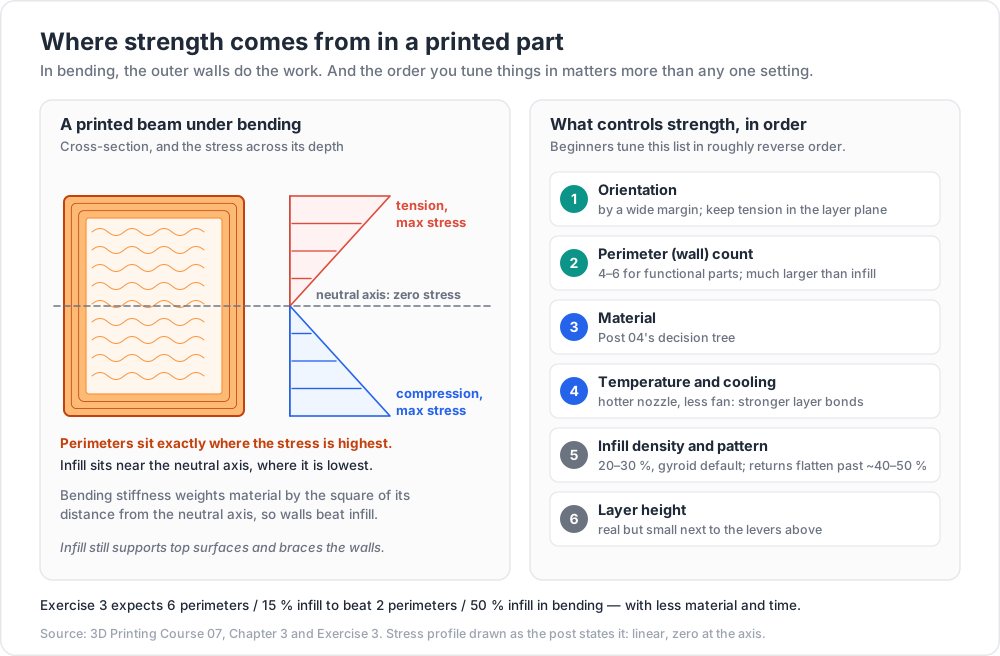
1. Orientation — by a wide margin the most important
Rotating the part on the plate can change its breaking load by a factor. Nothing else in the profile comes close.
The rule: never let the primary tensile load path cross a layer boundary. Identify how the part is loaded, identify where the tension is highest, and orient so the layers run along the load, not across it.
Concrete cases:
| Part | Wrong orientation | Right orientation |
|---|---|---|
| Hook carrying a downward load | printed upright — the bending tension at the root is across layers | printed flat on its side (or standing in the load plane) so layers run along the hook |
| Bracket with an L-shape | either leg vertical — the corner is a layer interface in tension | flat, with both legs in the layer plane |
| Threaded boss taking a pull-out load | axis vertical — the thread strips layer by layer | axis horizontal, or use a heat-set insert (Post 06) |
| Long thin rod under tension | vertical — every layer is a potential fracture plane | horizontal |
| A gear | either works for tooth bending; hub axis vertical is standard | axis vertical, so tooth loads are in-plane |
Post 03 covers orientation for surface quality and supports. This is the same decision viewed through strength, and when the two conflict, strength usually wins on a functional part.
2. Perimeter (wall) count
Second-largest lever, and much larger than infill. Going from 2 to 4 perimeters typically makes a far bigger difference than going from 20 % to 50 % infill, at a fraction of the material and time cost.
Why: where bending stress actually acts
Most printed parts fail in bending, not pure tension. In a beam under bending:
- The material on the outside of the bend is in tension; on the inside, in compression; and somewhere between them, at the neutral axis, the stress is zero.
- Stress varies linearly with distance from the neutral axis. The extreme fibres carry the maximum; material at the neutral axis carries nothing.
- Bending stiffness is governed by the second moment of area, which weights material by the square of its distance from the neutral axis. Bending strength is governed by the section modulus, which likewise rewards distance from the axis.
1
2
3
4
5
6
7
8
9
10
11
Cross-section of a printed beam under bending:
perimeters (outer shell) ----> #################### <- TENSION, max stress
#··················#
infill (interior) ------> #··· · · · · · · ·# <- near neutral axis,
#··················# near-zero stress
#################### <- COMPRESSION, max stress
Perimeters sit exactly where the stress is highest.
Infill sits exactly where the stress is lowest.
That is the entire argument. Perimeters are the material at the extreme fibres — the material that is doing the work. Infill is the material near the neutral axis, where the stress is small. Adding infill adds mass and print time in the place where it contributes least.
Infill is not useless; it does three real jobs:
- Supports the top surfaces so they can be printed at all (Post 02).
- Stabilises the perimeters against buckling — a thin shell under compression fails by buckling long before it fails by crushing, and infill braces it.
- Carries compression and shear in a part loaded through its bulk rather than in bending.
But for the common case — a bracket, a hook, a mount, a lever, anything cantilevered — perimeters win decisively.
3. Material
Third. Choosing PETG over PLA for a part that gets knocked, or nylon over PETG for a part that wears, changes the outcome more than any slicer setting except the two above. Post 04's decision tree is the tool. Note that the material choice interacts with orientation: fibre-filled composites are dramatically stiffer in-plane and are usually more brittle across layers, so the anisotropy gets worse, not better.
4. Temperature and cooling
Fourth. Nozzle temperature is the strongest single lever on interlayer strength within a given material (Chapter 2). Reduced part cooling helps interlayer bonding and hurts overhangs. An enclosure helps materials that want one. These are real effects with real trade-offs — but they are refinements on top of the first three decisions, not substitutes for them.
5. Infill density and pattern
Fifth, and well below where beginners put it.
- Density. Beyond roughly 40–50 %, additional infill buys little strength for a lot of time and material; the curve flattens. Below about 15 % the part becomes noticeably soft and top surfaces suffer. For most functional parts, 20–30 % infill with 4–6 perimeters outperforms 50 % infill with 2 perimeters, using less material.
- Pattern. Matters more than density in some load cases. Gyroid is isotropic, self-supporting, prints fast and is a strong general default. Cubic and triangular are stiff and good under multi-axis load. Grid creates crossing points where the nozzle collides with previously-laid material. Lines/rectilinear is weak in one direction. Concentric is right under flexible parts.
- Special case: a fully solid part (100 % infill) is not automatically the strongest thing you can print. Over-extrusion in a solid part introduces internal stress and can leave voids; and the part still fails at layer interfaces. Solid is heavy, slow and often not better than thick perimeters plus moderate infill.
6. Layer height
Sixth. Thicker layers bond somewhat better and print faster; thinner layers give finer detail and better surface. Its effect on strength is real but small next to the levers above.
Common pitfall: the reflex "print it at 100 % infill so it's strong". It costs hours and grams, and it usually loses to reorienting the part and adding two perimeters — which costs nothing.
Chapter 4 — Stress concentration and design patterns
The notch effect
A sharp internal corner is a stress concentrator. The local stress at the corner can be several times the nominal stress in the surrounding material, and it rises as the corner radius falls — approaching, in the idealised limit of a perfectly sharp corner, an unbounded value. Real materials do not see infinite stress, but the multiplication is large and real, and it is where cracks start.
Printed parts are unusually vulnerable to this for two reasons:
- PLA and filled composites are notch-sensitive — brittle materials do not locally yield to blunt the peak, so the concentration translates directly into a crack.
- A layer interface at a sharp internal corner combines a stress raiser with the weakest plane in the part. That combination is the single most common origin of a printed-part fracture.
Fillets: the cheapest strength upgrade available
Adding a fillet to a loaded internal corner costs one CAD feature, a negligible amount of material, and essentially no print time. It reduces the peak stress substantially. There is no other change with that ratio of benefit to cost.
Practical guidance:
- Fillet every loaded internal corner. A radius comparable to the local wall thickness is a reasonable default; larger is better, up to what the geometry allows.
- A larger radius is better than a smaller one. The benefit is strongly nonlinear at small radii — going from sharp to a small fillet buys most of the improvement.
- Fillet transitions between sections too. A sudden change from thick to thin is a stress raiser even without a corner. Taper it.
- Watch the printing rules (Post 06): fillet vertical and top edges freely; chamfer bottom edges.
- Do not fillet a corner that needs to mate flush with something. Chamfer that one, or add a relief groove on the mating part.
Design patterns for functional parts
| Pattern | Instead of | Why |
|---|---|---|
| Ribs | solid bulk | a rib places material away from the neutral axis; you get most of the stiffness for a fraction of the material and time. Rib thickness ≈ 0.5–1× the wall it stands on; rib height ≈ 2–3× thickness; add a draft or taper and a fillet at the root |
| Gussets (triangular webs) | a bare right-angle joint | carries the bending moment at a corner directly into a stiff triangle. The single most effective addition to an L-bracket |
| Generous fillets everywhere loaded | sharp internal corners | Chapter 4 above |
| Load spread over multiple fasteners | one big screw | distributes stress; a single fastener creates a concentrated bearing load in soft plastic that will creep |
| Washers or a metal backing plate under fastener heads | screw head directly on plastic | prevents the head pulling through and spreads the bearing area |
| Load path within the layer plane | load path crossing layers | Chapter 3, lever 1 |
| Compression rather than bending | cantilevers | polymers are far better in compression, and creep less |
| Increased section depth | increased material | stiffness scales with the cube of depth in bending — making a beam twice as deep makes it eight times as stiff, while making it twice as wide only doubles it, so extra depth is worth four times as much as the same extra width |
| Metal where load is sustained | plastic carrying it alone | a threaded rod, a steel pin, a bought bracket |
| Rounded rather than square holes near an edge | square cutouts | corners of square cutouts are stress raisers; radius them |
| A relief slot at the end of a flexure | a flexure terminating in a corner | terminates the crack path in a rounded feature |
Trick: the single highest-value five-minute change to almost any printed bracket is: add a gusset, fillet the internal corner, and rotate it so the layers run along the load. Those three together frequently more than double the failure load, and cost no extra material worth mentioning.
Chapter 5 — Post-processing
| Process | What it changes | Notes and safety |
|---|---|---|
| Annealing | crystallinity, stiffness, heat resistance, creep resistance, interlayer bonding — and dimensions | Post 04, Chapter 6. Support the part. Measure before and after. Amorphous polymers gain stress relief but not crystallinity |
| Sanding | surface finish; removes stress-raising surface features | wet-sand to control dust; always wear a respirator with fine plastic dust, and never dry-sand fibre-filled materials without one |
| Vapour smoothing (ABS/ASA) | glossy sealed surface; improves interlayer strength at the surface by dissolving and re-fusing it; softens sharp detail | acetone is highly flammable and its vapour forms explosive mixtures with air. No ignition sources — no sparks, no pilot lights, no motors in the vapour space. Ventilate. Use a sealed container and a cold-vapour method rather than heat. Also softens the part temporarily; it must dry fully before loading |
| Chemical smoothing (PLA, PETG) | limited; PLA responds poorly to common solvents and the aggressive ones are hazardous | generally not worth it; sand and prime instead |
| Priming and painting | appearance, UV protection, some moisture sealing | filler primer fills layer lines; sand between coats. A UV-stable topcoat genuinely extends outdoor life |
| Epoxy coating | seals the part, adds stiffness, waterproofs | good for parts that must hold liquid or resist moisture |
| Threaded inserts | a real metal thread | Post 06, Chapter 6 — pocket per the insert datasheet, temperature-controlled iron, press straight and slowly |
| Drilling / reaming / tapping | dimensional accuracy on the one feature that needs it | Post 05's recommended answer for a critical hole. Clamp properly; printed plastic grabs a drill |
| Heat-staking / plastic welding | joins printed parts | works well with a soldering iron and filament of the same material as filler |
Common pitfall: loading a part immediately after vapour smoothing or solvent gluing. The solvent is still in the polymer, the surface is soft, and the part is temporarily far weaker than it was before you improved it. Give it days, not hours, in a ventilated place before putting load on it.
Gluing, by material
| Material | Adhesive that works | Notes |
|---|---|---|
| PLA | cyanoacrylate (superglue); two-part epoxy for structural joints | solvent welding is unreliable |
| PETG | cyanoacrylate; two-part epoxy | solvents are largely ineffective |
| ABS / ASA | acetone (solvent weld — genuinely fuses the parts), ABS slurry (ABS dissolved in acetone), cyanoacrylate, epoxy | the solvent weld is by far the strongest option and is essentially a repair of the base material |
| Nylon | notoriously difficult — most adhesives do not bond. Cyanoacrylate with a plastic primer, or specialist polyamide adhesives | design a mechanical joint instead |
| TPU | flexible cyanoacrylate, polyurethane adhesive, contact cement | rigid glues crack at the joint under flex |
| PC | cyanoacrylate, epoxy; solvent cements exist but PC is prone to solvent stress-cracking | test on a scrap first |
Universal rules for a glued joint: roughen both faces, degrease with IPA, maximise surface area (a lap joint beats a butt joint), and clamp during cure. A glued joint that relies on end-grain-equivalent contact between two flat printed faces will disappoint; design a scarf, a lap or a tongue.
Chapter 6 — Failure-mode catalogue
Read the fracture surface. It tells you what happened.
| Symptom | What the fracture looks like | Root cause | Fix |
|---|---|---|---|
| Snapped cleanly along a layer line | flat, matching the layer plane exactly; you can see the bead pattern on the face | tensile load crossed the layer interface | reorient so the load runs in-plane. Then: hotter nozzle, less cooling, thicker layers, enclosure. Consider annealing |
| Cracked at a sharp internal corner | crack initiates at the corner and runs outward | stress concentration, often compounded by a layer interface at the corner | fillet the corner. Add a gusset. Reorient so the corner is not a layer boundary |
| Split between perimeters and infill | separation at the shell/infill boundary | insufficient perimeter-to-infill overlap, under-extrusion, or too few perimeters | increase perimeter count; check flow calibration (Post 01); increase infill/perimeter overlap |
| Stripped a printed thread | thread crests sheared off, often in a layer-wise spiral | printed threads are weak; the crest is layer-bonded plastic | heat-set insert or captive nut (Post 06). If it must be a printed thread: coarser pitch, axis vertical, more engagement length |
| Screw pulled through the plastic | conical crater under the head | bearing stress under the head exceeded what the polymer takes | washer or metal backing plate; larger head; spread across more fasteners; thicker section |
| Boss cracked around an insert | radial cracks from the insert outward | boss wall too thin, or the insert forced in cold / too fast / crooked | thicker boss wall; correct pocket dimensions per datasheet; proper installation temperature and slow, straight pressure |
| Warped over time on the shelf | no fracture; the part simply is not the shape it was | residual stress relaxing, or moisture absorption (nylon), or heat exposure | print with an appropriate thermal environment (Post 04); anneal to relieve stress deliberately; store away from heat |
| Sagged under a sustained load | no fracture; permanent bend, often at the highest-moment section | creep | Chapter 1. Change material, reduce stress, put the load in compression, or carry it in metal |
| Failed after long use at a load it once held easily | fracture surface with a smooth region (crack growth) and a rough final region | fatigue | reduce stress amplitude; eliminate stress raisers; a tougher material; more section |
| Became brittle and chalky outdoors | surface crazing, colour fade, snaps with no warning | UV degradation, plus thermal cycling | ASA. Paint with a UV-stable coating. Never PLA outdoors |
| Delaminated mid-print or shortly after | horizontal split, often in a tall thin part | thermal gradient plus residual stress; poor interlayer bonding | enclosure; hotter nozzle; less cooling; shorter/wider geometry (Post 04) |
| Layers separated at an overhang or bridge | localised, at the geometry transition | poor support of the region; excessive cooling variation | supports or reorientation (Post 03); bridging settings |
| Snapped where a section changed abruptly | fracture right at the step | stress concentration at the section change | taper or fillet the transition |
| Part dissolved / softened in service | swelling, tackiness, dimensional growth | chemical incompatibility with a solvent, oil or cleaner | check chemical resistance (Post 04); change material or coat it |
| Loosened at a press fit over time | joint has play that was not there when assembled | polymer stress relaxation — the interference decayed | do not rely on a plastic press fit for a permanent joint; use a fastener, a snap with a positive lock, or adhesive |
Trick: photograph every fracture surface before you throw the part away, with the load direction noted. A folder of these is the most useful engineering reference you will build, because it is entirely about your machine, your materials and your designs.
Chapter 7 — Testing, and when not to print
Test the part, not a coupon
Standardised tensile coupons (ISO 527, ASTM D638) exist for a reason: they let laboratories compare materials on equal terms. They are the right tool for material comparison and the wrong tool for answering "will my bracket hold".
A coupon tells you about a dogbone specimen printed in one orientation. Your part has a specific geometry, specific stress concentrations, a specific orientation, a specific load path, specific infill, and a specific set of fillets and section changes. Those interactions dominate. Test the actual part, loaded the way it will actually be loaded.
A repeatable comparative test rig
You are not trying to produce absolute engineering data. You are trying to answer "is A better than B on my machine". That requires only repeatability and a controlled comparison — both achievable with cheap equipment.
The minimum viable rig:
- A fixture that holds the part exactly the same way every time. This is the most important part. Print a jig that clamps the part in one repeatable position. Variation in how the part is held will swamp everything else.
- A way to apply load progressively and measure it. Options in ascending order of cost: a bucket you add water or sand to and then weigh; a luggage scale or fish scale pulled by hand; a hanging digital scale with a peak-hold function; a lever arm with hanging weights; an inexpensive load cell with an amplifier logging to a microcontroller.
- A record. Load at first audible crack, load at failure, where it failed, a photograph of the fracture.
The disciplines that make the results mean something:
- Change exactly one variable at a time. Same spool, same day, same profile except the one thing being tested.
- Print all specimens in the same batch, on the same plate where possible, so filament and machine state are shared.
- n ≥ 3 per condition. Five is better. Printed parts scatter; a single specimen tells you nothing, exactly as in Post 05.
- Report the spread, not just the mean. If A's mean beats B's by less than the within-group spread, you have not shown anything.
- Note the temperature. Polymer strength is temperature-dependent, so a test in a cold garage is not comparable to one in a warm room.
1
2
3
4
5
6
7
8
9
10
11
12
13
14
15
16
17
18
19
20
21
22
23
24
25
# compare.py — is condition A actually better than condition B?
import statistics as st
def report(label, loads):
m, s = st.fmean(loads), (st.stdev(loads) if len(loads) > 1 else 0.0)
print(f"{label:22s} n={len(loads)} mean={m:8.2f} sd={s:7.2f} "
f"min={min(loads):8.2f} max={max(loads):8.2f}")
return m, s
# Failure loads (N, or kg — units just have to be consistent). YOUR data.
A = [] # e.g. 4 perimeters, flat orientation
B = [] # e.g. 2 perimeters, flat orientation
if len(A) >= 3 and len(B) >= 3:
ma, sa = report("A", A)
mb, sb = report("B", B)
diff = ma - mb
pooled = ((sa**2 + sb**2) / 2) ** 0.5
print(f"\ndifference = {diff:+.2f} pooled sd = {pooled:.2f}")
if abs(diff) < pooled:
print("NOT a demonstrated difference — the spread swamps the effect.")
print("Increase n, or the effect is genuinely small.")
else:
print("Difference exceeds the spread. Worth acting on.")
Anisotropy test procedure
Print the same simple beam three times in each of three orientations — flat, on-edge, and upright — with everything else identical. Break each in three-point bending in your fixture. The upright specimens fail across layers; the others do not. The ratio of mean failure loads is your anisotropy figure, for that material and profile.
1
2
3
4
5
6
7
8
9
10
11
12
13
14
15
// beam.scad — a minimal comparative test coupon.
// Print sets of >=3 in each orientation. Change NOTHING else between sets.
length = 80;
width = 12;
depth = 6; // bending stiffness scales with depth^3 — keep it identical
cube([length, width, depth]);
// Orientations to compare (set in the slicer, not here):
// FLAT — laid on the length x width face -> layers along the beam
// ON EDGE — rotated 90 deg about the length -> layers along the beam,
// different bead direction
// UPRIGHT — stood on the width x depth face -> layers ACROSS the beam;
// every layer is a crack plane
Common pitfall: comparing A against B when the two batches were printed on different days, from different spools, or with the fixture reassembled in between. Any of those can shift the result by more than the effect you are trying to measure, and the comparison then tells you about the day rather than about the change.
When not to 3D print
This section is the honest one, and it is missing from most 3D printing material because it is not what the audience wants to hear. FDM is a superb process for a specific envelope: one-off or low-volume parts with complex geometry, needed quickly, at low cost, where moderate strength and moderate accuracy suffice. Outside that envelope, something else wins.
| Instead consider | When it wins | Why |
|---|---|---|
| Buying the part | it exists as a standard component — brackets, hinges, enclosures, knobs, clamps, standoffs, gears, bearings, fasteners | a mass-produced part is stronger, cheaper, and available now. Printing a worse copy of a €3 bracket over six hours is a hobby, not engineering. Search first. |
| CNC machining | precision, isotropic strength, metal, surface finish | milled aluminium is strong in every direction, dimensionally accurate to a far tighter tolerance, and holds up under heat and sustained load |
| Injection moulding | quantity — hundreds up, and certainly thousands | per-part cost collapses once tooling is amortised; parts are isotropic and dimensionally consistent. Print the prototype, mould the product |
| Sheet metal | flat panels, brackets, enclosures, chassis | enormously stiff and strong per gram; cheap; laser-cut and bent quickly. Most bracket-shaped problems are sheet-metal problems |
| Laser cutting (acrylic, ply, MDF) | flat parts and panels | seconds per part instead of hours, dimensionally excellent in-plane, isotropic |
| Casting (silicone mould, resin or urethane) | tens of copies of a complex shape | print the master, mould it, cast in a material with better properties than any filament |
| Woodwork / metalwork | large structures, furniture, anything over a few hundred millimetres | a printed part at that scale is slow, expensive, weak and warped |
| Extruded profile + fasteners | frames and structures | aluminium extrusion is straight, strong and instant |
| Hybrid: print + bought parts | almost always | a printed body carrying bought bearings, shafts, fasteners and springs is the strongest, cheapest and fastest answer far more often than a fully printed one |
The productive way to hold this: 3D printing's genuine superpower is geometry, not material. It makes shapes that no other process can make at any price, in a single operation, in an afternoon, with no tooling. Use it for that. When a part's requirement is strength, precision, temperature resistance, or quantity — the things other processes are actually good at — the printer is not the answer, and knowing that is a mark of competence rather than defeat.
The functional-part checklist
Run this before committing a functional part to a long print.
1
2
3
4
5
6
7
8
9
10
11
12
13
14
15
16
17
18
19
20
21
22
23
24
25
26
27
28
29
30
31
32
33
34
35
36
37
38
39
40
41
42
43
44
45
46
LOAD
[ ] Do I know the actual load — magnitude, direction, and duration?
[ ] Is it sustained (creep), cyclic (fatigue), or one-off (static)?
[ ] Is the primary tension in-plane, not across layers?
[ ] Is the part in compression rather than bending where possible?
ENVIRONMENT
[ ] Maximum service temperature, compared against the material's Tg with margin?
[ ] UV exposure? Moisture? Chemicals, oils, solvents, cleaners?
[ ] Food or skin contact? (If yes: it is a system problem — Post 04.)
MATERIAL
[ ] Chosen from the requirement (Post 04's tree), not from what is loaded?
[ ] Filament dry? Datasheet read?
GEOMETRY
[ ] Every loaded internal corner filleted?
[ ] Gussets at loaded right angles?
[ ] Section changes tapered, not stepped?
[ ] Ribs instead of solid bulk?
[ ] Wall thickness an integer multiple of extrusion width (Post 06)?
[ ] Bottom edges chamfered (Post 05/06)?
FASTENING
[ ] Heat-set inserts or captive nuts rather than printed threads?
[ ] Load spread over multiple fasteners?
[ ] Washers or a backing plate under screw heads?
[ ] Sustained load carried by metal where possible?
PROFILE
[ ] Orientation chosen for the load path FIRST?
[ ] 4-6 perimeters rather than high infill?
[ ] Infill 20-30 %, pattern appropriate (gyroid as default)?
[ ] Nozzle temperature at the upper end of the material's range?
[ ] Cooling reduced as far as the geometry allows?
FIT
[ ] Clearances from YOUR measured fit gauge (Post 05), as named parameters?
[ ] One adjustable dimension per tolerance chain?
[ ] Critical holes to be reamed after printing?
SANITY
[ ] Could I buy this part instead?
[ ] Would sheet metal, laser cutting, machining or moulding be better?
[ ] Have I tested a small version of the critical feature before the 9-hour print?
Practice Exercises
Exercise 1 — Feel the anisotropy
Print two identical small beams (Chapter 7's coupon), one flat and one upright. Break both by hand or in a fixture. Note how much force each needed and what the fracture surface looks like. Photograph both fractures.
Solution
1
2
3
4
5
6
7
8
9
10
11
12
13
14
15
16
17
18
19
20
21
What you will observe:
FLAT beam
- Requires substantially more force.
- Fracture is irregular, may show whitening/stretching before it breaks
(in PETG/ABS), and does not follow a single flat plane.
- Load was carried by continuous polymer along the beads.
UPRIGHT beam
- Fails at a markedly lower load, often suddenly.
- Fracture surface is FLAT and coincides exactly with one layer plane.
You can see the bead pattern on the face like a fingerprint.
- Load was carried entirely by one interlayer weld.
The lesson to write down: the two parts are the same CAD model, the same
material, the same profile, and the same machine. The ONLY difference is
which way up they were printed — and that decision was free.
Do not quote a percentage from this test as a general fact. It is a number
for your machine, material and profile. That is exactly why you measured it.
Exercise 2 — Measure your Z-strength ratio
Extend Exercise 1 properly: three specimens in each of flat, on-edge and upright, all from one plate, one spool, one profile. Break each in the same fixture. Report the mean and standard deviation for each orientation and the flat-to-upright ratio. Then repeat with the nozzle 15 °C hotter and see how much the ratio moves.
Exercise 3 — Perimeters versus infill, settled empirically
Print six identical beams: three at 2 perimeters / 50 % infill and three at 6 perimeters / 15 % infill. Record the material used and print time for each set. Break all six in three-point bending. Run compare.py on the results.
Solution
1
2
3
4
5
6
7
8
9
10
11
12
13
14
15
16
17
18
19
20
21
22
Expected outcome:
6 perimeters / 15 % infill -> higher failure load
-> LESS material
-> LESS print time
2 perimeters / 50 % infill -> lower failure load, more material, more time
Why, in one sentence: in bending, stress varies linearly with distance from
the neutral axis and bending stiffness scales with the SECOND MOMENT of that
distance — so material in the perimeters (at the extreme fibres) is doing the
work, and material in the infill (near the neutral axis) is mostly ballast.
Caveats that keep the conclusion honest:
- It is a BENDING result. In pure compression through the bulk, or in a
part loaded through its interior, infill matters much more.
- Very low infill under a large flat top will still cause pillowing.
Infill's job of supporting top surfaces does not go away.
- Check your spread first. If the two means differ by less than the
within-group standard deviation, the experiment has not shown anything —
print more specimens.
Exercise 4 — What a fillet is worth
Print three L-brackets with a sharp internal corner and three identical ones with a fillet of roughly one wall thickness at that corner. Load them until failure in the same fixture. Note where each cracked. Then print three more with a gusset added and repeat.
Solution
1
2
3
4
5
6
7
8
9
10
11
12
13
14
15
16
17
18
Expected pattern:
sharp corner -> cracks initiate exactly AT the corner, at the lowest load
filleted -> higher failure load; the crack, when it comes, often starts
somewhere other than the corner
gusseted -> highest failure load; failure mode frequently MOVES
elsewhere entirely (the gusset, the fastener holes, or
the arm itself)
The engineering reading: when a design change moves the failure to a
different location, that change has done its job — the original weak point
is no longer the weakest link. Iterate by chasing the failure around the
part until it fails somewhere you are content with.
Cost accounting: the fillet added a negligible amount of material and
essentially no print time. Nothing else in this course has that ratio of
benefit to cost.
Exercise 5 — Creep, observed
Print two identical PLA hooks. Hang the same modest weight on both — well below the load that breaks them. Leave one at room temperature and one somewhere warm (a sunny window, a warm cupboard, near a radiator). Photograph both against a printed reference scale at day 0, day 1, day 7 and day 30. Then repeat the whole experiment in PETG.
Exercise 6 — Build the fixture
Design and print a test fixture that holds your chosen test coupon in exactly the same position every time, and that interfaces with whatever load-measuring device you have. Test its repeatability by breaking five identical specimens and reporting the standard deviation. If that spread is large, improve the fixture before trusting any comparison you make with it.
Exercise 7 — The "should I print this?" audit
List the last ten things you printed. For each, answer: could it have been bought, and for how much? Would another process have been better? Be honest. Then, for the next functional part you design, run the full Chapter 7 checklist before starting the print and note which items caught something.
Cheat-sheet
| What | How |
|---|---|
| Stiffness | resistance to deflection (modulus E) — PLA is the stiffest common filament |
| Strength | stress at failure — direction-dependent in a printed part |
| Toughness | energy absorbed before fracture — PLA is poor; PETG/ABS/PC/PA are good |
| Creep | slow deformation under sustained load; accelerates sharply near Tg |
| The classic creep failure | a PLA bracket that droops in a hot car — nothing broke, it flowed |
| Anisotropy | Z (interlayer) strength is substantially lower than in-plane — magnitude is machine/material/profile-specific; measure yours |
| Strength lever 1 | orientation — never let the tensile load path cross layers |
| Strength lever 2 | perimeter count — 4–6 for functional parts |
| Strength lever 3 | material (Post 04's decision tree) |
| Strength lever 4 | nozzle temperature up, part cooling down, enclosure if the material wants one |
| Strength lever 5 | infill — 20–30 %, gyroid as default; returns flatten past ~40–50 % |
| Why perimeters beat infill | in bending, stress is highest at the extreme fibres and zero at the neutral axis |
| Stress concentration | sharp internal corners multiply local stress; PLA is notch-sensitive |
| Cheapest strength upgrade | fillet the loaded internal corner — one CAD feature, negligible cost |
| Instead of solid bulk | ribs (0.5–1× wall thick, 2–3× tall, filleted at the root) |
| Threads | heat-set inserts or captive nuts, not printed threads |
| Fastener heads | washer or backing plate; spread the load over several fasteners |
| Sustained load | carry it in metal, or in compression, or both |
| Vapour smoothing | ABS/ASA only; acetone vapour is explosive — ventilate, no ignition sources |
| Snapped along a layer line | reorient. Then hotter, less cooling, thicker layers, enclosure |
| Cracked at a corner | fillet it; add a gusset |
| Sagged over time | creep — change material, reduce stress, or use metal |
| Testing | test the part, not a coupon; n ≥ 3; one variable at a time; report the spread |
| Don't print it when | you can buy it, or when it needs precision, isotropic strength, heat resistance, or quantity |
| FDM's real superpower | geometry — shapes nothing else can make, with no tooling, in an afternoon |
Course base complete — what's next
You now have the full base: how the process works, how to calibrate a machine, how slicing decisions map to physical outcomes, how orientation and supports shape a design, what materials do and why, how to reason honestly about dimensions and tolerances, how to model for the process, and how to make parts that survive being used.
The through-line of the whole course, and the thing worth carrying forward: every number in this series is either a physical constant, a published material property with a range, or a value you must measure on your own machine — and the third category is much larger than beginners expect. A course that hands you settings makes you dependent on someone else's setup. A course that hands you procedures makes you able to characterise any machine you sit down at. That was the goal.
Planned future posts (extensions):
- 08 — Resin printing deep dive. MSLA mechanics, exposure calibration and test artefacts, supports and orientation for resin, wash and post-cure workflows, resin chemistry families, and the safety and waste handling this post only touched on.
- 09 — Multi-material and multi-colour printing. AMS/MMU/tool-changer architectures, purge towers and the real waste economics, interface layers and soluble supports in practice, and designing parts that exploit material combinations rather than just colour.
- 10 — Klipper tuning, input shaping and speed. Moving from Marlin, resonance measurement with an accelerometer, input shaping and pressure advance, and where speed genuinely costs quality versus where it is free.
- 11 — Printer modification, maintenance and repair. Preventive maintenance schedules, hotend and extruder rebuilds, bed levelling and probe systems, frame squaring, belts and linear motion, and diagnosing a machine that has drifted.
- 12 — Engineering materials and high-temperature printing. PA-CF, PPS, PPA, PEI/ULTEM and PEEK; hot chambers, all-metal high-temperature hotends, hardened everything, and whether any of it is justified for your work.
- 13 — Large-format printing and print farms. Scaling geometry and warp, segmenting and joining large parts, queue management and remote monitoring, and the economics of running several machines.
- 14 — From print to product. Cost modelling per part, batching and plate optimisation, finishing at scale, packaging, liability and standards, and what changes when you sell what you print.
- 15 — 3D printing meets furniture and CAD. Jigs, drilling templates, hardware fitting templates, and the millimetre-precision question — the direct bridge to the planned CAD/furniture series, which makes this course's Post 05 argument again in wood: CAD precision does not survive contact with the physical world.
References
- ISO/ASTM 52900:2021 — Additive manufacturing: general principles, fundamentals and vocabulary
- ISO 527-1:2019 — Plastics: determination of tensile properties, general principles — the standard behind most published filament tensile data.
- ASTM D638 — Standard test method for tensile properties of plastics
- ISO 179-1 — Plastics: determination of Charpy impact properties — the standard behind published impact figures.
- ASTM D2990 — Standard test methods for tensile, compressive, and flexural creep and creep-rupture of plastics — how creep is actually measured.
- Mechanical Behavior of Materials by Norman E. Dowling — the standard textbook for stress, strain, yield, fatigue and fracture.
- Materials Selection in Mechanical Design by Michael F. Ashby — the canonical treatment of choosing a material from a requirement.
- Engineering Design with Polymers and Composites by Gerdeen, Lord and Rorrer — polymer-specific design, including creep and viscoelasticity.
- Prusa Knowledge Base — print quality troubleshooting — symptom-driven diagnosis for print defects.
- Voron Design documentation — materials selection — engineering reasoning about printed parts under thermal and mechanical load.
- Your own folder of photographed fracture surfaces — genuinely the most useful reference in this list.
Note: this post — and the base course — is in progress. Planned additions: a printable load-test fixture with a load-cell interface and logging firmware, a measured anisotropy study across four materials with full data published, a rib and gusset sizing guide with test results, and a worked cost comparison of printing versus buying versus machining for one real bracket.