AWS Course — 08 · Infrastructure as Code — Terraform on AWS
Posts 01-07 used the AWS CLI and console to build a real workload. Both are fine for learning; both are wrong for production. The final base post covers Infrastructure as Code (IaC): declarative, version-controlled, repeatable definitions of every resource. The series uses Terraform as the primary tool — the de facto industry standard at present — with a fair comparison against CloudFormation, CDK, and Pulumi. By the end of this post, the entire 3-tier architecture from Post 03 fits in ~150 lines of HCL anyone on the team can read, review, and redeploy.
Series map: 00 Foundations → 01 Network First → 02 Compute & Storage → 03 Scale & Survive → 04 Managed Data → 05 Serverless & Events → 06 Workflow Orchestration → 07 Observability & Security → 08 Infrastructure as Code (this post). Future extensions: containers (ECS/EKS), edge (CloudFront/Route53), CI/CD pipelines, multi-account organisations, FinOps deep dive.
Learning Outcome
- Understand why IaC matters and the trade-offs between tools.
- Install Terraform and set up an AWS provider.
- Write resources, variables, outputs, modules.
- Use a remote backend (S3 + DynamoDB) for state.
- Apply Terraform's plan / apply / destroy cycle safely.
- Structure a real repository: envs (dev/staging/prod), modules, secrets, CI/CD.
- Compare Terraform vs CloudFormation vs CDK vs Pulumi.
Chapter 1 — Why IaC
| Without IaC | With IaC |
|---|---|
| Resources created by clicking — no record of how | Every resource in a git-tracked file |
| Re-creating in another region/account = pain | terraform apply in a new workspace |
| Drift between environments | Same code, parameterised |
| Code review for app code only | Code review for infrastructure too |
| Recovery from incident = guesswork | Re-apply from version control |
In serious organisations, clicking in the console for production is an audit finding. Even small projects benefit: the second time you destroy and rebuild a test environment is when IaC pays for itself.
Chapter 2 — Tool comparison
| Tool | Language | Vendor | When |
|---|---|---|---|
| Terraform / OpenTofu | HCL | HashiCorp / Linux Foundation | most multi-cloud, most ops teams, default in 2026 |
| CloudFormation | YAML / JSON | AWS | AWS-only stacks that benefit from native rollback + drift detection |
| AWS CDK | TypeScript / Python / Java / Go | AWS | teams comfortable with code-defined infra, complex constructs |
| Pulumi | TypeScript / Python / Go / C# | Pulumi | multi-cloud with general-purpose language preferred |
| AWS SAM | YAML | AWS | serverless-first projects (extends CloudFormation) |
| Ansible / Chef / Puppet | YAML / Ruby | various | config management of existing servers, not IaC |
Terraform's hegemony comes from:
- Multi-cloud + huge provider ecosystem (AWS, Azure, GCP, Datadog, GitHub, Cloudflare, etc.).
- Mature module ecosystem (the registry).
- Clear state model + plan/apply workflow.
For pure AWS shops, CDK is increasingly popular — it generates CloudFormation under the hood but lets you write in familiar code with constructs that bundle common patterns.
Note: in 2023 HashiCorp changed Terraform's licence; the OpenTofu fork (Linux Foundation, MPL-2.0) is a drop-in replacement many teams now prefer. The HCL syntax + provider plugins are compatible.
Chapter 3 — Terraform install + first resource
1
2
3
4
5
6
7
8
9
10
11
12
13
14
# macOS
brew install hashicorp/tap/terraform
# Linux (Ubuntu)
sudo apt install -y gnupg software-properties-common
wget -O- https://apt.releases.hashicorp.com/gpg | sudo gpg --dearmor -o /usr/share/keyrings/hashicorp.gpg
echo "deb [signed-by=/usr/share/keyrings/hashicorp.gpg] https://apt.releases.hashicorp.com $(lsb_release -cs) main" | sudo tee /etc/apt/sources.list.d/hashicorp.list
sudo apt update && sudo apt install terraform
# Windows
winget install Hashicorp.Terraform
terraform --version
A minimal AWS provider + resource:
1
2
3
4
5
6
7
8
9
10
11
12
13
14
15
16
17
18
19
20
21
22
23
# main.tf
terraform {
required_version = ">= 1.5"
required_providers {
aws = {
source = "hashicorp/aws"
version = "~> 5.0"
}
}
}
provider "aws" {
region = "ap-east-1"
}
resource "aws_s3_bucket" "demo" {
bucket = "course-demo-2026-${random_id.b.hex}"
}
resource "random_id" "b" {
byte_length = 4
}
Workflow:
1
2
3
4
5
terraform init # download providers
terraform plan # show what would change
terraform apply # make it happen (prompts to confirm)
terraform destroy # tear it all down
Chapter 4 — Core HCL constructs
Variables
1
2
3
4
5
6
7
8
9
10
11
12
variable "region" {
type = string
default = "ap-east-1"
}
variable "az_count" {
type = number
default = 3
}
provider "aws" { region = var.region }
Pass at apply time:
1
2
3
4
terraform apply -var="region=us-east-1"
# or
terraform apply -var-file=prod.tfvars
Outputs
1
2
3
4
output "bucket_name" {
value = aws_s3_bucket.demo.bucket
}
Print with terraform output bucket_name after apply.
Locals
1
2
3
4
5
6
7
8
9
locals {
prefix = "${var.environment}-myapp"
common_tags = {
Environment = var.environment
ManagedBy = "terraform"
Owner = "team-platform"
}
}
Resources with for_each / count
1
2
3
4
5
6
7
8
resource "aws_subnet" "public" {
for_each = toset(["a", "b", "c"])
vpc_id = aws_vpc.main.id
cidr_block = cidrsubnet(aws_vpc.main.cidr_block, 8, index(["a","b","c"], each.value))
availability_zone = "${var.region}${each.value}"
tags = merge(local.common_tags, { Name = "${local.prefix}-public-${each.value}" })
}
Chapter 5 — Modules
A module is a reusable bundle of resources. The full 3-AZ VPC from Post 01 can be a module:
1
2
3
4
5
6
7
8
9
10
11
12
13
14
15
16
17
18
19
20
21
22
23
# modules/vpc/main.tf
variable "cidr" { type = string }
variable "azs" { type = list(string) }
variable "name" { type = string }
resource "aws_vpc" "this" {
cidr_block = var.cidr
tags = { Name = var.name }
}
resource "aws_subnet" "public" {
for_each = toset(var.azs)
vpc_id = aws_vpc.this.id
cidr_block = cidrsubnet(var.cidr, 8, index(var.azs, each.value))
availability_zone = each.value
tags = { Name = "${var.name}-public-${each.value}" }
}
# ... private, isolated subnets, IGW, NAT, route tables ...
output "vpc_id" { value = aws_vpc.this.id }
output "public_subnet_ids" { value = [for s in aws_subnet.public : s.id] }
Consume:
1
2
3
4
5
6
7
8
9
module "vpc" {
source = "./modules/vpc"
name = "prod"
cidr = "10.0.0.0/16"
azs = ["ap-east-1a", "ap-east-1b", "ap-east-1c"]
}
output "vpc_id" { value = module.vpc.vpc_id }
Public registry
For many common patterns, use a pre-built module instead of writing your own:
1
2
3
4
5
6
7
8
9
10
11
12
module "vpc" {
source = "terraform-aws-modules/vpc/aws"
version = "~> 5.0"
name = "prod"
cidr = "10.0.0.0/16"
azs = ["ap-east-1a", "ap-east-1b", "ap-east-1c"]
public_subnets = ["10.0.1.0/24", "10.0.2.0/24", "10.0.3.0/24"]
private_subnets = ["10.0.11.0/24", "10.0.12.0/24", "10.0.13.0/24"]
enable_nat_gateway = true
single_nat_gateway = false
}
The official terraform-aws-modules repos cover VPC, EKS, RDS, ALB, ASG, IAM, Lambda — production-ready, peer-reviewed, well-tested.
Chapter 6 — Remote state
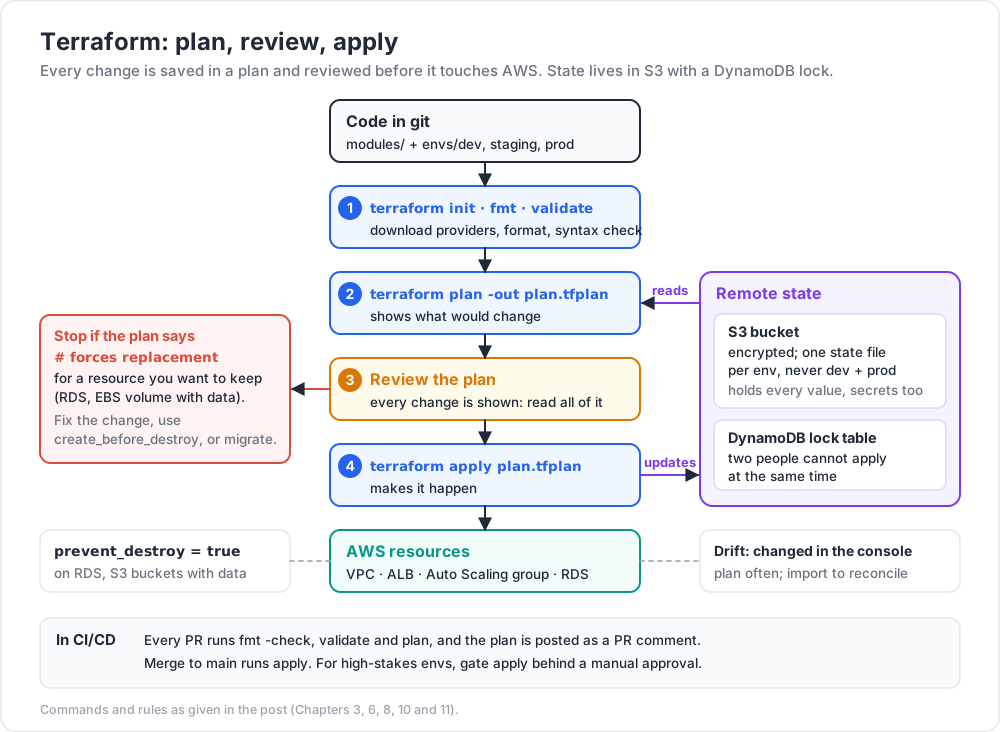
By default Terraform stores state locally in terraform.tfstate. For teams, store it in S3 + a DynamoDB lock table:
1
2
3
4
5
6
7
8
9
10
terraform {
backend "s3" {
bucket = "myorg-tfstate"
key = "prod/network/terraform.tfstate"
region = "us-east-1"
encrypt = true
dynamodb_table = "myorg-tfstate-lock"
}
}
Setup once: create the bucket + lock table by hand (or with a tiny bootstrap Terraform run). Then every subsequent project uses the backend.
Watch out: the state file contains every value — including secrets you passed to resources. Encrypt the bucket, restrict access tightly, and treat state with the same care as a database backup.
Chapter 7 — Project layout
A real Terraform repo for a multi-env workload:
1
2
3
4
5
6
7
8
9
10
11
12
13
14
15
16
infra/
├── modules/
│ ├── vpc/
│ ├── ecs-cluster/
│ ├── lambda/
│ └── rds/
├── envs/
│ ├── dev/
│ │ ├── main.tf # composes modules with dev sizes
│ │ ├── variables.tf
│ │ ├── outputs.tf
│ │ └── backend.tf # state key: dev/terraform.tfstate
│ ├── staging/
│ └── prod/
└── README.md
Each envs/<name> is an independent Terraform root. Same modules, different parameters. Promotions are PRs that change values + module versions.
Chapter 8 — The plan / apply discipline
1
2
3
4
5
6
terraform fmt # canonical formatting
terraform validate # syntax check
terraform plan -out plan.tfplan
# review carefully — every change shown
terraform apply plan.tfplan
Rules everyone in the team should follow:
- Always review the plan before apply. Terraform happily replaces a database if the configuration says so.
- Use
prevent_destroy = trueon stateful resources (RDS, S3 buckets with data). - Workspaces or directories isolate envs — never one state file for dev + prod.
- Lock files (
.terraform.lock.hcl) are committed — pins provider versions. - Pin module + provider versions. Floating versions break builds quietly.
1
2
3
4
lifecycle {
prevent_destroy = true
}
Trick: when you see
# forces replacementin aplanfor a resource you don't want destroyed (an RDS, an EBS volume with data), stop. Either the change is wrong, or you needlifecycle { create_before_destroy = true }, or you need a migration approach. Never just apply through it.
Chapter 9 — Putting it all together: a 3-tier app in Terraform
Compressed example tying Posts 01-04 together:
1
2
3
4
5
6
7
8
9
10
11
12
13
14
15
16
17
18
19
20
21
22
23
24
25
26
27
28
29
30
31
32
33
34
35
36
37
38
39
40
41
42
43
44
45
46
47
48
49
50
51
52
53
module "vpc" {
source = "terraform-aws-modules/vpc/aws"
version = "~> 5.0"
name = "${var.env}-app"
cidr = "10.0.0.0/16"
azs = ["ap-east-1a", "ap-east-1b", "ap-east-1c"]
public_subnets = ["10.0.1.0/24", "10.0.2.0/24", "10.0.3.0/24"]
private_subnets = ["10.0.11.0/24", "10.0.12.0/24", "10.0.13.0/24"]
database_subnets = ["10.0.21.0/24", "10.0.22.0/24", "10.0.23.0/24"]
enable_nat_gateway = true
}
module "alb" {
source = "terraform-aws-modules/alb/aws"
version = "~> 9.0"
name = "${var.env}-alb"
vpc_id = module.vpc.vpc_id
subnets = module.vpc.public_subnets
# ... listeners, target groups ...
}
resource "aws_launch_template" "web" {
name_prefix = "${var.env}-web-"
image_id = data.aws_ami.al2023.id
instance_type = "t3.micro"
vpc_security_group_ids = [aws_security_group.web.id]
iam_instance_profile { name = aws_iam_instance_profile.web.name }
user_data = base64encode(file("${path.module}/user-data.sh"))
}
module "asg" {
source = "terraform-aws-modules/autoscaling/aws"
version = "~> 7.0"
name = "${var.env}-web-asg"
vpc_zone_identifier = module.vpc.private_subnets
min_size = 2
max_size = 6
launch_template_id = aws_launch_template.web.id
target_group_arns = [module.alb.target_group_arns[0]]
}
module "db" {
source = "terraform-aws-modules/rds/aws"
version = "~> 6.0"
identifier = "${var.env}-app-db"
engine = "postgres"
engine_version = "16"
instance_class = "db.t4g.micro"
multi_az = true
db_subnet_group_name = module.vpc.database_subnet_group_name
vpc_security_group_ids = [aws_security_group.db.id]
}
This is ~150 lines for the whole stack. Adding a new region is a directory copy + 2 variable changes.
Chapter 10 — CI/CD for Terraform
A typical pipeline (GitHub Actions / GitLab CI / CodePipeline):
- PR opened with
.tfchanges. - CI runs
terraform fmt -check,terraform validate,terraform plan. - The plan is posted as a PR comment for review.
- On merge to
main, CI runsterraform applyagainst the target env. - Optionally run
tflint,tfsec,checkovfor static security analysis.
Use Atlantis or AWS-managed alternatives like CodePipeline + CodeBuild for centralised Terraform automation.
For high-stakes envs, gate apply behind manual approval in the pipeline. Belt-and-braces: even with a perfect plan, a second pair of eyes catches the case where the plan and the intent diverge.
Chapter 11 — Common Terraform pitfalls
| Pitfall | Fix |
|---|---|
| State file lost or corrupted | use remote backend; backup the bucket |
| Two people apply simultaneously | DynamoDB lock table |
| Drift (resource changed in console) | run terraform plan regularly; terraform import to reconcile |
| Provider version floats and breaks | pin versions in required_providers |
Secrets in .tfvars committed to git |
use SSM / Secrets Manager, fetch via data sources |
| Big monolith refactors | split into modules + per-env directories |
| Resource destroyed accidentally | lifecycle { prevent_destroy = true } on stateful things |
| Drift you can't reconcile | as a last resort, terraform state rm then terraform import to re-attach |
Practice Exercises
Exercise 1 — Hello Terraform
Install Terraform; write a minimal main.tf that creates a single S3 bucket; run init → plan → apply → destroy.
Exercise 2 — Variables + outputs
Parameterise the bucket name with a variable; add an output for the bucket ARN. Use -var="bucket=...".
Exercise 3 — Remote backend
Create an S3 bucket + DynamoDB lock table (by hand or with a tiny bootstrap module). Configure your Exercise 1 module to use the S3 backend. Confirm terraform.tfstate no longer appears locally.
Exercise 4 — VPC module
Use the public terraform-aws-modules/vpc/aws module to recreate the 3-AZ VPC from Post 01. Compare line count vs the CLI walkthrough.
Exercise 5 — Full 3-tier stack
Wire up Chapter 9's example end-to-end. Apply to a fresh AWS account, hit the ALB DNS, confirm responses come from the EC2 instances. Destroy.
Exercise 6 — Pipeline
Push your Terraform repo to GitHub. Add a GitHub Actions workflow that runs terraform fmt + validate + plan on PRs and apply on merge. Bonus: add tflint + tfsec.
Cheat-sheet
| What | How |
|---|---|
| Init | terraform init |
| Plan | terraform plan -out plan.tfplan |
| Apply | terraform apply plan.tfplan |
| Destroy | terraform destroy |
| Format | terraform fmt -recursive |
| Validate | terraform validate |
| Workspace | terraform workspace select staging |
| Variable file | -var-file=prod.tfvars |
| Remote state | S3 bucket + DynamoDB lock table |
| Public modules | terraform-aws-modules/* |
| Prevent destroy | lifecycle { prevent_destroy = true } |
| Replace one resource | terraform apply -replace=aws_instance.web |
| Import existing | terraform import aws_s3_bucket.x bucket-name |
| Tools | tflint, tfsec, checkov for static analysis |
| Alternative | OpenTofu (drop-in OSS fork) |
Course base complete — what's next
This concludes the base AWS course. You've covered:
- Cloud foundations + account setup.
- Network-first design with VPC.
- Compute + storage with EC2 / EBS / S3.
- High availability with ALB + ASG + Multi-AZ.
- Managed data: RDS, Aurora, DynamoDB, ElastiCache.
- Serverless + events: Lambda, API Gateway, SQS, SNS, EventBridge.
- Workflow orchestration: Step Functions + Saga.
- Production-ready observability + security baseline.
- Infrastructure as Code with Terraform.
That covers a sizable fraction of what a working cloud engineer touches week-to-week.
Planned future extensions
| # | Topic | Why it follows |
|---|---|---|
| 09 | Containers — ECS Fargate + EKS basics | modern alternative to EC2 + ASG |
| 10 | Edge — CloudFront, Route 53, ACM | global perf + DNS |
| 11 | CI/CD — CodePipeline, CodeBuild, CodeDeploy, GitHub Actions | release safely |
| 12 | Multi-account — AWS Organizations, SSO, Control Tower, landing zones | enterprise scale |
| 13 | FinOps — Cost Explorer, Budgets, Compute Optimizer, Savings Plans modelling | reduce spend without losing capacity |
| 14 | Data analytics — Glue, Athena, Kinesis, Redshift, OpenSearch | the analytics half of the platform |
| 15 | ML on AWS — SageMaker overview, Bedrock | applied AI |
| 16 | Disaster recovery — backup strategies, RTO/RPO, cross-region failover | survive worst case |
References
- Terraform AWS provider docs
- Terraform AWS modules
- HashiCorp Learn — Terraform tracks
- OpenTofu — the open-source fork.
- Terraform: Up & Running by Yevgeniy Brikman — the canonical book.
- AWS CloudFormation User Guide for comparison.
- AWS CDK Workshop for the CDK perspective.
Note: this post — and this base course — is in progress. Planned additions: full Terraform-only walkthrough of the 3-tier app with screenshots; CDK and CloudFormation versions of the same stack for direct comparison; Atlantis vs Terraform Cloud vs Spacelift overview.