Containers Course — 07 · Ingress, Observability, RBAC and GitOps
The workloads run, they are scheduled sensibly, and they survive a rollout. What remains is everything around them: how external traffic reaches the cluster, how Pods are prevented from talking to each other, how you find out what is wrong at three in the morning, who is allowed to do what, and how manifests get from a Git repository into a cluster without a human running kubectl apply from a laptop. This is the last post of the base course, and it is the one that turns a working cluster into an operable platform.
Series map: 00 Containers from First Principles → 01 Images and Dockerfiles → 02 Networking, Volumes and Compose → 03 Registries, Supply Chain and Security → 04 Kubernetes Architecture and Core Objects → 05 Config, Storage and Stateful Workloads → 06 Scheduling, Resources, Probes and Rollouts → 07 Ingress, Observability, RBAC and GitOps (this post — final base post).
Learning Outcome
- Route external HTTP traffic, terminate TLS, and automate certificates with cert-manager.
- State the current status of the Gateway API and decide whether to start there instead of Ingress.
- Write a default-deny NetworkPolicy, and judge honestly whether a service mesh is worth its cost.
- Assemble the metrics/logs/traces triad on Kubernetes and alert on symptoms rather than causes.
- Debug a broken Pod with describe, previous logs, events and ephemeral debug containers.
- Design least-privilege RBAC, apply Pod Security Admission, and enforce policy with an admission controller.
- Choose between Helm and Kustomize, run delivery with Argo CD or Flux, and control managed-cluster cost.
Chapter 1 — Getting traffic in
Terminology
- Ingress — a built-in API object describing HTTP/HTTPS routing rules (host, path, backend Service, TLS).
- Ingress controller — the component that actually implements those rules. Kubernetes ships the API, not an implementation.
- Gateway API — the newer, role-oriented, extensible routing API that supersedes Ingress. Installed as CRDs, not built in.
- TLS termination — decrypting HTTPS at the edge so backends receive plain HTTP.
- ACME — the protocol (used by Let's Encrypt) for automated certificate issuance.
Ingress
A LoadBalancer Service per application means one cloud load balancer per application, each with its own IP, its own bill and its own certificate. Ingress collapses that into one entry point that routes by hostname and path.
1
2
3
4
5
6
7
8
9
10
11
12
13
14
15
16
17
18
19
20
21
22
apiVersion: networking.k8s.io/v1
kind: Ingress
metadata:
name: shop
namespace: shop
annotations:
cert-manager.io/cluster-issuer: letsencrypt-prod
spec:
ingressClassName: traefik
tls:
- { hosts: [shop.example.com], secretName: shop-tls } # cert-manager fills this in
rules:
- host: shop.example.com
http:
paths:
- path: /api
pathType: Prefix
backend: { service: { name: api, port: { name: http } } }
- path: /
pathType: Prefix
backend: { service: { name: web, port: { name: http } } }
The controller watches Ingress objects and reconfigures its own proxy. Note what the API does not cover: rate limiting, header rewriting, request mirroring, timeouts, retries, authentication. Every controller exposes those through vendor-specific annotations, which is precisely why Ingress manifests are not portable between controllers and why the Gateway API exists.
The ingress controller landscape, as of 2026
This changed materially and you need the current picture. The long-time default, ingress-nginx, was retired in March 2026: maintenance ceased, the repository was archived, and the planned successor project (InGate) was abandoned before reaching maturity. The Kubernetes SIG Network and Security Response Committee guidance is to migrate to the Gateway API or to another actively maintained controller.
| Option | Notes |
|---|---|
| Gateway API with a conformant implementation (Envoy Gateway, Traefik, Istio, Cilium, kgateway, cloud-native gateways) | the recommended direction for new clusters |
| Traefik | actively maintained, supports both Ingress and Gateway API, good developer ergonomics |
| HAProxy / F5 NGINX (commercial) / Envoy-based controllers | maintained Ingress implementations if you must stay on the Ingress API |
| Cloud-native — AWS Load Balancer Controller, GKE Ingress, AGIC | provisions the cloud's own L7 load balancer; least to operate, most vendor-coupled |
| ingress-nginx | retired — running it means running unmaintained, unpatched edge software |
If you are on ingress-nginx today, treat migration as a scheduled project, not an emergency: inventory your annotations first (that is where the work is), then use the ingress2gateway conversion tool as a starting point and review everything it emits.
TLS with cert-manager
cert-manager is a controller that turns a certificate request into a Kubernetes Secret and keeps it renewed.
1
2
3
4
5
6
7
8
9
10
11
12
apiVersion: cert-manager.io/v1
kind: ClusterIssuer
metadata: { name: letsencrypt-prod }
spec:
acme:
server: https://acme-v02.api.letsencrypt.org/directory
email: platform@example.com
privateKeySecretRef: { name: letsencrypt-prod-account-key }
solvers:
- http01: { ingress: { ingressClassName: traefik } }
- dns01: { route53: { region: eu-central-1 } } # required for wildcards
With the cert-manager.io/cluster-issuer annotation on an Ingress, cert-manager notices the tls block, solves the ACME challenge, writes shop-tls, and renews it automatically before expiry.
Common pitfall: developing against
letsencrypt-prodand burning through Let's Encrypt's rate limits in an afternoon. Use the ACME staging endpoint until the whole chain works, then switch. The staging certificate will not validate in a browser — that is the point.
The Gateway API
Gateway API replaces one overloaded object with a set of role-separated ones:
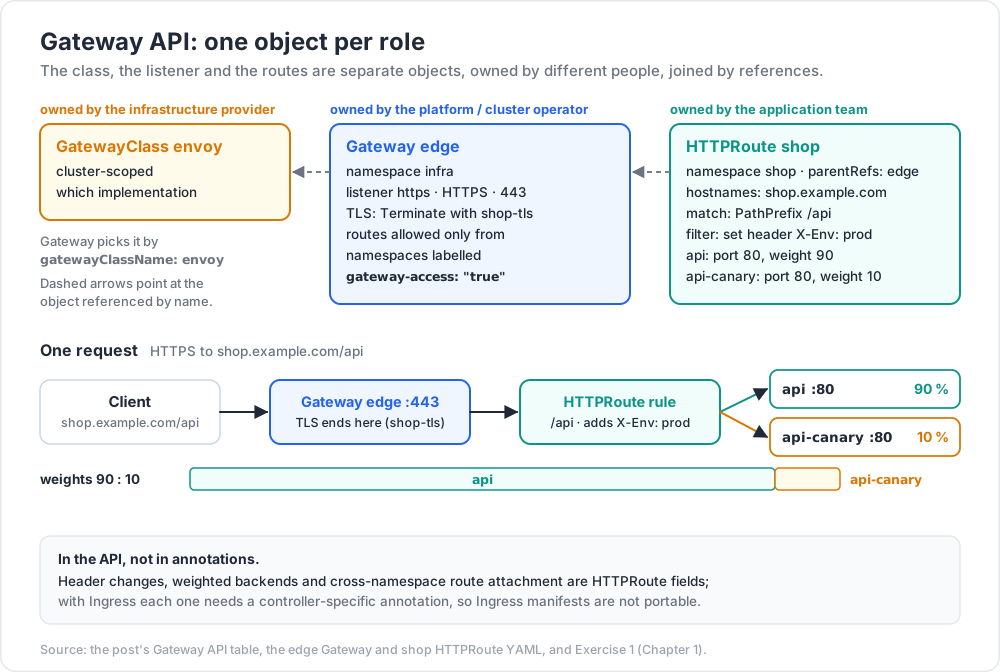
| Resource | Owned by | Purpose |
|---|---|---|
| GatewayClass | infrastructure provider | which implementation, cluster-scoped |
| Gateway | platform / cluster operator | a listener: ports, protocols, TLS, which namespaces may attach |
| HTTPRoute / GRPCRoute / TLSRoute / TCPRoute | application team | the routing rules themselves |
1
2
3
4
5
6
7
8
9
10
11
12
13
14
15
16
17
18
19
20
21
22
23
24
25
26
27
28
29
30
31
32
33
34
35
36
37
38
apiVersion: gateway.networking.k8s.io/v1
kind: Gateway
metadata: { name: edge, namespace: infra }
spec:
gatewayClassName: envoy
listeners:
- name: https
protocol: HTTPS
port: 443
tls: { mode: Terminate, certificateRefs: [{ name: shop-tls, namespace: shop }] } # needs the ReferenceGrant below
allowedRoutes:
namespaces: { from: Selector, selector: { matchLabels: { gateway-access: "true" } } }
---
apiVersion: gateway.networking.k8s.io/v1
kind: HTTPRoute
metadata: { name: shop, namespace: shop }
spec:
parentRefs: [{ name: edge, namespace: infra }]
hostnames: ["shop.example.com"]
rules:
- matches: [{ path: { type: PathPrefix, value: /api } }]
filters:
- { type: RequestHeaderModifier, requestHeaderModifier: { set: [{ name: X-Env, value: prod }] } }
backendRefs:
- { name: api, port: 80, weight: 90 }
- { name: api-canary, port: 80, weight: 10 } # traffic splitting, in the API
---
apiVersion: v1
kind: Namespace
metadata: { name: shop, labels: { gateway-access: "true" } } # matches the listener's allowedRoutes selector
---
apiVersion: gateway.networking.k8s.io/v1
kind: ReferenceGrant # lives in the Secret's namespace; lets Gateways in infra use its Secrets
metadata: { name: allow-infra-gateways, namespace: shop }
spec:
from: [{ group: gateway.networking.k8s.io, kind: Gateway, namespace: infra }]
to: [{ group: "", kind: Secret }]
Current status, stated plainly. Gateway API is a set of CRDs versioned independently of Kubernetes and installed separately. Its Standard (GA) channel has carried GatewayClass, Gateway and HTTPRoute since v1.0 in late 2023, with GRPCRoute following, and v1.5 (early 2026) promoted a further six features from Experimental to Standard. Several conformant implementations exist. The Ingress API remains GA and supported but is feature-frozen — all active development happens in Gateway API. Meanwhile the most widely deployed Ingress controller has been retired.
The practical reading: new clusters should start on the Gateway API; existing Ingress deployments keep working and should be migrated deliberately, prioritising any cluster still running ingress-nginx. Check the conformance report for your chosen implementation rather than assuming a feature is available — extended features are genuinely optional.
Chapter 2 — East-west traffic: CNI, NetworkPolicy and meshes
The CNI model
Kubernetes does not implement Pod networking. It defines a contract — CNI (Container Network Interface) — and requires that every Pod gets its own IP, that any Pod can reach any other Pod without NAT, and that nodes can reach all Pods. A plugin (Calico, Cilium, Flannel, AWS VPC CNI, Azure CNI, Weave) fulfils it, with very different implementations: overlay tunnels (VXLAN, Geneve), native routing (BGP), or cloud-native IP allocation from the VPC.
Two consequences: the default posture is completely flat — every Pod in every namespace can reach every other Pod, on every port — and NetworkPolicy is enforced by the CNI plugin, not by Kubernetes. A NetworkPolicy applied on a cluster whose plugin does not implement it is silently accepted and does nothing at all. Verify enforcement before you rely on it.
Default-deny, then open what is needed
1
2
3
4
5
6
7
8
9
10
11
12
13
14
15
16
17
18
19
20
21
22
23
24
25
26
27
28
29
30
31
32
33
34
35
36
37
38
39
40
41
42
43
44
45
46
# 1. Deny all ingress and egress in the namespace. Applies to every Pod (empty selector).
apiVersion: networking.k8s.io/v1
kind: NetworkPolicy
metadata: { name: default-deny, namespace: shop }
spec:
podSelector: {}
policyTypes: [Ingress, Egress]
---
# 2. Allow DNS egress — without this, everything breaks in a confusing way.
apiVersion: networking.k8s.io/v1
kind: NetworkPolicy
metadata: { name: allow-dns, namespace: shop }
spec:
podSelector: {}
policyTypes: [Egress]
egress:
- to:
- namespaceSelector: { matchLabels: { kubernetes.io/metadata.name: kube-system } }
podSelector: { matchLabels: { k8s-app: kube-dns } }
ports: [{ protocol: UDP, port: 53 }, { protocol: TCP, port: 53 }]
---
# 3. The api Pods may receive traffic from the gateway namespace, and reach Postgres.
apiVersion: networking.k8s.io/v1
kind: NetworkPolicy
metadata: { name: api, namespace: shop }
spec:
podSelector: { matchLabels: { app.kubernetes.io/name: api } }
policyTypes: [Ingress, Egress]
ingress:
- from: [{ namespaceSelector: { matchLabels: { kubernetes.io/metadata.name: infra } } }]
ports: [{ protocol: TCP, port: 8080 }]
egress:
- to: [{ podSelector: { matchLabels: { app: pg } } }]
ports: [{ protocol: TCP, port: 5432 }]
---
# 4. Postgres accepts connections from the api Pods only (default-deny also blocks ingress to pg).
apiVersion: networking.k8s.io/v1
kind: NetworkPolicy
metadata: { name: pg, namespace: shop }
spec:
podSelector: { matchLabels: { app: pg } }
policyTypes: [Ingress]
ingress:
- from: [{ podSelector: { matchLabels: { app.kubernetes.io/name: api } } }]
ports: [{ protocol: TCP, port: 5432 }]
Rules to internalise:
- Policies are additive whitelists. A Pod selected by any policy denies everything not explicitly allowed by some policy that selects it. A Pod selected by no policy allows everything.
podSelector: {}with bothpolicyTypesand no rules is the idiomatic default-deny.- Always allow DNS egress explicitly. Forgetting it is the single most common NetworkPolicy incident: name resolution fails, every outbound call breaks, and the errors point everywhere except the network policy.
- Policies are namespace-scoped and select by label. Cross-namespace rules need
namespaceSelector; the automatickubernetes.io/metadata.namelabel makes that convenient. - Standard NetworkPolicy is L3/L4 only — IPs, ports, protocols. It cannot express "GET but not DELETE" or "only with a valid identity". CNI-specific CRDs (Cilium's
CiliumNetworkPolicy, Calico'sNetworkPolicy) add L7 rules, and the emergingAdminNetworkPolicyAPI adds cluster-wide rules that individual namespaces cannot override.
Trick: roll out default-deny in audit mode first if your CNI supports it, or apply the deny policy to one low-risk namespace and watch the errors. Applying default-deny to a busy production namespace on a Friday is a well-documented way to spend a weekend.
Service mesh, honestly
A service mesh (Istio, Linkerd, Cilium's mesh mode) puts a proxy in the path of every Pod-to-Pod call — historically a sidecar, increasingly a per-node or ambient component. In exchange for that you get automatic mTLS between all workloads, L7 traffic control (retries, timeouts, circuit breaking, canary splitting by header or weight), uniform golden-signal telemetry for every service without touching application code, and identity-based authorisation policy rather than IP-based.
The costs are real and routinely understated: an extra network hop and a few milliseconds on every call; noticeable CPU and memory per Pod for sidecar deployments; a substantial new control plane to upgrade in lockstep with the cluster; failure modes that are genuinely hard to debug because the proxy is now between you and every symptom; and a body of concepts (VirtualService, DestinationRule, PeerAuthentication, or their equivalents) the whole team must learn. Most clusters do not need one. If you have a handful of services, NetworkPolicy plus TLS at the ingress plus a decent HTTP client library covers the same ground for a fraction of the operational cost. Reach for a mesh when you have a real, specific driver — a compliance requirement for encryption in transit everywhere, dozens of teams needing uniform traffic policy, or progressive delivery you cannot express any other way — and when you have someone who will own it. Linkerd is the smaller, simpler option; Istio ambient mode and Cilium remove the per-Pod sidecar cost; a mesh chosen because it was on a conference slide is a liability.
Chapter 3 — Observability
The triad
| Signal | Answers | Typical stack |
|---|---|---|
| Metrics | "is something wrong, and how wrong?" — cheap, aggregatable, alertable | Prometheus, Thanos/Mimir/Cortex, cloud-native metrics |
| Logs | "what exactly happened in this request?" — high detail, high volume | Fluent Bit or Vector → Loki, OpenSearch, or a managed backend |
| Traces | "where did the latency go across N services?" | OpenTelemetry → Jaeger, Tempo, or a vendor |
Metrics tell you that; traces tell you where; logs tell you why. You need all three, in that order of priority for a small team.
Prometheus and kube-state-metrics
The kube-prometheus-stack chart is the conventional starting point. It brings four things that are easy to confuse:
- Prometheus — scrapes and stores time series; discovers targets from the Kubernetes API.
- node-exporter (DaemonSet) — node metrics: CPU, memory, disk, filesystem, network.
- cAdvisor (inside the kubelet) — container resource metrics:
container_cpu_usage_seconds_total,container_memory_working_set_bytes. - kube-state-metrics — object state metrics generated from the API server:
kube_deployment_status_replicas_available,kube_pod_container_status_restarts_total,kube_pod_status_phase. Not resource usage — the declared and observed state of objects.
That last distinction matters constantly: "is the container using too much memory" is cAdvisor; "have the desired replicas been available for ten minutes" is kube-state-metrics. Note also that metrics-server is a separate, minimal component that exists only to serve kubectl top and the HPA — it is not a monitoring system and does not store history.
Alert on symptoms, not causes
The discipline that separates a usable on-call rotation from an ignored one: page on what users experience; make everything else a dashboard or a ticket.
Cause-based alerts ("CPU above 80 %", "a Pod restarted", "disk 70 % full", "replica count below desired") fire constantly, are usually harmless, and train people to ignore the pager. Symptom-based alerts describe a violated expectation:
- Error rate on
shop.example.comexceeded 1 % of requests over 5 minutes. - p99 latency for checkout exceeded 2 s over 10 minutes.
- The nightly export CronJob has not produced a successful Job in 26 hours.
- The service is consuming its error budget fast enough to exhaust the month's allowance in under a day (multi-window, multi-burn-rate SLO alerting).
Useful frameworks: RED (Rate, Errors, Duration) for request-driven services, USE (Utilisation, Saturation, Errors) for resources, and the four golden signals (latency, traffic, errors, saturation). A small number of genuinely paging alerts beats a hundred noisy ones.
A short list of Kubernetes-specific conditions genuinely worth paging on: a Deployment with zero available replicas; CrashLoopBackOff persisting beyond a few minutes; Pods Pending for more than N minutes (capacity); a node NotReady beyond the eviction timeout; PersistentVolume nearly full; certificate expiring within a week; API server error rate or latency elevated.
Logging when Pods are ephemeral
kubectl logs reads from the node's log files for a currently existing Pod. Delete the Pod — as every rollout, eviction and node scale-down does — and the logs are gone. --previous reaches exactly one container generation back, and rotation discards the rest. That is not a logging strategy.
The standard architecture is a node-level agent (Fluent Bit or Vector as a DaemonSet) that tails /var/log/containers/*.log, enriches each line with Kubernetes metadata (namespace, Pod, container, labels) from the API, and ships it to a store — Loki, OpenSearch, or a managed service. Requirements that pay for themselves:
- Log to stdout/stderr as structured JSON. Writing to a file inside the container means the agent never sees it. Unstructured text means you cannot query by field.
- Carry the trace ID in every line. It is what joins the three signals.
- Set retention by value, not by default. Logs are usually the largest line in an observability bill; 7 days hot plus 90 days in cheap object storage is a common shape.
- Do not log secrets or personal data. Once shipped, it is in someone else's index and in their backups.
OpenTelemetry
OpenTelemetry is the vendor-neutral standard for producing and shipping all three signals: one set of APIs and SDKs, one wire protocol (OTLP), and the OpenTelemetry Collector as a pipeline of receivers, processors and exporters. On Kubernetes it is typically deployed twice — as a DaemonSet for node-local collection and enrichment, and as a Deployment (gateway) for aggregation, sampling and fan-out to backends. The OpenTelemetry Operator adds auto-instrumentation by injecting language agents into Pods via an annotation, which gets you traces from a Java, Python, Node or .NET service without editing its code.
The reason to standardise on it is portability: instrument once, and changing backends becomes a Collector configuration change instead of a re-instrumentation project. For a full worked treatment of OpenTelemetry — spans, context propagation, sampling strategy, collector configuration and correlating traces with database telemetry — see content/posts/mongo_26_opentelemetry_observability.md.
Debugging a broken Pod
An ordered toolkit, roughly cheapest first:
1
2
3
4
5
6
7
8
9
kubectl get pod web-6d4f-abcde -o wide # phase, restarts, node, IP
kubectl describe pod web-6d4f-abcde # events: probe failures, image pull,
# scheduling failures, OOMKilled last state
kubectl events --for pod/web-6d4f-abcde -w # events as they happen
kubectl logs web-6d4f-abcde -c web --previous # the container that just crashed ← key
kubectl logs -l app=web --tail=100 --prefix # across all replicas at once
kubectl port-forward pod/web-6d4f-abcde 8080:8080 # probe it directly, bypassing the Service
kubectl get endpointslices -l kubernetes.io/service-name=web # is it in the Service at all?
When the image is distroless or scratch and has no shell — as a hardened image should be (Post 03) — use an ephemeral debug container, GA since Kubernetes 1.25:
1
2
3
4
5
6
7
# Attach a busybox to a running Pod, sharing the target container's namespaces.
kubectl debug -it web-6d4f-abcde --image=busybox:1.36 --target=web
# Copy a crash-looping Pod, swapping the entrypoint so it stays up for inspection.
kubectl debug web-6d4f-abcde -it --copy-to=web-debug --container=web -- sh
# Get a root shell in the host namespaces of a node.
kubectl debug node/ip-10-0-1-23 -it --image=busybox:1.36
Common pitfall: reaching for
kubectl execand finding no shell, then rebuilding the image with a shell "for debugging" and shipping that to production. Ephemeral containers exist precisely so that production images can stay minimal. Ensure your RBAC permitspods/ephemeralcontainersfor the people who need it — and only them.
Chapter 4 — Security: RBAC, Pod Security and admission control
RBAC
Four object types, one simple model.
- Role — a set of permissions, namespaced.
- ClusterRole — the same, but cluster-scoped; also the only way to grant access to cluster-scoped resources (nodes, PVs, CRDs) or to non-resource URLs.
- RoleBinding — grants a Role or a ClusterRole to subjects within one namespace.
- ClusterRoleBinding — grants a ClusterRole across the whole cluster.
Binding a ClusterRole with a RoleBinding is the most useful idiom: define the permission set once, grant it namespace by namespace.
1
2
3
4
5
6
7
8
9
10
11
12
13
14
15
16
17
18
19
20
21
apiVersion: rbac.authorization.k8s.io/v1
kind: Role
metadata: { name: deploy-manager, namespace: shop }
rules:
- apiGroups: ["apps"]
resources: ["deployments", "deployments/scale"] # subresources are separate
verbs: ["get", "list", "watch", "create", "update", "patch"]
- apiGroups: [""]
resources: ["pods", "pods/log"]
verbs: ["get", "list", "watch"]
- apiGroups: [""]
resources: ["secrets"]
verbs: ["get"]
resourceNames: ["shop-tls"] # narrow to named objects where possible
---
apiVersion: rbac.authorization.k8s.io/v1
kind: RoleBinding
metadata: { name: deploy-manager, namespace: shop }
subjects: [{ kind: Group, name: shop-developers, apiGroup: rbac.authorization.k8s.io }]
roleRef: { kind: Role, name: deploy-manager, apiGroup: rbac.authorization.k8s.io }
Verbs: get, list, watch, create, update, patch, delete, deletecollection, plus impersonate, bind and escalate. RBAC is purely additive — there is no deny rule. If you need denial, that is admission control's job.
Three permissions deserve special caution, because each is effectively cluster-admin in disguise: create pods in a namespace whose ServiceAccounts are privileged (you can mount any Secret and run as any identity); escalate or bind on roles (you can grant yourself more); and get secrets at cluster scope (you can read every credential in the cluster).
ServiceAccounts and their tokens
Every Pod runs as a ServiceAccount — default in its namespace unless told otherwise, and default should have no permissions at all. Give each workload its own:
1
2
3
4
spec:
serviceAccountName: api
automountServiceAccountToken: false # if the workload never calls the API, do not mount one
Token handling changed and the modern behaviour matters. Since Kubernetes 1.24, creating a ServiceAccount no longer auto-creates a non-expiring Secret token. Pods receive a projected, time-bound, audience-scoped token that the kubelet rotates automatically. For an out-of-cluster consumer, mint one explicitly with kubectl create token api --duration=1h rather than creating a long-lived Secret. Long-lived static tokens are exactly the credential that ends up in a CI variable and never gets rotated.
On managed clusters, bind ServiceAccounts to cloud identity (IRSA on EKS, Workload Identity on GKE and AKS) so Pods obtain short-lived cloud credentials without any stored secret.
The least-privilege audit
A concrete, repeatable procedure:
1
2
3
4
5
6
7
8
9
10
11
12
kubectl auth can-i --list # as me
kubectl auth can-i --list --as=system:serviceaccount:shop:api # as a workload
kubectl auth can-i delete pods --as=jane -n shop
kubectl get clusterrolebindings -o json \
| jq -r '.items[] | select(.roleRef.name=="cluster-admin")
| "\(.metadata.name): \([.subjects[]?.name] | join(", "))"' # who is admin
kubectl get roles,clusterroles -A -o json \
| jq -r '.items[] | select(.rules[]? | (.verbs[]?=="*") or (.resources[]?=="*"))
| "\(.kind)/\(.metadata.name)"' # wildcards
Then: remove every wildcard you cannot justify, replace human cluster-admin with time-bound elevation, delete unused bindings, and re-run quarterly. Tools such as rbac-tool, kubectl-who-can and krane automate the reporting.
Pod Security Admission
PodSecurityPolicy was deprecated in 1.21 and removed in Kubernetes 1.25. Its replacement, Pod Security Admission, is a built-in admission controller — stable since 1.25 — configured with namespace labels rather than cluster-wide policy objects.
Three levels: privileged (no restrictions), baseline (blocks known privilege escalations: host namespaces, privileged containers, most host paths), and restricted (baseline plus hardening: run as non-root, drop all capabilities, seccomp RuntimeDefault, no privilege escalation, restricted volume types). Three modes: enforce (reject), audit (record in the audit log), warn (return a warning to the client).
1
2
3
4
5
6
7
8
9
10
apiVersion: v1
kind: Namespace
metadata:
name: shop
labels:
pod-security.kubernetes.io/enforce: baseline
pod-security.kubernetes.io/enforce-version: v1.33
pod-security.kubernetes.io/audit: restricted # see what would break
pod-security.kubernetes.io/warn: restricted # tell authors now
The migration path is exactly that shape: enforce baseline, audit and warn on restricted, fix what the warnings reveal, then raise enforcement. Pin enforce-version so a cluster upgrade cannot tighten policy underneath you unannounced.
PSA is deliberately limited — it checks Pod security context fields and nothing else. It cannot say "images must come from our registry" or "every Deployment must set resource requests". That needs a policy engine.
Admission control and policy engines
Every request to the API server passes through authentication, then authorisation (RBAC), then admission: first mutating admission (which can modify the object — inject sidecars, set defaults), then schema validation of the mutated object, then validating admission (which can only accept or reject), then persistence.
You extend it three ways:
- MutatingAdmissionWebhook — an HTTPS service you run that patches objects. Powerful, and a liability: if it is down and
failurePolicy: Fail, the API server rejects the requests it intercepts. Always scope webhooks narrowly withnamespaceSelectorandobjectSelector, and excludekube-system. - ValidatingAdmissionPolicy — in-tree validation expressed in CEL, evaluated by the API server itself, GA since 1.30. No webhook to run or fail. The right first choice for simple rules.
- Policy engines — Kyverno (policies are Kubernetes resources written in YAML; validate, mutate, generate and verify image signatures; a gentle learning curve) or OPA Gatekeeper (constraint templates written in Rego; more expressive, steeper curve, shared with non-Kubernetes OPA deployments).
1
2
3
4
5
6
7
8
9
10
11
12
13
14
15
16
# Kyverno: every Pod must declare resource requests (Post 06 explains why).
apiVersion: kyverno.io/v1
kind: ClusterPolicy
metadata: { name: require-requests }
spec:
validationFailureAction: Audit # start here; move to Enforce once clean
rules:
- name: check-requests
match: { any: [{ resources: { kinds: [Pod] } }] }
validate:
message: "CPU and memory requests are required."
pattern:
spec:
containers:
- resources: { requests: { cpu: "?*", memory: "?*" } }
Policies worth having early: require resource requests; require images from an approved registry and by digest (Post 03); forbid latest tags; require runAsNonRoot; require ownership and cost-centre labels; forbid hostNetwork and hostPath outside named namespaces. Run everything in Audit mode first — enforcing a policy that most existing workloads violate blocks deploys immediately.
Chapter 5 — Packaging and delivery
Helm
Helm is a package manager: a chart is a directory of Go-templated manifests plus a values.yaml of defaults; installing it produces a release whose state Helm stores in a Secret in the cluster.
1
2
3
4
5
6
7
helm repo add bitnami https://charts.bitnami.com/bitnami
helm install shop ./charts/shop -n shop --values values-prod.yaml
helm upgrade shop ./charts/shop -n shop --values values-prod.yaml --atomic --timeout 5m
helm template shop ./charts/shop --values values-prod.yaml # render locally, no cluster
helm diff upgrade shop ./charts/shop # via the helm-diff plugin
helm rollback shop 3
Helm's strengths are real: one command installs a complex third-party system, versioned and parameterised; conditionals and loops express genuine variation; the ecosystem of charts is enormous.
The sharp edges are equally real and worth stating before you commit:
- It is text templating over YAML. Indentation is your problem;
nindentandtoYamlare load-bearing; a template that produces valid text can produce invalid YAML. Error messages point at rendered lines you never wrote. - Charts become unreadable. A generic chart with forty conditionals serving five environments is harder to reason about than five explicit manifests.
- Release state lives in the cluster, not in Git. Two operators, two laptops, two versions of the chart, and the state is whatever the last
helm upgradewrote. --atomicis not optional. Without it a failed upgrade leaves the release half-applied. Also set--timeoutdeliberately.- CRDs in
crds/are installed but never upgraded or deleted by Helm. Chart upgrades that change a CRD require manual work; this surprises everyone once. - Values sprawl. Deeply nested values files across environments drift, and nothing type-checks them. Schema-validate with
values.schema.json.
Kustomize
Kustomize takes the opposite approach: no templating language, only overlays that patch plain YAML. It is built into kubectl (kubectl apply -k).
1
2
3
4
k8s/base/{kustomization.yaml, deployment.yaml, service.yaml}
k8s/overlays/staging/{kustomization.yaml, replicas-patch.yaml}
k8s/overlays/prod/{kustomization.yaml, resources-patch.yaml, hpa.yaml}
1
2
3
4
5
6
7
8
9
10
11
12
13
# overlays/prod/kustomization.yaml
apiVersion: kustomize.config.k8s.io/v1beta1
kind: Kustomization
namespace: shop
resources: [../../base, hpa.yaml]
commonLabels: { environment: prod }
images: [{ name: ghcr.io/example/web, newTag: 1.4.3 }]
replicas: [{ name: web, count: 6 }]
configMapGenerator: # generates a name with a content hash →
- { name: web-config, files: [app.yaml] } # config change rolls the Deployment
patches:
- { path: resources-patch.yaml, target: { kind: Deployment, name: web } }
Every file is valid Kubernetes YAML that your editor, linter and kubectl explain all understand. The configMapGenerator hash-suffix behaviour implements the rollout-on-config-change pattern from Post 05 for free. The limits: no conditionals or loops, so genuinely divergent environments mean duplication; deep patch hierarchies get hard to follow; and it does not package or distribute anything.
| Helm | Kustomize | |
|---|---|---|
| Mechanism | Go templating + values | patch plain YAML |
| Best at | distributing third-party software, wide parameterisation | your own manifests across a few environments |
| Readability | rendered output differs from source | source is the output |
| Distribution | repositories, versioned charts, OCI registries | Git directories |
| State | release history in-cluster | none — the output is applied |
| Common practice | use Helm for other people's software, Kustomize for your own (or Kustomize's helmCharts field for both) |
GitOps
GitOps inverts the direction of deployment. Instead of CI pushing to the cluster with credentials, an agent inside the cluster pulls the desired state from Git and reconciles continuously. Git is the source of truth; the cluster converges on it.
Argo CD models this with an Application CRD, a strong UI, sync waves and hooks for ordering, and an "app of apps" pattern for managing many. Flux is a set of focused controllers (source, kustomize, helm, image automation, notification) driven entirely by CRDs, with no UI of its own. Both do the same job well; Argo CD suits teams who want the dashboard, Flux suits teams who want everything in the API.
1
2
3
4
5
6
7
8
9
10
11
12
13
14
apiVersion: argoproj.io/v1alpha1
kind: Application
metadata: { name: shop, namespace: argocd }
spec:
project: default
source:
repoURL: https://github.com/example/platform.git
targetRevision: main
path: k8s/overlays/prod
destination: { server: https://kubernetes.default.svc, namespace: shop }
syncPolicy:
automated: { prune: true, selfHeal: true } # delete removed objects; revert drift
syncOptions: [CreateNamespace=true]
What you actually gain:
- Drift detection and correction.
selfHealmeans a manualkubectl editis reverted within seconds. The cluster cannot silently diverge from the repository. - The audit trail is the Git history. Who changed what, when, reviewed by whom, and how to revert — for free, in a system everyone already knows.
- Rollback is
git revert. No special tooling, no remembering which Helm revision was good. - Disaster recovery becomes re-pointing an agent at the repository rather than reconstructing state from memory.
And the consequence that matters most: human access to the cluster should shrink once GitOps is in place. If every change arrives through a reviewed pull request, engineers do not need apply, edit or delete in production. Reduce them to read plus logs, port-forward and exec where justified, with break-glass elevation that is time-bound and alerted on. This is the point at which the RBAC work in Chapter 4 becomes genuinely easy — most people simply do not need write access any more.
Two caveats worth planning for: secrets still cannot be committed in plaintext, so pair GitOps with Sealed Secrets, SOPS, or the External Secrets Operator (Post 05); and image tags in Git must be updated by something — a CI step that commits the new tag, or an image-automation controller — otherwise "GitOps" quietly becomes "someone edits the tag by hand".
Chapter 6 — Managed Kubernetes and cost control
The managed offerings
EKS (AWS), GKE (Google) and AKS (Azure) all run and upgrade the control plane, manage etcd and its backups, and integrate with the cloud's IAM, load balancers and storage. What differs is the amount of remaining work: GKE Autopilot removes node management almost entirely; EKS gives you the most control and the most assembly; AKS sits between them. All charge for the control plane on a per-cluster-hour basis (with a free tier on some), and all charge normally for the worker nodes, load balancers, storage and data transfer — which is where the money actually goes. Check current pricing pages rather than trusting any figure quoted in a blog post, including this one.
The genuinely important decisions are the same everywhere: how many clusters (each has a control-plane cost and an operational cost — resist one per team until you have a reason), what your upgrade cadence is (Kubernetes releases roughly three times a year and support windows are finite), and whether your workloads can tolerate the node churn that spot instances and consolidation require.
Where the money goes, and what to do about it
| Lever | Action | Typical effect |
|---|---|---|
| Over-requested resources | right-size from measured usage (Post 06) | usually the single largest win; requests are often multiples of real usage |
| Idle nodes | Cluster Autoscaler scale-down or Karpenter consolidation | reclaims capacity nobody is using |
| On-demand everything | spot/preemptible for stateless and batch, with PDBs and graceful shutdown | large discount, in exchange for interruption handling |
| Oversized instance types | let Karpenter choose per workload rather than one node group for all | better bin-packing |
| Cross-AZ traffic | topology-aware routing; keep chatty pairs in one zone | inter-zone transfer is metered and adds up quietly |
| Orphaned resources | audit unbound PVCs, unused LoadBalancers, old snapshots, dangling images | recurring, always finds something |
| Logs and metrics | retention tiers; drop high-cardinality labels | observability bills can rival compute |
| Cluster count | consolidate with namespaces + RBAC + quotas instead of new clusters | removes whole control planes |
Make it visible and enforceable: OpenCost or Kubecost attribute spend to namespaces, labels and teams; a ResourceQuota and LimitRange per namespace stop one team consuming the cluster; and mandatory cost-centre labels (enforced by the Kyverno policy in Chapter 4) are what makes attribution possible at all. A monthly review of the top ten namespaces by cost against their requests-versus-usage ratio takes half an hour and consistently pays for itself.
Practice Exercises
Exercise 1 — Ingress or Gateway, end to end
On a local cluster, install a Gateway API implementation and expose two services on one hostname — /api to one, / to another — with TLS from a self-signed issuer. Then express the same routing as an Ingress and list every difference, including which features required controller-specific annotations.
Solution
1
2
3
4
5
6
7
8
9
10
kubectl apply -f https://github.com/kubernetes-sigs/gateway-api/releases/latest/download/standard-install.yaml
helm install traefik traefik/traefik -n infra --create-namespace \
--set providers.kubernetesGateway.enabled=true
kubectl apply -f gateway.yaml -f httproute.yaml
kubectl describe httproute shop -n shop # check the Accepted / ResolvedRefs conditions
# Differences to record: header manipulation, weighted backends and cross-namespace
# route attachment are first-class HTTPRoute fields but controller-specific
# annotations in Ingress — which is why Ingress manifests are not portable.
Exercise 2 — Default-deny without breaking DNS
Apply a default-deny NetworkPolicy to a namespace running a two-tier app. Confirm everything breaks. Then restore it with exactly three policies: DNS egress, frontend→backend, backend→database. Verify with a debug Pod that nothing else is reachable.
Solution
1
2
3
4
5
6
7
8
9
kubectl apply -f default-deny.yaml
kubectl exec -it deploy/frontend -- wget -qO- http://backend:8080 # hangs / fails
kubectl exec -it deploy/frontend -- nslookup backend # fails first — DNS
kubectl apply -f allow-dns.yaml -f allow-frontend-backend.yaml -f allow-backend-db.yaml
kubectl exec -it deploy/frontend -- wget -qO- http://backend:8080 # works
kubectl run probe --rm -it --image=busybox:1.36 -n other -- \
wget -qO- --timeout=3 http://backend.shop:8080 # still blocked
Exercise 3 — Audit and shrink RBAC
For your own cluster: list every subject bound to cluster-admin, every Role using a wildcard verb or resource, and every ServiceAccount that can read Secrets cluster-wide. Then write a replacement Role for one over-privileged workload and verify with kubectl auth can-i --list --as=....
Solution
1
2
3
4
5
6
7
8
9
10
kubectl get clusterrolebindings -o json \
| jq -r '.items[] | select(.roleRef.name=="cluster-admin") | .metadata.name'
kubectl get roles,clusterroles -A -o json \
| jq -r '.items[] | select(.rules[]? | (.verbs[]?=="*") or (.resources[]?=="*")) | .metadata.name'
kubectl auth can-i --list --as=system:serviceaccount:shop:api # before
kubectl apply -f role-api-minimal.yaml
kubectl auth can-i --list --as=system:serviceaccount:shop:api # after
kubectl auth can-i get secrets --as=system:serviceaccount:shop:api -n shop # expect: no
Exercise 4 — Debug a shell-less Pod
Build a distroless image with no shell that fails a readiness probe. Diagnose it end to end using only describe, events, logs --previous, an ephemeral debug container and port-forward. Write down which step actually revealed the cause.
Exercise 5 — Policy in audit, then enforce
Install Kyverno. Write a policy requiring CPU and memory requests on every Pod, in Audit mode. Count the violations in your cluster. Fix them, switch to Enforce, and confirm a non-compliant Pod is now rejected with a readable message.
Exercise 6 — Helm and Kustomize, same result
Package one application twice: once as a Helm chart with staging and prod values, once as a Kustomize base with two overlays. Render both with helm template and kubectl kustomize, diff the outputs, and argue which you would choose here and why.
Exercise 7 — GitOps with self-heal
Install Argo CD, point an Application at your Kustomize overlay with prune and selfHeal enabled, and confirm it syncs. Then kubectl scale the Deployment by hand and time how long the change survives. Finally, git revert a change and confirm the cluster follows.
Cheat-sheet
| What | How |
|---|---|
| One entry point, many services | Ingress or Gateway API — not a LoadBalancer Service per app |
| ingress-nginx | retired March 2026 — migrate to Gateway API or a maintained controller |
| Gateway API status | separately installed CRDs; core resources GA, v1.5 promoted more to Standard; Ingress frozen — start new clusters here |
| Automatic TLS | cert-manager + ClusterIssuer; use the ACME staging endpoint while developing |
| Pod networking | CNI plugin, flat by default — NetworkPolicy is enforced by the plugin, not by Kubernetes |
| Default deny | podSelector: {} + both policyTypes, then whitelist — always allow DNS egress; L3/L4 only |
| Service mesh | real benefits, real cost — most clusters do not need one; require a specific driver and an owner |
| Metrics stack | Prometheus + node-exporter (nodes) + cAdvisor (containers) + kube-state-metrics (object state); metrics-server is only for kubectl top and the HPA |
| Alerting | page on symptoms (error rate, latency, missing output), dashboard the causes |
| Logs | ship with a node agent; kubectl logs dies with the Pod; log structured JSON with a trace ID |
| Traces | OpenTelemetry SDK + Collector (DaemonSet + gateway); instrument once, swap backends |
| First debug moves | describe → events → logs --previous → kubectl debug ephemeral container |
| RBAC model | Role/ClusterRole + RoleBinding/ClusterRoleBinding; additive only, no deny |
| Dangerous grants | cluster-wide get secrets, escalate/bind, create pods in a privileged namespace |
| ServiceAccount tokens | projected, short-lived, auto-rotated since 1.24; kubectl create token for external use |
| Pod hardening | Pod Security Admission (PSP removed in 1.25): enforce baseline, audit/warn restricted |
| Custom policy | ValidatingAdmissionPolicy (CEL, in-tree) or Kyverno / OPA Gatekeeper — start in Audit |
| Packaging | Helm for other people's software, Kustomize for your own; --atomic on every helm upgrade |
| Delivery | GitOps (Argo CD or Flux): pull, reconcile, selfHeal, prune — and shrink human cluster access |
| Cost control | right-size requests first, then consolidation, spot, cross-AZ traffic and log retention |
Course base complete — what's next
That is the base course. Across eight posts you have gone from a process isolated by namespaces and cgroups on a single host to a multi-node platform with declarative delivery: 00-03 covered what a container actually is, how images are built and layered, networking and volumes and Compose, and image supply-chain security; 04 the reconciliation model, cluster components, Pods, Deployments, Services and DNS; 05 configuration and secrets, the storage stack from Volume to CSI, StatefulSets, DaemonSets, Jobs and CronJobs; 06 scheduling and placement, requests versus limits, QoS and eviction, probes, rollouts, disruption budgets, graceful shutdown and autoscaling; and 07 ingress and the Gateway API, NetworkPolicy, observability, RBAC and admission control, Helm and Kustomize, GitOps and cost.
That is enough to run production services on Kubernetes competently and to read the documentation for anything not covered here without getting lost. The most valuable next step is not another post — it is to operate something real, break it in a non-production cluster on purpose, and practise the failure drills in the exercises until they are boring.
Planned future posts (extensions):
- 08 — Writing a Kubernetes operator — CustomResourceDefinitions, the controller-runtime library, reconciler design, status conditions, finalizers, testing with envtest, and when a CRD is the wrong answer.
- 09 — CI/CD pipelines end to end — build, scan, sign, push, promote across environments, image automation, progressive delivery with Argo Rollouts or Flagger.
- 10 — Multi-tenancy and platform engineering — namespaces versus clusters, quotas and limit ranges, hierarchical namespaces, vCluster, golden paths, and building an internal developer platform (Backstage, Crossplane).
- 11 — Service mesh deep dive — Istio (sidecar and ambient), Linkerd and Cilium mesh compared on identity, traffic policy, telemetry and operational cost.
- 12 — Cluster cost engineering and FinOps — OpenCost and Kubecost, showback and chargeback, spot strategies, bin-packing, and measured before/after case studies.
- 13 — EKS in production — VPC CNI and IP exhaustion, IRSA and Pod Identity, node groups versus Karpenter, add-on lifecycle and upgrades, cross-linking the existing AWS series (
aws_01_network_first_vpc.md,aws_03_scale_survive.md,aws_07_observability_security.md,aws_08_terraform_iac.md). - 14 — Stateful data on Kubernetes, deep — CloudNativePG, Strimzi and Vitess in practice; backup, point-in-time recovery, failover drills and storage performance measurement.
- 15 — Disaster recovery, upgrades and cluster lifecycle — etcd backup and restore, version skew policy, blue/green cluster upgrades, Velero, and running a real DR exercise.
References
- Ingress · Ingress controllers · Gateway API
- Gateway API v1.5: Moving features to Stable · Ingress NGINX: statement from the Steering and Security Response Committees · Announcing ingress2gateway 1.0
- cert-manager · Network Policies · Cilium · Calico
- Prometheus · kube-state-metrics · OpenTelemetry · Google SRE Book — Alerting on SLOs
- RBAC · ServiceAccounts · Pod Security Admission · Admission controllers
- Helm · Kustomize · Argo CD · Flux · Kyverno · OPA Gatekeeper · OpenCost
content/posts/mongo_26_opentelemetry_observability.md— OpenTelemetry instrumentation and trace correlation in depth.
Note: this post — and this base course — is in progress. Planned additions: a full Gateway API migration walkthrough from a real ingress-nginx configuration; a Kyverno policy pack covering the Post 03 supply-chain controls; an Argo CD app-of-apps reference repository; a measured cost case study before and after right-sizing.