Containers Course — 05 · Config, Storage and Stateful Workloads
Post 04 built the stateless half of Kubernetes: a Deployment of identical, interchangeable, disposable Pods behind a Service. Real systems are not that. They need configuration that differs per environment, credentials that must not leak, disks that survive a Pod being rescheduled onto another node, members with stable names that peer with each other, and batch work that runs once and stops. This post covers all of it — and closes with the question everyone eventually asks: should the database be in the cluster at all?
Series map: 00 Containers from First Principles → 01 Images and Dockerfiles → 02 Networking, Volumes and Compose → 03 Registries, Supply Chain and Security → 04 Kubernetes Architecture and Core Objects → 05 Config, Storage and Stateful Workloads (this post) → 06 Scheduling, Resources, Probes and Rollouts → 07 Ingress, Observability, RBAC and GitOps.
Learning Outcome
- Inject configuration as environment variables or mounted files, and predict exactly which of the two updates without a restart.
- State precisely what a Kubernetes Secret does and does not protect, and choose between encryption at rest, an external secret manager, and the Secrets Store CSI driver.
- Force a deliberate rollout when configuration changes, using immutable objects plus a checksum annotation.
- Distinguish Volume, PersistentVolume, PersistentVolumeClaim and StorageClass, and choose access modes, reclaim policies and binding modes correctly.
- Deploy a StatefulSet with stable identity and per-Pod storage, and explain what happens to its PVCs when it is deleted.
- Use DaemonSets, Jobs and CronJobs, including the concurrency and missed-schedule traps.
- Decide, with reasons, whether a given database belongs on Kubernetes.
Chapter 1 — ConfigMaps and Secrets
Terminology
- ConfigMap — a namespaced API object holding non-confidential key/value data, consumed by Pods as environment variables, command-line arguments, or files.
- Projection — the act of a kubelet rendering a ConfigMap or Secret into a Pod's filesystem.
- Hot reload — the application noticing a configuration change without being restarted.
- Immutable object — a ConfigMap or Secret marked
immutable: true, which can never be updated, only replaced.
1
2
3
4
5
6
7
8
9
10
11
12
13
14
apiVersion: v1
kind: ConfigMap
metadata:
name: web-config
namespace: shop
data:
LOG_LEVEL: "info"
FEATURE_CHECKOUT_V2: "true"
app.yaml: |
server:
timeout: 30s
cache:
ttl: 300
Two ways to consume it, with very different behaviour
1
2
3
4
5
6
7
8
9
10
11
12
13
14
15
16
17
18
19
spec:
containers:
- name: web
image: ghcr.io/example/web:1.4.2
env:
- name: LOG_LEVEL # one key
valueFrom:
configMapKeyRef: { name: web-config, key: LOG_LEVEL }
envFrom:
- configMapRef: { name: web-config } # every key as an env var
volumeMounts:
- { name: config, mountPath: /etc/app } # every key as a file
volumes:
- name: config
configMap:
name: web-config
items:
- { key: app.yaml, path: app.yaml } # project only what you need
The difference is the single most useful fact in this chapter:
| Consumption | Updates when the ConfigMap changes? |
|---|---|
env / envFrom |
No. Environment variables are set once at container start. Editing the ConfigMap changes nothing until the Pod is recreated. |
| Volume mount | Yes, eventually — the kubelet re-projects the files in place. |
Volume mount with subPath |
No. A subPath mount is resolved once and never refreshed. |
The propagation delay
Mounted files do not update instantly. The kubelet refreshes projected volumes on its periodic sync, using a locally cached copy of the object. The worst-case delay is therefore roughly the kubelet sync period (--sync-frequency, default 1 minute) plus the ConfigMap/Secret cache propagation delay (watch-based by default; the TTL-based strategy defaults to another minute). In practice, budget for changes appearing within about two minutes, not immediately.
Three further caveats:
- Updates are atomic per volume. The kubelet writes a new timestamped directory and swings a symlink, so an application never reads a half-updated set of files. Watch the directory, not the file inode — many file watchers miss the symlink swap.
- The application still has to do something. A file changing on disk is not a reload; something must re-read it. Either implement a watcher, or accept a restart.
subPathis the classic trap. It is used to drop a single file into a directory that already has other content (/etc/nginx/conf.d/app.conf), and it silently opts you out of updates entirely.
Common pitfall: "I edited the ConfigMap and nothing happened." Check which of the three consumption forms you used. If it is
envorsubPath, nothing will happen. Roll the Deployment.
Secrets, and what they actually protect
A Secret looks exactly like a ConfigMap with a different kind and a stringData convenience field.
1
2
3
4
5
6
7
apiVersion: v1
kind: Secret
metadata: { name: db-credentials, namespace: shop }
type: Opaque
stringData: # written as plain text, stored base64-encoded
DB_PASSWORD: "s3cr3t-do-not-commit"
The blunt truth
A Secret is base64-encoded, not encrypted. Base64 is an encoding, not a cipher; kubectl get secret db-credentials -o jsonpath='{.data.DB_PASSWORD}' | base64 -d prints the password, and anyone with get secrets permission in that namespace can do it. By default the value also sits in etcd in plain text, which means an etcd backup, a stolen disk snapshot, or a compromised control-plane node exposes it.
What a Secret actually buys you over a ConfigMap:
- It is a distinct resource kind, so RBAC can be written against it separately (Post 07). This is the real benefit.
- Its values are not printed by
kubectl describe. - The kubelet stores projected Secret volumes in
tmpfs, so they do not touch the node's disk. - It is only distributed to nodes running a Pod that requests it.
What it does not buy you: encryption, audit of reads by the application, rotation, or safety from anyone who can exec into the Pod.
Making Secrets meaningfully secret
| Layer | Mechanism | What it fixes |
|---|---|---|
| Encryption at rest | API server EncryptionConfiguration with aescbc/secretbox, or a KMS provider (AWS KMS, GCP KMS, Vault) |
plaintext in etcd and in etcd backups |
| Least privilege | RBAC: no wildcard get secrets; separate namespaces per team |
who can read them |
| External store | External Secrets Operator or Vault Agent injector — the truth lives in AWS Secrets Manager / Vault / GCP Secret Manager and is synced or injected | rotation, central audit, no secret in Git |
| Direct mount | Secrets Store CSI driver — mounts secrets from an external store into the Pod as files, optionally syncing a Kubernetes Secret | the secret never needs to exist as a Kubernetes object at all |
| Git safety | Sealed Secrets (encrypt with a cluster public key, commit the ciphertext) or SOPS + age | committing manifests to a repository (Post 07) |
On managed Kubernetes, prefer workload identity over any stored credential: EKS IAM Roles for Service Accounts, GKE Workload Identity, AKS Workload Identity all let a Pod obtain short-lived cloud credentials from its ServiceAccount token. A secret that is never issued cannot leak.
Watch out: enabling encryption at rest does not retroactively encrypt existing Secrets. After changing the
EncryptionConfiguration, rewrite every Secret (kubectl get secrets -A -o json | kubectl replace -f -) so they are re-persisted through the new provider.
Chapter 2 — Forcing a rollout when configuration changes
Because env-injected values do not hot-reload, and because most applications cannot reload files anyway, the honest default is: treat a configuration change as a deployment. Two patterns make that reliable.
Immutable ConfigMaps and Secrets
Set immutable: true (stable since Kubernetes 1.21). The object can then never be edited — only deleted and recreated under a new name. This removes an entire class of "someone edited the live ConfigMap and half the fleet is now on different config", and it also lets the kubelet stop watching the object, which measurably reduces API server load on large clusters.
1
2
3
4
5
6
7
apiVersion: v1
kind: ConfigMap
metadata: { name: web-config-7f3a91c } # name carries a content hash
immutable: true
data:
LOG_LEVEL: "info"
Kustomize's configMapGenerator and Helm both have idioms for hash-suffixed names; a new hash produces a new object name, the Deployment template references the new name, and the template change triggers a rollout automatically.
The checksum annotation
When the ConfigMap name is fixed, put a hash of its content in the Pod template annotations. Changing an annotation on the template changes the template, which is exactly what makes the Deployment controller create a new ReplicaSet.
1
2
3
4
5
6
spec:
template:
metadata:
annotations:
checksum/config: "{{ include (print $.Template.BasePath \"/configmap.yaml\") . | sha256sum }}"
Outside Helm, compute it in CI:
1
2
3
CFG_HASH=$(kubectl create configmap web-config --from-file=./config --dry-run=client -o yaml | sha256sum | cut -c1-16)
yq -i ".spec.template.metadata.annotations.\"checksum/config\" = \"$CFG_HASH\"" k8s/web-deployment.yaml
Trick: annotate the Pod template, not the Deployment's own
metadata.annotations. An annotation on the Deployment object changes nothing about the Pods and triggers no rollout. This is a very common and very confusing mistake.
Chapter 3 — Storage
Terminology
- Volume — a directory available to the containers in a Pod, with a lifetime tied to the Pod.
emptyDiris scratch space that vanishes with the Pod;configMap,secret,downwardAPIandprojectedare read-only data sources. - PersistentVolume (PV) — a cluster-scoped object representing a real piece of storage (an EBS volume, a Ceph RBD image, an NFS export).
- PersistentVolumeClaim (PVC) — a namespaced request for storage: size, access mode, class. Pods reference PVCs, never PVs.
- StorageClass — a named recipe describing how to provision a PV on demand: which provisioner, which parameters, which reclaim and binding policy.
- CSI (Container Storage Interface) — the standard gRPC contract between Kubernetes and a storage vendor's driver.
The indirection exists so that a workload author can ask for "20 GiB, fast, exclusive" without knowing whether the cluster runs on AWS, on-prem Ceph, or a laptop.
1
2
3
4
5
Pod ──uses──► PVC ──bound to──► PV ──backed by──► real disk
│ ▲
└──requests a────►│ dynamically provisioned by
StorageClass ──┘ the CSI driver
Static versus dynamic provisioning
Static: an administrator creates PVs by hand and users claim them. Necessary for pre-existing storage (an NFS export, a restored snapshot). Dynamic: the user creates a PVC naming a StorageClass, and the CSI driver provisions a matching PV automatically. Dynamic is the default in every managed cloud and is what you should use unless you have a specific reason not to.
1
2
3
4
5
6
7
8
9
10
11
12
13
14
15
16
17
18
19
20
apiVersion: storage.k8s.io/v1
kind: StorageClass
metadata: { name: fast-ssd }
provisioner: ebs.csi.aws.com
parameters:
type: gp3
iops: "6000"
encrypted: "true"
reclaimPolicy: Delete
allowVolumeExpansion: true
volumeBindingMode: WaitForFirstConsumer
---
apiVersion: v1
kind: PersistentVolumeClaim
metadata: { name: data-pg-0, namespace: shop }
spec:
storageClassName: fast-ssd
accessModes: ["ReadWriteOnce"]
resources: { requests: { storage: 50Gi } }
Access modes — and the mistake everyone makes
| Mode | Short | Meaning |
|---|---|---|
| ReadWriteOnce | RWO | mounted read-write by one node (several Pods on that node may share it) |
| ReadOnlyMany | ROX | mounted read-only by many nodes |
| ReadWriteMany | RWX | mounted read-write by many nodes |
| ReadWriteOncePod | RWOP | mounted read-write by exactly one Pod (GA in Kubernetes 1.29) |
The mistake: assuming RWX is available. It usually is not. Block storage — EBS, GCE PD, Azure Disk, most on-prem SANs — is RWO only, because a block device cannot safely be mounted read-write on two machines at once. RWX requires a file protocol: NFS, EFS, Azure Files, CephFS, Filestore. If your design has three replicas of a Deployment all writing to one shared volume, either budget for a networked filesystem (slower, more expensive, another thing to operate) or redesign so each replica owns its own volume — which is what a StatefulSet gives you.
Note also that RWO is per node, not per Pod. Two Pods of the same Deployment that happen to land on the same node can both write to one RWO volume and corrupt each other. RWOP exists precisely to prevent that.
Reclaim policy
Set on the StorageClass (inherited by dynamically provisioned PVs) or directly on a static PV:
- Delete — deleting the PVC deletes the PV and the underlying disk. The default for dynamic provisioning. Convenient; also how data gets destroyed by a careless
kubectl delete -f. - Retain — the PV survives in
Releasedstate, the data stays, and an administrator must manually clean up or re-bind. The correct choice for anything you would be upset to lose. - Recycle — deprecated, do not use.
Watch out: for production databases, either use
reclaimPolicy: Retainor make sure the StorageClass'sDeletebehaviour is compensated by real, tested, off-cluster backups. "The PVC was deleted" should not be an unrecoverable event.
volumeBindingMode and the zone-mismatch bug
This setting fixes a failure that is baffling the first time you hit it.
Immediate— the PV is provisioned as soon as the PVC is created, before any Pod exists. In a multi-zone cluster the provisioner has to guess a zone. If the scheduler later places the Pod in a different zone, the Pod cannot mount the volume and staysPendingforever with anode(s) had volume node affinity conflictevent. Zonal block storage cannot cross zones.WaitForFirstConsumer— provisioning is deferred until a Pod that uses the PVC is scheduled. The scheduler picks a node first, considering all its normal constraints, and then the volume is created in that node's zone.
Use WaitForFirstConsumer on every zonal block-storage class. It is the default on modern managed clusters for exactly this reason.
CSI in one paragraph
Every storage integration is now an out-of-tree CSI driver: a controller Deployment that handles create/delete/attach and a node DaemonSet that handles mount/unmount, both speaking a standard gRPC interface. The in-tree cloud provider volume plugins have been migrated to CSI and removed. Practical consequences: driver features arrive on the vendor's schedule rather than Kubernetes releases; snapshots (VolumeSnapshot, VolumeSnapshotClass), cloning, expansion (allowVolumeExpansion: true, then edit the PVC's requested size) and topology awareness are all standard CSI capabilities you can rely on if the driver advertises them.
Chapter 4 — StatefulSets
A Deployment's Pods are interchangeable and get random names. Some workloads cannot work that way: a Postgres replica must know it is the replica, a Kafka broker must keep its broker ID and its log directory, a Zookeeper ensemble must have stable peer addresses. StatefulSet provides four guarantees a Deployment does not.
| Guarantee | Mechanism |
|---|---|
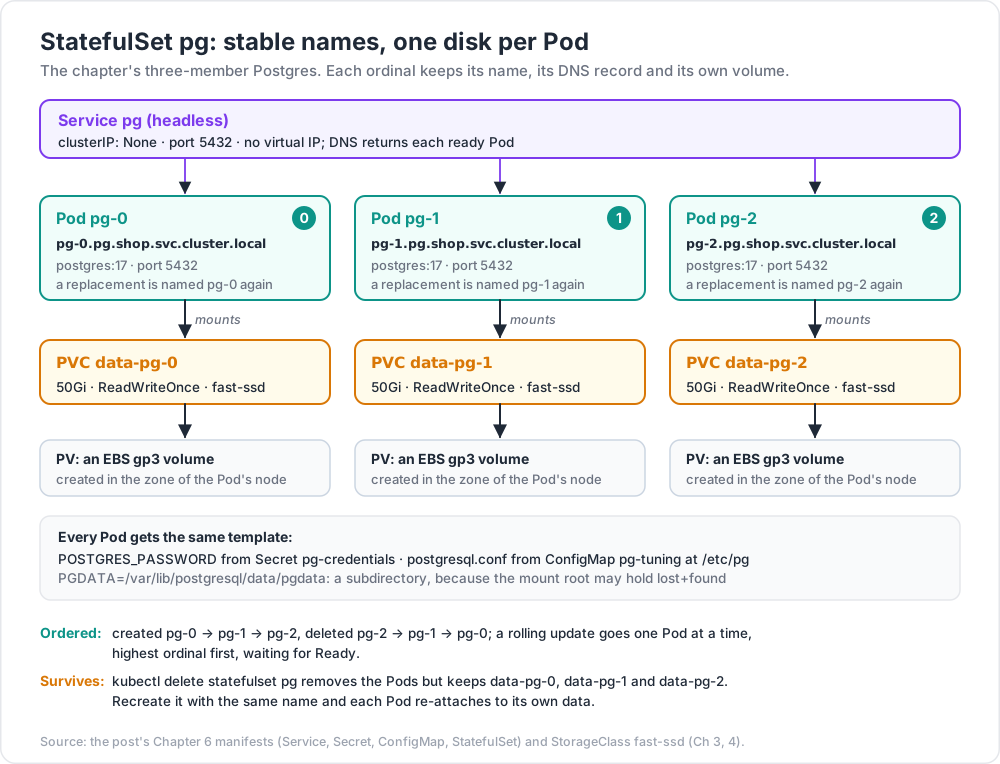
| Stable identity | Pods are named <statefulset>-<ordinal>: pg-0, pg-1, pg-2. A replacement Pod reuses the name |
| Stable network name | with a headless Service, each Pod gets pg-0.pg.shop.svc.cluster.local |
| Stable per-Pod storage | volumeClaimTemplates creates one PVC per ordinal; pg-1 always re-attaches to data-pg-1 |
| Ordered operations | Pods are created 0,1,2 and deleted 2,1,0; a rolling update proceeds one Pod at a time, highest ordinal first, waiting for Ready |
The fields that distinguish it from a Deployment (a full manifest follows in Chapter 6):
1
2
3
4
5
6
7
8
9
10
11
12
13
14
spec:
serviceName: pg # must name the headless Service
replicas: 3
podManagementPolicy: OrderedReady # or Parallel, when peers need no ordering
updateStrategy:
type: RollingUpdate
rollingUpdate: { partition: 0 } # raise to stage a canary on high ordinals
volumeClaimTemplates: # one PVC per ordinal, named data-pg-<n>
- metadata: { name: data }
spec:
storageClassName: fast-ssd
accessModes: ["ReadWriteOnce"]
resources: { requests: { storage: 50Gi } }
The PVCs outlive the StatefulSet
This is deliberate and it surprises people. kubectl delete statefulset pg deletes the Pods and leaves data-pg-0, data-pg-1, data-pg-2 in place. Recreate the StatefulSet with the same name and the same Pods re-attach to the same data. It is a safety feature: the workload controller is disposable, the data is not.
Since Kubernetes 1.32 you can opt out explicitly:
1
2
3
4
5
spec:
persistentVolumeClaimRetentionPolicy:
whenDeleted: Retain # or Delete
whenScaled: Retain # or Delete — applies when replicas are reduced
whenScaled: Delete is useful for genuinely elastic stateful caches. For a database, keep both on Retain and delete PVCs deliberately.
Common pitfall: scaling a StatefulSet down and back up looks free but is not. Scaling
pgfrom 3 to 2 removespg-2and (withwhenScaled: Retain) leaves its 50 GiB volume billing quietly forever. Audit orphaned PVCs:kubectl get pvc -Aagainstkubectl get pods -A -o jsonpathis a five-minute script that regularly finds real money.
Other honest caveats: volumeClaimTemplates is immutable — you cannot change the requested size in the template on an existing StatefulSet, only expand each PVC individually (and only if the class allows expansion). And a StatefulSet gives you identity and storage; it does not give you replication, leader election, backup, or failover. Those are the database's job, or an operator's.
Chapter 5 — DaemonSets, Jobs and CronJobs
DaemonSet
Runs exactly one Pod per node (optionally a filtered subset), and automatically adds a Pod when a node joins the cluster. This is the right shape for anything that is a property of the node rather than of the application: log collectors, metrics exporters (node-exporter), CNI agents, CSI node plugins, security agents.
1
2
3
4
5
6
7
8
9
10
11
12
13
14
15
apiVersion: apps/v1
kind: DaemonSet
metadata: { name: node-exporter, namespace: monitoring }
spec:
selector: { matchLabels: { app: node-exporter } }
template:
metadata: { labels: { app: node-exporter } }
spec:
tolerations: [{ operator: Exists }] # run on tainted nodes too
hostNetwork: true
containers:
- name: node-exporter
image: quay.io/prometheus/node-exporter:v1.8.2
ports: [{ containerPort: 9100, hostPort: 9100 }]
Without the tolerations, a DaemonSet skips tainted nodes — usually the opposite of what a node agent wants. Taints and tolerations are covered in Post 06.
Job
Runs Pods until a specified number complete successfully, then stops.
1
2
3
4
5
6
7
8
9
10
11
12
13
14
15
16
17
18
apiVersion: batch/v1
kind: Job
metadata: { name: reindex }
spec:
completions: 100 # total successful Pods required
parallelism: 10 # how many run at once
completionMode: Indexed # each Pod gets JOB_COMPLETION_INDEX 0..99
backoffLimit: 4 # Pod failures tolerated before the Job is marked Failed
activeDeadlineSeconds: 3600
ttlSecondsAfterFinished: 86400 # auto-clean the Job object a day after it finishes
template:
spec:
restartPolicy: OnFailure # or Never — Always is invalid for a Job
containers:
- name: reindex
image: ghcr.io/example/tools:1.2.0
command: ["/app/reindex", "--shard=$(JOB_COMPLETION_INDEX)"]
completions+parallelismexpress a work queue or a fixed fan-out. WithcompletionMode: Indexed, each Pod knows which slice of work is its own — the cleanest way to shard a batch job without an external queue.backoffLimitcounts Pod failures, with exponential back-off between retries (10s, 20s, 40s, capped). Set it deliberately:backoffLimit: 6on a job that fails deterministically wastes six retries and about ten minutes of back-off (10 + 20 + 40 + 80 + 160 + 320 s = 630 s).ttlSecondsAfterFinishedis the difference between a tidy cluster and 4,000CompletedPods.- The Pod-level
restartPolicymust beOnFailureorNever.
Trick: a Job with a sidecar used to hang forever, because the Job only completes when all containers exit and the sidecar never did. Use a native sidecar (
initContainerswithrestartPolicy: Always, stable since 1.33 — Post 04): Kubernetes terminates it automatically once the main container finishes.
CronJob
Creates a Job on a schedule.
1
2
3
4
5
6
7
8
9
10
11
12
13
14
15
16
17
18
apiVersion: batch/v1
kind: CronJob
metadata: { name: nightly-report }
spec:
schedule: "17 2 * * *" # cron syntax; controller timezone unless overridden
timeZone: "Europe/Berlin" # explicit IANA zone — stable since 1.27
concurrencyPolicy: Forbid # Allow | Forbid | Replace
startingDeadlineSeconds: 300
successfulJobsHistoryLimit: 3
failedJobsHistoryLimit: 3
jobTemplate:
spec:
backoffLimit: 2
template:
spec:
restartPolicy: Never
containers: [{ name: report, image: ghcr.io/example/reports:2.0.1 }]
concurrencyPolicy matters more than it looks:
- Allow (default) — a run that overruns its interval simply overlaps with the next one. Fine for idempotent work, catastrophic for a job that takes a lock or writes a shared file.
- Forbid — skip the new run if the previous one is still going. The safe default for most reporting and maintenance jobs.
- Replace — kill the running Job and start a fresh one.
The missed-schedule trap
The CronJob controller does not have perfect memory. When it wakes up, it counts the schedules it missed since it last ran. If it finds more than 100 missed schedules, it gives up entirely, schedules nothing, and records an event saying so — the CronJob then silently never fires again until it is edited or recreated. This happens after a long control-plane outage, after restoring an old cluster backup, or after a CronJob is created with a schedule in the past.
startingDeadlineSeconds interacts with this: if set, the controller only counts misses within that window, which keeps the count small and avoids the lockout — but it also means a run more than that many seconds late is dropped rather than started. Setting it to a value shorter than the controller's own check interval can cause runs to be missed altogether.
Watch out: always alert on "expected CronJob has not produced a successful Job in N intervals". Do not alert on the CronJob object being healthy — it looks perfectly healthy while firing nothing at all.
Chapter 6 — Worked example: a stateful database with a headless Service
Putting the pieces together: a three-member Postgres with per-Pod storage, stable DNS names, credentials from a Secret, and tuning from a ConfigMap.
1
2
3
4
5
6
7
8
9
10
11
12
13
14
15
16
17
18
19
20
21
22
23
24
25
26
27
28
29
30
31
32
33
34
35
36
37
38
39
40
41
42
43
44
45
46
47
48
49
50
51
52
53
54
55
56
57
58
59
60
61
62
63
64
65
66
67
68
# 1. Headless Service — gives pg-0/1/2 stable DNS, no virtual IP.
apiVersion: v1
kind: Service
metadata: { name: pg, namespace: shop, labels: { app: pg } }
spec:
clusterIP: None
selector: { app: pg }
ports: [{ name: postgres, port: 5432 }]
---
# 2. Credentials (in production, synced from a secret manager — Chapter 1).
apiVersion: v1
kind: Secret
metadata: { name: pg-credentials, namespace: shop }
type: Opaque
stringData: { POSTGRES_PASSWORD: "replace-me-from-your-secret-manager" }
---
# 3. Tuning, mounted as a file so it can change without editing the template.
apiVersion: v1
kind: ConfigMap
metadata: { name: pg-tuning, namespace: shop }
data:
postgresql.conf: |
max_connections = 200
shared_buffers = 1GB
wal_level = replica
---
# 4. The StatefulSet.
apiVersion: apps/v1
kind: StatefulSet
metadata: { name: pg, namespace: shop }
spec:
serviceName: pg
replicas: 3
selector: { matchLabels: { app: pg } }
template:
metadata:
labels: { app: pg }
annotations:
checksum/tuning: "REPLACED-BY-CI" # forces a rollout on config change
spec:
terminationGracePeriodSeconds: 120 # let Postgres check-point cleanly
securityContext: { fsGroup: 999 } # so the mounted volume is writable
containers:
- name: postgres
image: postgres:17
args: ["-c", "config_file=/etc/pg/postgresql.conf"]
ports: [{ containerPort: 5432, name: postgres }]
env:
- name: POSTGRES_PASSWORD
valueFrom:
secretKeyRef: { name: pg-credentials, key: POSTGRES_PASSWORD }
- name: PGDATA
value: /var/lib/postgresql/data/pgdata # a subdirectory, not the mount root
volumeMounts:
- { name: data, mountPath: /var/lib/postgresql/data }
- { name: tuning, mountPath: /etc/pg }
readinessProbe:
exec: { command: ["pg_isready", "-U", "postgres"] }
periodSeconds: 5
volumes:
- { name: tuning, configMap: { name: pg-tuning } }
volumeClaimTemplates:
- metadata: { name: data }
spec:
storageClassName: fast-ssd
accessModes: ["ReadWriteOnce"]
resources: { requests: { storage: 50Gi } }
Two details in there are load-bearing and routinely omitted:
PGDATApoints at a subdirectory of the mount, not the mount root. Many block-storage volumes arrive with alost+founddirectory, and Postgres refuses to initialise into a non-empty directory.fsGroupmakes the kubelet chown the volume so the non-root database user can write to it. Without it the container starts and immediately dies on a permission error.
What this manifest still does not give you: replication between the three members, promotion of a new primary when pg-0 dies, backups, or point-in-time recovery. Those need an operator (CloudNativePG, Zalando Postgres Operator, Percona, or the vendor's own) or a managed service. A StatefulSet is the substrate, not the database platform.
Chapter 7 — Should the database be on Kubernetes at all?
The honest answer is "sometimes", and the reasoning matters more than the verdict.
The case against
- The failure modes are unfamiliar. A node drain, a spot-instance reclaim, a memory limit hit, an eviction under disk pressure, a CNI hiccup — each is routine for a stateless service and each is a potential data event for a database.
- You are now operating two hard systems. Kubernetes upgrades every few months; the database has its own upgrade path. The intersection is where the incidents live.
- Managed services are genuinely good. RDS, Aurora, Cloud SQL, Atlas and their peers give you backups, PITR, failover, patching and a support contract for a price that is usually less than the engineer-time you would spend replicating them badly.
- Storage performance is a layer deeper. Network-attached block storage under a CSI driver under a container runtime has more moving parts and more tail latency than a local NVMe device.
The case for
- You already run Kubernetes for everything else, and the operational uniformity — same deploy pipeline, same secrets, same observability, same RBAC — is worth real money.
- On-prem, sovereign or air-gapped requirements rule out managed services entirely.
- A mature operator exists for your database. This is the pivotal question. CloudNativePG for Postgres, Strimzi for Kafka, the MongoDB and Percona operators, Vitess for MySQL — these encode failover, backup and upgrade as controllers. Running a database on Kubernetes with a mature operator is a different activity from running one with a hand-written StatefulSet.
- Many identical database instances. Per-tenant or per-environment databases are exactly where declarative provisioning pays off.
A decision rule
| Situation | Reasonable call |
|---|---|
| Managed service available, no sovereignty constraint, small team | Use the managed service. |
| Already deep in Kubernetes, mature operator exists, platform team on call | On Kubernetes, via the operator. |
| On-prem or air-gapped | On Kubernetes — it is likely the best option available |
| Small dataset, low QPS, one instance | plain VM or managed; the cluster adds cost without benefit |
| Hand-written StatefulSet, no operator, no runbook, production data | Do not. |
For a fuller treatment of this exact trade-off in one ecosystem — operator choice, production checklist, cost and compliance — see content/posts/mongo_29_k8s_mongosync_cost_compliance.md, which covers the same decision for MongoDB with the concrete numbers and the operator landscape spelled out.
Whatever you choose, the non-negotiables are the same: tested restores (not just backups), storage with a Retain reclaim policy or an equivalent guard, a PodDisruptionBudget so a node drain cannot take quorum (Post 06), anti-affinity so replicas are not co-located, and monitoring that alerts on replication lag rather than on Pod count.
Practice Exercises
Exercise 1 — Prove the hot-reload rule
Deploy a Pod that consumes one ConfigMap key as an environment variable and the same ConfigMap as a mounted file. Edit the ConfigMap. Then, from inside the Pod, print both values every 10 seconds and record how long each takes to change.
Solution
1
2
3
4
5
6
7
kubectl create configmap demo --from-literal=MSG=one
# Pod consumes MSG via env AND mounts demo at /etc/demo
kubectl exec -it demo-pod -- sh -c 'while true; do echo "env=$MSG file=$(cat /etc/demo/MSG)"; sleep 10; done'
kubectl create configmap demo --from-literal=MSG=two --dry-run=client -o yaml | kubectl apply -f -
# env=one forever; file=two appears within roughly a minute or two
# (kubelet sync period + ConfigMap cache propagation).
Exercise 2 — Decode a Secret and then defend it
Create a Secret, retrieve the plaintext with kubectl and base64 -d, and confirm it is trivially readable. Then write the RBAC Role that would have prevented your user from doing so, and list two mechanisms that would protect it even from a cluster administrator with etcd access.
Solution
1
2
3
4
5
6
7
8
9
10
11
kubectl create secret generic demo --from-literal=PASSWORD=hunter2
kubectl get secret demo -o jsonpath='{.data.PASSWORD}' | base64 -d # hunter2
# A Role granting ConfigMaps but not Secrets:
# rules: [{ apiGroups: [""], resources: ["configmaps"], verbs: ["get","list","watch"] }]
#
# Against an admin with etcd access:
# 1. EncryptionConfiguration with a KMS provider — etcd holds ciphertext only.
# 2. An external store (Vault / cloud secret manager) via the Secrets Store CSI
# driver or workload identity, so the value never becomes a Kubernetes object.
Exercise 3 — Trigger a rollout from a config change
Take a Deployment whose only configuration source is a mounted ConfigMap. Change the ConfigMap and confirm no rollout happens. Then add a checksum/config annotation to the Pod template, change the ConfigMap again with the checksum recomputed, and confirm a new ReplicaSet appears.
Solution
1
2
3
4
5
6
7
8
9
10
kubectl rollout history deployment/web # note the current revision
kubectl apply -f configmap-changed.yaml
kubectl get rs -l app=web # unchanged — no new ReplicaSet
HASH=$(sha256sum k8s/configmap.yaml | cut -c1-16)
kubectl patch deployment web -p \
"{\"spec\":{\"template\":{\"metadata\":{\"annotations\":{\"checksum/config\":\"$HASH\"}}}}}"
kubectl get rs -l app=web # a new ReplicaSet now exists
kubectl rollout status deployment/web
Exercise 4 — Reproduce the zone-mismatch bug
On a multi-zone cluster (or a kind cluster with fake topology.kubernetes.io/zone node labels and a topology-aware class), create a StorageClass with volumeBindingMode: Immediate and a PVC, then create a Pod that can only be scheduled in a different zone. Capture the exact event text. Switch the class to WaitForFirstConsumer and show that the same Pod schedules.
Exercise 5 — StatefulSet identity and survival
Deploy the three-member Postgres from Chapter 6. Then:
- Write a row through
pg-0. Delete the Pod. Confirm the row survives and the Pod comes back aspg-0with the same PVC. - Delete the entire StatefulSet. List the PVCs. Recreate the StatefulSet and confirm the data is still there.
- Scale to 2 and find the orphaned PVC.
Exercise 6 — CronJob concurrency
Write a CronJob that runs every minute and sleeps for 150 seconds. Run it with concurrencyPolicy: Allow, then Forbid, then Replace, and record how many Pods exist after five minutes in each case. Explain which policy each of these needs: a nightly backup, a metrics scrape, a queue drainer.
Exercise 7 — Access-mode reality check
Determine empirically which access modes each StorageClass in your cluster supports. Then create a two-replica Deployment sharing one RWO PVC, force both Pods onto the same node, and describe what happens — and what would happen if they landed on different nodes.
Cheat-sheet
| What | How |
|---|---|
| Config as env vars | env.valueFrom.configMapKeyRef / envFrom — never updates without a restart |
| Config as files | volumes.configMap + volumeMounts — updates in place, but not instantly |
subPath mount |
single file into a populated directory; never receives updates |
| Update delay | ≈ kubelet sync period (1 min default) + ConfigMap cache propagation |
| Secret reality | base64, not encryption; plaintext in etcd unless encryption at rest is configured |
| Real secret protection | KMS EncryptionConfiguration + tight RBAC + external store / workload identity |
| Force a rollout on config change | hash-suffixed immutable ConfigMap, or checksum/config on the Pod template |
| Storage chain | Pod → PVC → PV → disk, provisioned by a StorageClass via CSI |
| Access modes | RWO (one node), ROX, RWX (needs a file protocol), RWOP (one Pod, GA 1.29) |
| Reclaim policy | Delete (default, dynamic) vs Retain (use for anything valuable) |
| Zone-mismatch fix | volumeBindingMode: WaitForFirstConsumer on zonal classes |
| Stable identity + storage | StatefulSet + headless Service + volumeClaimTemplates |
| Pod DNS name | pg-0.pg.shop.svc.cluster.local |
| StatefulSet PVCs | outlive the StatefulSet by design; persistentVolumeClaimRetentionPolicy since 1.32 |
| One Pod per node | DaemonSet — remember tolerations for tainted nodes |
| Batch fan-out | Job with completions + parallelism + completionMode: Indexed |
| Clean up finished Jobs | ttlSecondsAfterFinished |
| CronJob overlap | concurrencyPolicy: Forbid unless the work is genuinely idempotent |
| CronJob silent death | more than 100 missed schedules stops it firing; alert on output, not on the object |
| Database on Kubernetes | yes with a mature operator and a platform team; otherwise use the managed service |
What's next
Post 06 covers Scheduling, Resources, Probes and Rollouts — how the scheduler chooses a node, affinity and topology spread, the difference between requests and limits (and why it is the single most consequential setting in the cluster), QoS and eviction, CPU throttling, OOMKills, the three probe types and the outage pattern they cause when misused, rolling updates, disruption budgets, graceful shutdown, and autoscaling.
References
- ConfigMaps · Secrets · Encrypting data at rest
- Volumes · Persistent Volumes · Storage Classes
- Container Storage Interface · Volume snapshots
- StatefulSets · StatefulSet PVC retention
- DaemonSets · Jobs · CronJobs
- Secrets Store CSI Driver · External Secrets Operator
content/posts/mongo_29_k8s_mongosync_cost_compliance.md— the same "database on Kubernetes" decision worked through for MongoDB.
Note: this post is in progress. Planned additions: a CloudNativePG walkthrough with backup and point-in-time recovery; a VolumeSnapshot-based clone-for-staging recipe; a measured comparison of RWX filesystem options; a worked External Secrets Operator setup against AWS Secrets Manager.