Containers Course — 06 · Scheduling, Resources, Probes and Rollouts
Posts 04 and 05 covered what to declare. This post covers how it behaves under pressure: which node a Pod lands on, how much CPU and memory it may consume, what happens when it wants more than it asked for, how Kubernetes decides whether it is healthy, and how a new version replaces an old one without dropping requests. Almost every self-inflicted Kubernetes outage — cascading restarts, mysterious 502s during deploys, nodes that evict the wrong workloads, autoscalers that oscillate — traces back to one of the settings in this post.
Series map: 00 Containers from First Principles → 01 Images and Dockerfiles → 02 Networking, Volumes and Compose → 03 Registries, Supply Chain and Security → 04 Kubernetes Architecture and Core Objects → 05 Config, Storage and Stateful Workloads → 06 Scheduling, Resources, Probes and Rollouts (this post) → 07 Ingress, Observability, RBAC and GitOps.
Learning Outcome
- Describe the scheduler's filter-then-score cycle and predict why a Pod is
Pending. - Choose correctly between nodeSelector, node affinity, pod anti-affinity, taints and topology spread constraints.
- Explain the single most consequential idea in Kubernetes resource management: requests drive scheduling, limits drive enforcement.
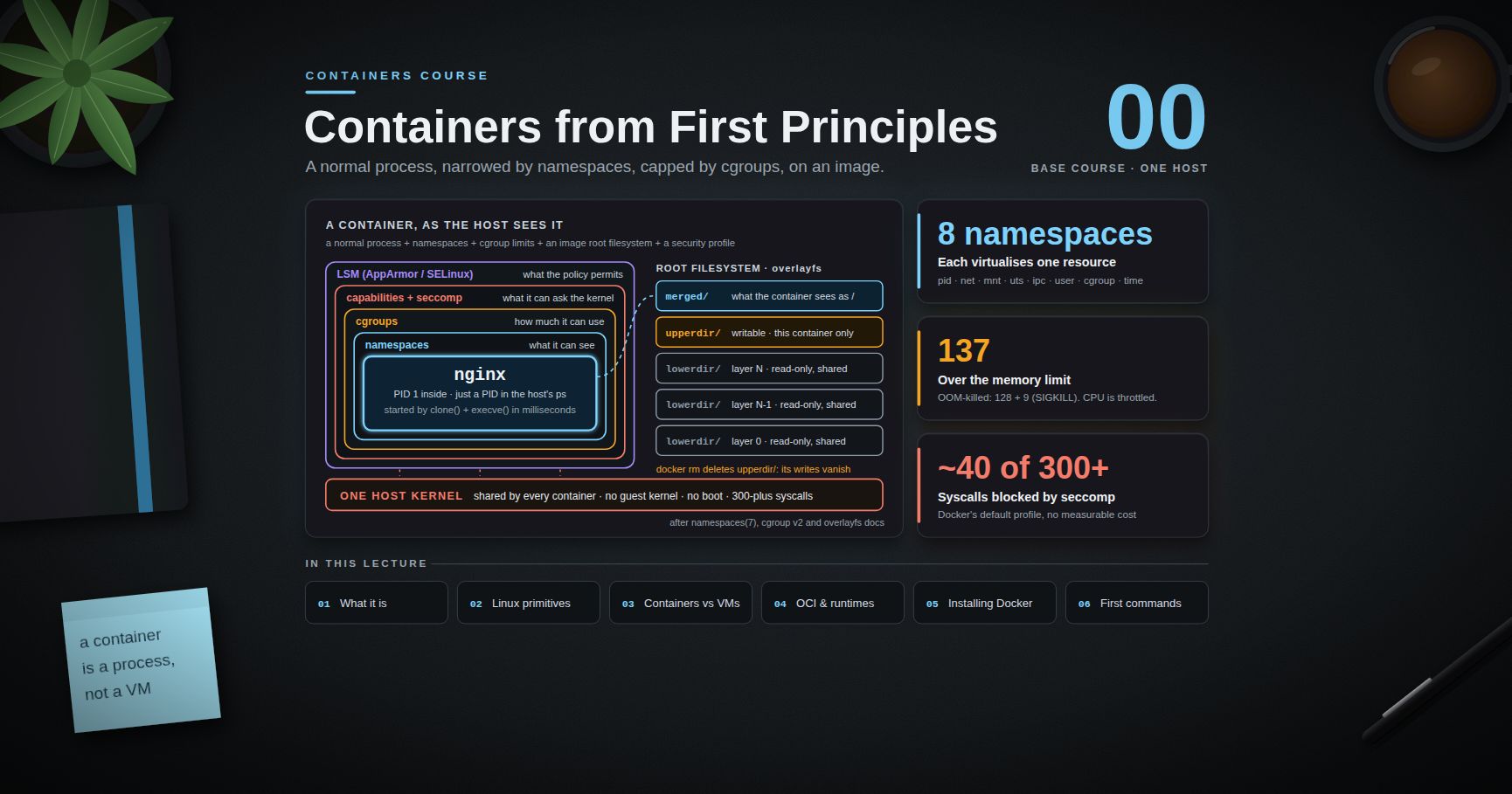
- Determine a Pod's QoS class, predict its eviction order, and recognise an OOMKill from exit code 137.
- Argue coherently about CPU limits and CFS throttling, and set memory limits without causing restarts.
- Configure liveness, readiness and startup probes so they cannot cause the outage they are meant to prevent.
- Run a rolling update that neither drops traffic nor breaks quorum, using surge settings, PodDisruptionBudgets,
preStopand grace periods. - Configure an HPA that converges instead of oscillating, and right-size resources from measured data.
Chapter 1 — How the scheduler works
Terminology
- Scheduling — assigning an unscheduled Pod to a node by writing
.spec.nodeName. The kubelet on that node then starts it. - Filter (predicate) — a check that eliminates nodes a Pod cannot run on.
- Score (priority) — a ranking of the surviving nodes by how good a fit they are.
- Binding — persisting the chosen node back to the API server.
- Feasible node — a node that survived every filter.
The two phases
For each Pod in the scheduling queue, kube-scheduler runs a scheduling cycle and then a binding cycle. The scheduling cycle has two halves:
1. Filter. Every node is tested against a series of predicates. Any failure removes the node from consideration:
- Does the node have enough allocatable CPU, memory and ephemeral storage to satisfy the Pod's requests?
- Do the Pod's
nodeSelectorand required node affinity match the node's labels? - Are the node's taints tolerated by the Pod?
- Are the requested host ports free?
- Can the Pod's volumes be attached here (zone, node affinity of the PV, attach limits)?
- Do required pod affinity and anti-affinity rules hold?
- Is the node
Readyand not underMemoryPressure,DiskPressureorPIDPressure?
If zero nodes survive, the Pod stays Pending and the scheduler records an event naming the failing predicate — 0/12 nodes are available: 8 Insufficient cpu, 4 node(s) had untolerated taint. That event is the answer to almost every "why is my Pod Pending" question.
2. Score. Each feasible node is scored 0-100 by several plugins and the totals are weighted:
NodeResourcesFit— spread load (LeastAllocated, the default) or pack it tight (MostAllocated, better for autoscaler-driven cost savings).ImageLocality— prefer nodes that already have the image cached.InterPodAffinity,PodTopologySpread,TaintToleration,NodeAffinity— the preferred (soft) forms of each rule.
The highest-scoring node wins; ties are broken at random. The scheduler then reserves the resources, runs any Permit plugins, and binds asynchronously.
Two properties matter operationally:
- The scheduler decides once, at admission. It does not move a running Pod because the cluster later became unbalanced. Rebalancing requires deleting Pods (the
deschedulerproject automates this). - The scheduler reasons about requests, never about actual usage. A node can be 95 % idle and still reject a Pod because its requests are fully committed — and it can be 100 % CPU-saturated and happily accept more Pods whose requests fit.
Trick:
kubectl describe node <node>prints an "Allocated resources" table with requests and limits as a percentage of allocatable. That table, notkubectl top, is what the scheduler sees.
Chapter 2 — Controlling placement
nodeSelector — the simple case
1
2
3
4
5
spec:
nodeSelector:
disktype: nvme
topology.kubernetes.io/zone: eu-central-1a
Exact-match labels only, hard requirement. Fine for small, unambiguous rules; it cannot express preferences, negation, or set membership.
Node affinity — the expressive case
1
2
3
4
5
6
7
8
9
10
11
12
13
14
spec:
affinity:
nodeAffinity:
requiredDuringSchedulingIgnoredDuringExecution:
nodeSelectorTerms:
- matchExpressions:
- { key: kubernetes.io/arch, operator: In, values: [amd64, arm64] }
- { key: node-role, operator: NotIn, values: [control-plane] }
preferredDuringSchedulingIgnoredDuringExecution:
- weight: 80
preference:
matchExpressions:
- { key: node.kubernetes.io/instance-type, operator: In, values: [c7i.2xlarge] }
Read the long field names literally. requiredDuringScheduling is a filter; preferredDuringScheduling is a score contribution. IgnoredDuringExecution is the important half: an already-running Pod is never evicted because the node's labels changed. There is no RequiredDuringExecution — if you need eviction on a condition change, use a taint with NoExecute.
Pod affinity and anti-affinity
These place Pods relative to other Pods, using a topologyKey to define what "together" means.
1
2
3
4
5
6
7
8
9
10
11
12
13
14
15
16
17
18
19
20
21
22
23
spec:
affinity:
podAntiAffinity:
# Hard: never two replicas of this app on one node.
requiredDuringSchedulingIgnoredDuringExecution:
- labelSelector:
matchLabels: { app.kubernetes.io/name: web }
topologyKey: kubernetes.io/hostname
# Soft: also try to spread across zones.
preferredDuringSchedulingIgnoredDuringExecution:
- weight: 100
podAffinityTerm:
labelSelector:
matchLabels: { app.kubernetes.io/name: web }
topologyKey: topology.kubernetes.io/zone
podAffinity:
# Co-locate with the cache, in the same zone, to avoid cross-AZ latency and cost.
preferredDuringSchedulingIgnoredDuringExecution:
- weight: 50
podAffinityTerm:
labelSelector: { matchLabels: { app: redis } }
topologyKey: topology.kubernetes.io/zone
Common pitfall: hard
podAntiAffinityonkubernetes.io/hostnamecaps your replica count at the node count. Scale to 10 replicas on a 6-node cluster and 4 Pods sitPendingforever. Use the preferred form, or topology spread constraints, unless the co-location really is unacceptable.
Pod affinity is also computationally expensive — the scheduler must evaluate every Pod in the matched topology for every candidate node. On large clusters, prefer topology spread constraints.
Taints and tolerations — the inverse
Affinity is a Pod attracting a node. A taint is a node repelling Pods. Only Pods with a matching toleration may land there.
1
2
3
kubectl taint nodes gpu-node-1 workload=gpu:NoSchedule
kubectl taint nodes bad-node-3 maintenance=true:NoExecute # also evicts running Pods
1
2
3
4
spec:
tolerations:
- { key: workload, operator: Equal, value: gpu, effect: NoSchedule }
| Effect | Meaning |
|---|---|
NoSchedule |
no new Pod without a toleration |
PreferNoSchedule |
soft version — avoid if possible |
NoExecute |
as NoSchedule, plus evict already-running Pods that do not tolerate it (optionally after tolerationSeconds) |
Taints are how you reserve expensive hardware (GPU nodes, high-memory nodes) for the workloads that need it, how control-plane nodes stay free of user workloads, and how the node lifecycle controller cordons off unhealthy nodes — node.kubernetes.io/not-ready and unreachable are NoExecute taints applied automatically.
Note that a toleration does not attract. Tolerating the GPU taint lets a Pod run on GPU nodes; it does not make it prefer them. Pair a toleration with node affinity to get both halves.
Topology spread constraints — the modern way to spread
1
2
3
4
5
6
7
8
9
10
11
12
13
14
spec:
topologySpreadConstraints:
- maxSkew: 1
topologyKey: topology.kubernetes.io/zone
whenUnsatisfiable: DoNotSchedule # or ScheduleAnyway (soft)
minDomains: 3 # fail if fewer than 3 zones exist
labelSelector:
matchLabels: { app.kubernetes.io/name: web }
- maxSkew: 1
topologyKey: kubernetes.io/hostname
whenUnsatisfiable: ScheduleAnyway
labelSelector:
matchLabels: { app.kubernetes.io/name: web }
maxSkew is the maximum permitted difference between the most-populated and least-populated domain. With maxSkew: 1 across three zones, nine replicas land 3/3/3 and ten land 4/3/3. This expresses "spread evenly" directly, instead of approximating it with anti-affinity, and it is far cheaper for the scheduler to evaluate.
The standard production pairing for a stateless service: a hard zone spread with maxSkew: 1 and a soft hostname spread. That survives an availability-zone loss and still schedules when a zone is temporarily full.
Watch out:
whenUnsatisfiable: DoNotSchedulecombined with a cluster autoscaler can deadlock — the Pod is unschedulable, so the autoscaler adds a node, but the new node is in the wrong zone, so the Pod remains unschedulable. Verify that your node groups actually span the topology you are spreading over.
Chapter 3 — Requests, limits and QoS
The one sentence that matters
Requests drive scheduling. Limits drive enforcement.
- A request is a reservation. The scheduler subtracts it from the node's allocatable capacity and guarantees the Pod that much. It is also the number that decides whether the Pod fits at all.
- A limit is a ceiling enforced at runtime by the kernel through cgroups. Exceed the CPU limit and you are throttled. Exceed the memory limit and you are killed.
Everything else in this chapter follows from that distinction.
1
2
3
4
5
6
7
8
resources:
requests:
cpu: "250m" # 0.25 of a core; the scheduler reserves this
memory: "256Mi" # guaranteed; the basis of eviction ranking
limits:
memory: "512Mi" # exceed this and the kernel OOM-kills the container
# cpu deliberately omitted — see below
CPU is compressible: exceeding your share means running slower. Memory is incompressible: there is no "slower", only "killed".
QoS classes
The kubelet assigns each Pod a class based purely on how its requests and limits are written:
| Class | Condition | Consequence |
|---|---|---|
| Guaranteed | every container sets both CPU and memory, and request == limit for each | evicted last; eligible for exclusive CPUs under the static CPU manager policy |
| Burstable | at least one request is set, but not the Guaranteed pattern | evicted after BestEffort, in order of how far usage exceeds requests |
| BestEffort | no requests or limits anywhere in the Pod | evicted first, always |
Under node memory pressure the kubelet evicts in that order: BestEffort first, then Burstable Pods that are using more than they requested (ranked by the excess), then Guaranteed. The kernel's own OOM killer uses a parallel mechanism, oom_score_adj, derived from the same classes.
Common pitfall: BestEffort Pods look thrifty and are actually hazardous. They are the first thing evicted when a node fills up, they contribute nothing to autoscaler capacity calculations, and they can starve neighbours. Set requests on everything, including the small "unimportant" jobs.
CPU limits and CFS throttling
A CPU limit is implemented as a CFS quota: the cgroup is granted quota microseconds of CPU time per period (100 ms by default). A limit of 500m means 50 ms of CPU per 100 ms window. When the quota is exhausted, every thread in the cgroup is stopped until the next period begins.
This produces a failure mode that is invisible in average CPU graphs. An application averaging 30 % of its limit can still be throttled hard, because the work is not spread evenly: a request arrives, several threads wake, the quota is consumed in 15 ms, and the container sleeps for the remaining 85 ms. The result is tail latency in whole multiples of 100 ms while the dashboard shows a comfortable average.
Multithreaded runtimes make it worse. A JVM or Go program that sees 32 host CPUs will happily run 32 threads, burning the quota 32× faster than a single thread would.
Measure it — do not guess:
1
2
3
4
# Fraction of periods in which the container was throttled.
rate(container_cpu_cfs_throttled_periods_total{pod=~"web-.*"}[5m])
/ rate(container_cpu_cfs_periods_total{pod=~"web-.*"}[5m])
Sustained values above roughly 5-10 % on a latency-sensitive service are worth acting on. Confirm on your own workload rather than trusting any published threshold.
The genuine argument for omitting CPU limits
Set memory limits always; consider omitting CPU limits on latency-sensitive services.
The case for omitting: CPU is compressible and already fairly shared. When several containers on a node contend, the kernel divides CPU time in proportion to their requests (cgroup CPU shares) — so requests alone already provide isolation under contention. A limit adds nothing during contention and actively hurts when the node is idle, because it forbids a container from using spare capacity it could have had for free. Throttling a service that could have run faster, on a machine that is 60 % idle, is pure loss.
The case for keeping them: limits make behaviour reproducible and capacity predictable, they stop one runaway process from degrading its neighbours' latency (fair sharing is fair, but a busy neighbour still slows you down), some regulated or multi-tenant environments require hard ceilings, and Guaranteed QoS — which requires a CPU limit — is needed for exclusive CPU pinning.
A defensible policy: memory limit always set and equal to a measured peak plus headroom; CPU request set from measured usage; CPU limit omitted for latency-sensitive services, set generously (well above the request) for batch and untrusted workloads. Whatever you choose, also set GOMAXPROCS (Go) or the container-aware JVM flags so the runtime sizes its thread pools to the cgroup, not to the host.
OOMKill and exit code 137
Exceed the memory limit and the kernel's OOM killer terminates the process with SIGKILL. The container exits with 137 — the shell convention of 128 + signal, and 9 is SIGKILL.
1
2
3
4
5
6
7
kubectl describe pod web-6d4f-abcde
# Last State: Terminated
# Reason: OOMKilled
# Exit Code: 137
# Restart Count: 4
kubectl get pod web-6d4f-abcde -o jsonpath='{.status.containerStatuses[0].lastState}'
Diagnosis:
- Exit 137 with
Reason: OOMKilled— the container exceeded its own memory limit. Raise the limit or fix the leak. - Exit 137 without
OOMKilled— something sent SIGKILL: usually a grace period expiring during shutdown (Chapter 5), or a node-level OOM. - Pod status
Evicted— the node ran out of memory and the kubelet chose this Pod by QoS ranking. Different problem: the node is over-committed. - Exit 143 is
128 + 15(SIGTERM) — a normal, graceful termination.
Note also that a request far below the real working set is what makes node-level OOM possible in the first place: the scheduler packed the node believing the Pods were small.
Chapter 4 — Probes
Three probes, three completely different jobs. Confusing them is the most common cause of self-inflicted outages in Kubernetes.
| Probe | Question | Action on failure |
|---|---|---|
| liveness | "Is this process wedged beyond recovery?" | kill and restart the container |
| readiness | "Should this Pod receive traffic right now?" | remove the Pod from Service endpoints (no restart) |
| startup | "Has the process finished booting?" | kill the container; while it runs, liveness and readiness are suspended |
1
2
3
4
5
6
7
8
9
10
11
12
13
14
15
16
17
18
19
containers:
- name: web
image: ghcr.io/example/web:1.4.2
startupProbe: # covers slow boots without loosening liveness
httpGet: { path: /healthz, port: http }
periodSeconds: 5
failureThreshold: 60 # up to 5 minutes to start
livenessProbe:
httpGet: { path: /healthz, port: http } # shallow: process-local only
periodSeconds: 10
timeoutSeconds: 2
failureThreshold: 3 # ~30s of failure before a restart
readinessProbe:
httpGet: { path: /readyz, port: http } # may check dependencies
periodSeconds: 5
timeoutSeconds: 2
failureThreshold: 2
successThreshold: 1
The classic outage
A team writes one /health endpoint that checks the database, and wires it to both the readiness and the liveness probe. The database has a 30-second hiccup.
- Every replica's liveness probe fails.
- The kubelet kills and restarts every replica simultaneously.
- The database recovers — and is immediately hit by the full fleet reconnecting and re-warming caches at once.
- The probes fail again. Restart storm.
CrashLoopBackOff. The blast radius of a 30-second dependency blip is now a total outage that outlives it by many minutes.
The rule that prevents it: a liveness probe must never test anything outside the process. If the dependency is down, restarting your container does not help — it makes recovery harder by discarding warm state and multiplying reconnection load.
- Liveness → shallow. "Is the event loop running, can I serve a trivial response?" Many mature services are better off with no liveness probe at all; a process that crashes on a fatal fault is restarted by the Pod restart policy anyway.
- Readiness → may be deep. Failing readiness removes the Pod from load balancing and is reversible with no state loss. If every replica fails readiness the Service has no endpoints and clients get connection errors — bad, but strictly better than a restart storm, and it recovers the instant the dependency does.
- Startup → the correct tool for slow-starting applications. Without it you must inflate
initialDelaySecondsorfailureThresholdon liveness, which weakens liveness forever to accommodate one slow boot.
Timing parameters
| Field | Default | Guidance |
|---|---|---|
initialDelaySeconds |
0 | prefer a startup probe over a large value here |
periodSeconds |
10 | 5-10s for readiness, 10-20s for liveness |
timeoutSeconds |
1 | raise it — 1 second is shorter than many healthy responses under load |
failureThreshold |
3 | liveness: periodSeconds × failureThreshold should exceed your worst legitimate GC pause or lock wait |
successThreshold |
1 | must be 1 for liveness and startup |
terminationGracePeriodSeconds |
inherited | can be overridden per probe for the liveness-triggered kill |
Watch out: the default
timeoutSeconds: 1is the quiet cause of many phantom restarts. Under load, a healthy service can take longer than a second to answer, and three such answers in a row become a restart.
Probe types are httpGet, tcpSocket, exec and grpc (the gRPC health-checking protocol, GA since 1.27). Prefer httpGet or grpc; exec probes fork a process on every check and are surprisingly expensive at scale.
Chapter 5 — Rollouts, disruption and graceful shutdown
Rolling updates
1
2
3
4
5
6
7
8
9
10
spec:
strategy:
type: RollingUpdate
rollingUpdate:
maxSurge: 25% # extra Pods allowed above `replicas` during the roll
maxUnavailable: 0 # never drop below `replicas` ready Pods
minReadySeconds: 10 # a new Pod must stay Ready this long before it counts
progressDeadlineSeconds: 600
revisionHistoryLimit: 5
maxSurge: 25%, maxUnavailable: 0— the safe default. Capacity never dips; the rollout needs spare cluster capacity and is slightly slower.maxSurge: 0, maxUnavailable: 1— for workloads that cannot be over-provisioned (a licence limit, a singleton lock). Capacity dips during the roll.minReadySecondsis underused and valuable: it stops a rollout that passes readiness and then dies five seconds later from marching all the way through the fleet.progressDeadlineSecondsmarks the DeploymentProgressing=Falsewhen it stalls, which is what your alerting and your GitOps controller should watch. Note that it does not roll back automatically.
1
2
3
4
5
6
7
kubectl set image deployment/web web=ghcr.io/example/web:1.4.3
kubectl rollout status deployment/web --timeout=5m # the command that actually waits
kubectl rollout history deployment/web
kubectl rollout undo deployment/web # previous revision
kubectl rollout pause deployment/web # freeze mid-roll to inspect a canary
kubectl rollout resume deployment/web
revisionHistoryLimit bounds how far back undo can go, at the cost of keeping that many zero-replica ReplicaSets. Blue/green and true canary deployments need more than a Deployment provides — Argo Rollouts, Flagger, or a service mesh (Post 07).
Voluntary versus involuntary disruption
| Involuntary | Voluntary |
|---|---|
| node hardware failure, kernel panic | kubectl drain for an upgrade |
| node OOM, kubelet eviction | cluster autoscaler removing an under-used node |
| spot / preemptible instance reclaim | a rolling update you triggered |
| a container OOMKilled | deleting a Pod by hand |
A PodDisruptionBudget constrains only the voluntary column. It works by making the Eviction API refuse an eviction that would violate the budget; anything that does not go through that API — a node catching fire — is unaffected.
1
2
3
4
5
6
7
8
apiVersion: policy/v1
kind: PodDisruptionBudget
metadata: { name: web }
spec:
minAvailable: 2 # or: maxUnavailable: 1
selector:
matchLabels: { app.kubernetes.io/name: web }
Guidance:
- Use
maxUnavailable: 1for large stateless fleets — it scales with replica count without editing. - Use
minAvailable: <quorum>for quorum systems (etcd, Zookeeper, a 3-member database): losing quorum during a routine node drain is a real and common outage. - A PDB that can never be satisfied blocks node drains indefinitely.
minAvailable: 3on a Deployment withreplicas: 3means no Pod may ever be evicted, and every cluster upgrade hangs. Always leave slack. - A PDB on a single-replica Deployment is a contradiction: you are asserting that the Pod is both critical and unreplicated.
Graceful shutdown and the endpoint-removal race
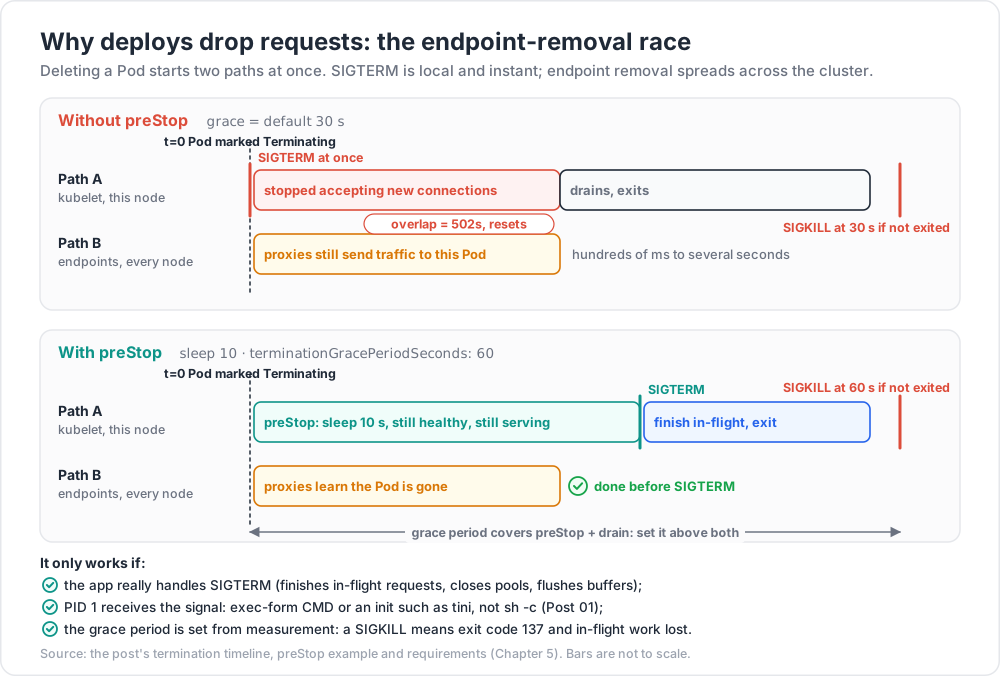
When a Pod is deleted, two things happen concurrently, and this is the subtle part:
1
2
3
4
5
6
7
8  t=0   Pod marked Terminating
        ├── path A: kubelet runs preStop, then sends SIGTERM to PID 1
        └── path B: endpoints controller removes the Pod from the EndpointSlice
                    → the API server notifies every node's kube-proxy
                    → each kube-proxy reprograms its own iptables/IPVS rules
                    → any ingress controller or mesh updates its own view
  t=grace  SIGKILL if the container has not exited
Path B is a distributed propagation across every node in the cluster; path A is local and immediate. So a container can receive SIGTERM, stop accepting connections, and still be sent traffic for hundreds of milliseconds to several seconds afterwards, by proxies that have not yet heard the news. That is the source of the 502s and connection resets that appear during otherwise "zero-downtime" deploys.
The fix is to make the container keep serving for a moment after SIGTERM:
1
2
3
4
5
6
7
8
9
spec:
terminationGracePeriodSeconds: 60
containers:
- name: web
lifecycle:
preStop:
exec:
command: ["sleep", "10"] # keep serving while endpoints propagate
preStop runs before SIGTERM and the grace period clock covers both, so the grace period must exceed the sleep plus the real drain time. The sequence you want:
preStopsleeps ~5-15 s. The container is still healthy and still serving; meanwhile every proxy learns the Pod is gone.- SIGTERM. The application stops accepting new connections, finishes in-flight requests, closes pools, flushes buffers, and exits.
- If it has not exited by
terminationGracePeriodSeconds(default 30), SIGKILL — exit code 137, in-flight work lost.
Requirements that are easy to miss:
- The application must actually handle SIGTERM. Many do not, and rely on being killed. Check.
- PID 1 must receive the signal. A container started via
sh -c "app"makes the shell PID 1, and it does not forward signals. Use exec form (CMD ["app"]), an init such astini, ordocker run --initsemantics. This was covered in Post 01 and it bites hardest here. - Set the grace period from measurement. A worker draining 5-minute jobs needs a grace period longer than 5 minutes, or every deploy kills work in flight.
Trick: if you cannot add a
sleepbinary to a distroless image, usepreStop: httpGetagainst an endpoint that flips readiness to false and blocks, or add asleepimplementation to the image explicitly. The pattern matters more than the mechanism.
Chapter 6 — Autoscaling
HorizontalPodAutoscaler
The HPA changes replicas on a Deployment or StatefulSet to keep a metric near a target. Use autoscaling/v2 — v1 supported CPU only.
1
2
3
4
5
6
7
8
9
10
11
12
13
14
15
16
17
18
19
20
21
22
23
24
25
26
27
28
apiVersion: autoscaling/v2
kind: HorizontalPodAutoscaler
metadata: { name: web }
spec:
scaleTargetRef: { apiVersion: apps/v1, kind: Deployment, name: web }
minReplicas: 3
maxReplicas: 40
metrics:
- type: Resource
resource:
name: cpu
target: { type: Utilization, averageUtilization: 70 }
- type: Pods
pods:
metric: { name: http_requests_per_second }
target: { type: AverageValue, averageValue: "150" }
behavior:
scaleUp:
stabilizationWindowSeconds: 0 # react to load immediately
policies:
- { type: Percent, value: 100, periodSeconds: 30 } # double per 30s...
- { type: Pods, value: 8, periodSeconds: 30 } # ...or +8 Pods, whichever is larger (Max)
selectPolicy: Max
scaleDown:
stabilizationWindowSeconds: 600 # 10 min of calm before shrinking
policies:
- { type: Percent, value: 25, periodSeconds: 60 }
Essential facts:
- The algorithm is
desiredReplicas = ceil(currentReplicas × currentMetric / targetMetric), with a tolerance band (10 % by default) so small deviations do not cause churn. Utilizationis a percentage of the CPU request, not of the node or the limit. A Pod requesting100mand using90mis at 90 % utilisation regardless of how idle the node is. An HPA on a workload with no CPU request cannot work at all.stabilizationWindowSecondsmakes the controller use the maximum recommendation over the window when scaling down (and the minimum when scaling up), which is what stops flapping. Asymmetric windows — scale up fast, scale down slowly — are almost always right.- Resource metrics need metrics-server installed. Custom and external metrics need an adapter (typically Prometheus Adapter or KEDA).
- Never point an HPA and a VPA at the same metric on the same workload. They fight: the VPA raises the request, which lowers utilisation, which makes the HPA scale in, which raises per-Pod load, which makes the VPA raise the request again.
- The HPA cannot scale below 1 without the alpha/beta scale-to-zero feature; KEDA is the usual answer for event-driven scale-to-zero.
VerticalPodAutoscaler
The VPA recommends — and optionally applies — better CPU and memory requests, learned from observed usage. Modes: Off (recommend only), Initial (apply at Pod creation), Recreate/Auto (evict and recreate Pods to apply new values).
Off mode is genuinely useful on its own: run it across the cluster and read kubectl describe vpa as a free, continuously updated right-sizing report, without letting it touch anything. Historically Auto mode had to evict Pods to change resources, which made it disruptive; in-place Pod resize graduated to stable in Kubernetes 1.35, and pod-level in-place resize reached beta in 1.36, so on current clusters resource changes can increasingly be applied without a restart. Check what your cluster version and your VPA release actually support before relying on it.
Cluster Autoscaler and Karpenter
The HPA adds Pods. Something has to add nodes when those Pods do not fit.
| Cluster Autoscaler | Karpenter | |
|---|---|---|
| Model | scales pre-defined node groups / ASGs up and down | provisions individual nodes chosen to fit the pending Pods |
| Instance choice | fixed per node group | picks instance type, size, zone and capacity type per batch of Pods |
| Speed | minutes (ASG-mediated) | typically faster; talks to the cloud API directly |
| Consolidation | scale-down of under-used nodes | active consolidation and bin-packing; replaces nodes with cheaper ones |
| Availability | all major clouds | AWS-native origin, now with other providers |
Both react to unschedulable Pods, which means both depend entirely on your requests being accurate. Requests that are too high make the autoscaler buy capacity nobody uses; requests that are too low let it under-provision and then evict. Note also that Karpenter-style consolidation deliberately churns nodes, so PodDisruptionBudgets and correct graceful shutdown (Chapter 5) stop being optional.
Right-sizing methodology
A repeatable procedure, in order:
- Instrument first. Without
metrics-serverand a metrics store you are guessing. Collect at least two weeks, covering a weekly cycle and any peak event. - Set memory request at ~P95 of observed working set; set the memory limit at the observed peak plus 25-50 %. Memory is incompressible, so the limit is a safety fuse, not a target.
- Set CPU request at ~P90 of observed usage. This is the scheduling reservation and the HPA's denominator, so it should reflect typical, not peak.
- Decide the CPU limit by policy (Chapter 3), then verify with the throttling ratio.
- Check the QoS class you ended up with —
kubectl get pod -o jsonpath='{.status.qosClass}'— and confirm it matches the workload's importance. - Compare requests against actual usage cluster-wide. The ratio of total requests to total usage is your headline waste number, and it is usually far worse than anyone expects.
- Re-measure after every significant release. Right-sizing is not a one-off project.
1
2
3
4
5
6
7
8
# Requested vs actually used CPU, per workload — the core right-sizing view.
sum by (namespace, pod) (kube_pod_container_resource_requests{resource="cpu"})
sum by (namespace, pod) (rate(container_cpu_usage_seconds_total{container!=""}[1h]))
# Peak working set against the configured limit.
max_over_time(container_memory_working_set_bytes{container!=""}[7d])
/ on(pod, container) kube_pod_container_resource_limits{resource="memory"}
Read those two together: a memory ratio consistently near 1.0 predicts OOMKills; a CPU ratio consistently near 0.05 is money on fire.
Practice Exercises
Exercise 1 — Diagnose a Pending Pod
Create a Deployment requesting more CPU than any node can provide, then one with an untolerated taint, then one with hard anti-affinity and more replicas than nodes. For each, find the exact scheduler message and explain which predicate failed.
Solution
1
2
3
4
5
6
7
kubectl describe pod <pending-pod> | sed -n '/Events/,$p'
kubectl get events --field-selector reason=FailedScheduling -A
# "0/3 nodes are available: 3 Insufficient cpu."
# "0/3 nodes are available: 3 node(s) had untolerated taint {workload: gpu}."
# "0/3 nodes are available: 3 node(s) didn't match pod anti-affinity rules."
kubectl describe node <node> | sed -n '/Allocated resources/,/^Events/p' # what the scheduler sees
Exercise 2 — Provoke and identify an OOMKill
Run a container with limits.memory: 64Mi that allocates 200 MiB. Capture the exit code, the termination reason and the restart count. Then set the request to 64Mi with no limit and compare what happens when the node runs out of memory instead.
Solution
1
2
3
4
5
6
7
8
9
kubectl run oom --image=polinux/stress --restart=Never \
--overrides='{"spec":{"containers":[{"name":"oom","image":"polinux/stress",
"command":["stress","--vm","1","--vm-bytes","200M","--vm-hang","0"],
"resources":{"limits":{"memory":"64Mi"}}}]}}'
kubectl describe pod oom | grep -A4 'Last State'
# Reason: OOMKilled Exit Code: 137
# With no limit, the container is not capped; instead the kubelet may evict the
# Pod under node MemoryPressure — status becomes Evicted, not OOMKilled.
Exercise 3 — Reproduce the liveness cascade
Deploy three replicas whose /health endpoint returns 500 when a dependency Service is unreachable, wired to the liveness probe. Scale the dependency to zero. Record how long until all three are in CrashLoopBackOff. Then split the endpoint into a shallow /healthz for liveness and a deep /readyz for readiness and repeat.
Solution
1
2
3
4
5
6
7
8
9
10
kubectl scale deployment/dependency --replicas=0
kubectl get pods -l app=web -w
# All three restart within failureThreshold × periodSeconds, then back off
# exponentially: CrashLoopBackOff, up to a 5-minute cap between restarts.
# After the split: liveness keeps passing, so no restarts. Readiness fails, so
# the Pods leave the Service endpoints and return immediately when the
# dependency comes back — no lost warm state, no thundering herd.
kubectl get endpointslices -l kubernetes.io/service-name=web
Exercise 4 — Measure the endpoint-removal race
Put a load generator at steady RPS against a Service. Roll the Deployment with no preStop hook and count failed requests. Add preStop: sleep 10 and a grace period of 60 s, roll again, and compare. Report both numbers.
Exercise 5 — PDB versus node drain
Create a 3-replica Deployment with minAvailable: 3, then kubectl drain its node. Observe the drain block. Fix it two ways — relax the PDB, and add capacity — and explain which you would use during a real cluster upgrade.
Exercise 6 — Tune an HPA that oscillates
Configure an HPA with stabilizationWindowSeconds: 0 on both directions and drive it with a spiky load. Record the replica count over 15 minutes. Then apply asymmetric behaviour (fast up, 10-minute down window) and compare replica churn and p99 latency.
Exercise 7 — Right-size a real workload
Pick one Deployment. Pull 7 days of CPU and memory usage. Compute P90 CPU and P95 memory, set requests accordingly, set the memory limit at peak + 30 %, and measure the throttling ratio before and after. Report the change in requested capacity and in p99 latency.
Cheat-sheet
| What | How |
|---|---|
| Scheduler cycle | filter (feasible nodes) → score (best node) → bind |
| Why is my Pod Pending | kubectl describe pod events name the failing predicate |
| Scheduler sees | requests, never live usage — kubectl describe node shows the same table |
| Never co-locate replicas | podAntiAffinity on kubernetes.io/hostname — use preferred, or you cap replicas at node count |
| Spread evenly | topologySpreadConstraints, maxSkew: 1, zone (hard) + hostname (soft) |
| Repel Pods from a node | taint (NoExecute also evicts); a toleration permits but does not attract |
| The core rule | requests drive scheduling, limits drive enforcement |
| QoS | Guaranteed (request == limit everywhere) → Burstable → BestEffort (evicted first) |
| CPU limit | CFS quota per 100 ms period; measure container_cpu_cfs_throttled_periods_total / ..._periods_total |
| Policy | always set memory limits; consider omitting CPU limits on latency-sensitive services |
| Exit 137 / 143 | SIGKILL (Reason: OOMKilled, or a grace-period kill) / SIGTERM, a normal stop |
| Liveness probe | shallow only; never check a dependency, or one blip restarts the fleet |
| Readiness probe | may be deep; failing it removes endpoints without losing state |
| Startup probe | for slow boots, instead of inflating liveness thresholds |
| Probe timeout | default timeoutSeconds: 1 is too low — raise it |
| Safe rollout | maxSurge: 25%, maxUnavailable: 0, minReadySeconds; wait with kubectl rollout status |
| PDB scope | voluntary disruption only; never satisfiable ⇒ drains hang forever |
| Drop-free deploys | preStop: sleep 5-15s + grace period > drain time + SIGTERM actually handled |
| HPA | autoscaling/v2; utilisation is a % of the request; scaleUp window 0, scaleDown 300-600 s |
| Right-sizing | memory request ≈ P95, memory limit ≈ peak + 25-50 %, CPU request ≈ P90 |
What's next
Post 07 closes the base course with Ingress, Observability, RBAC and GitOps — getting external traffic in through an ingress controller or the Gateway API, NetworkPolicy for default-deny east-west traffic, the metrics/logs/traces triad and what to alert on, RBAC and Pod Security Admission, admission control and policy engines, Helm versus Kustomize, and continuous delivery with Argo CD or Flux.
References
- Kubernetes Scheduler · Assigning Pods to Nodes · Taints and Tolerations
- Pod Topology Spread Constraints
- Resource Management for Pods and Containers · Pod QoS classes · Node-pressure eviction
- Configure Liveness, Readiness and Startup Probes
- Pod lifecycle — termination · Disruptions
- HorizontalPodAutoscaler · Vertical Pod Autoscaler · Cluster Autoscaler · Karpenter
- Kubernetes 1.35: In-Place Pod Resize Graduates to Stable
Note: this post is in progress. Planned additions: a measured CFS-throttling experiment with before/after latency histograms; a descheduler walkthrough for rebalancing after node changes; an Argo Rollouts canary example with automated analysis; a KEDA event-driven scale-to-zero recipe.