Three.js Course — 07 · Instancing & Batching for Large Scenes
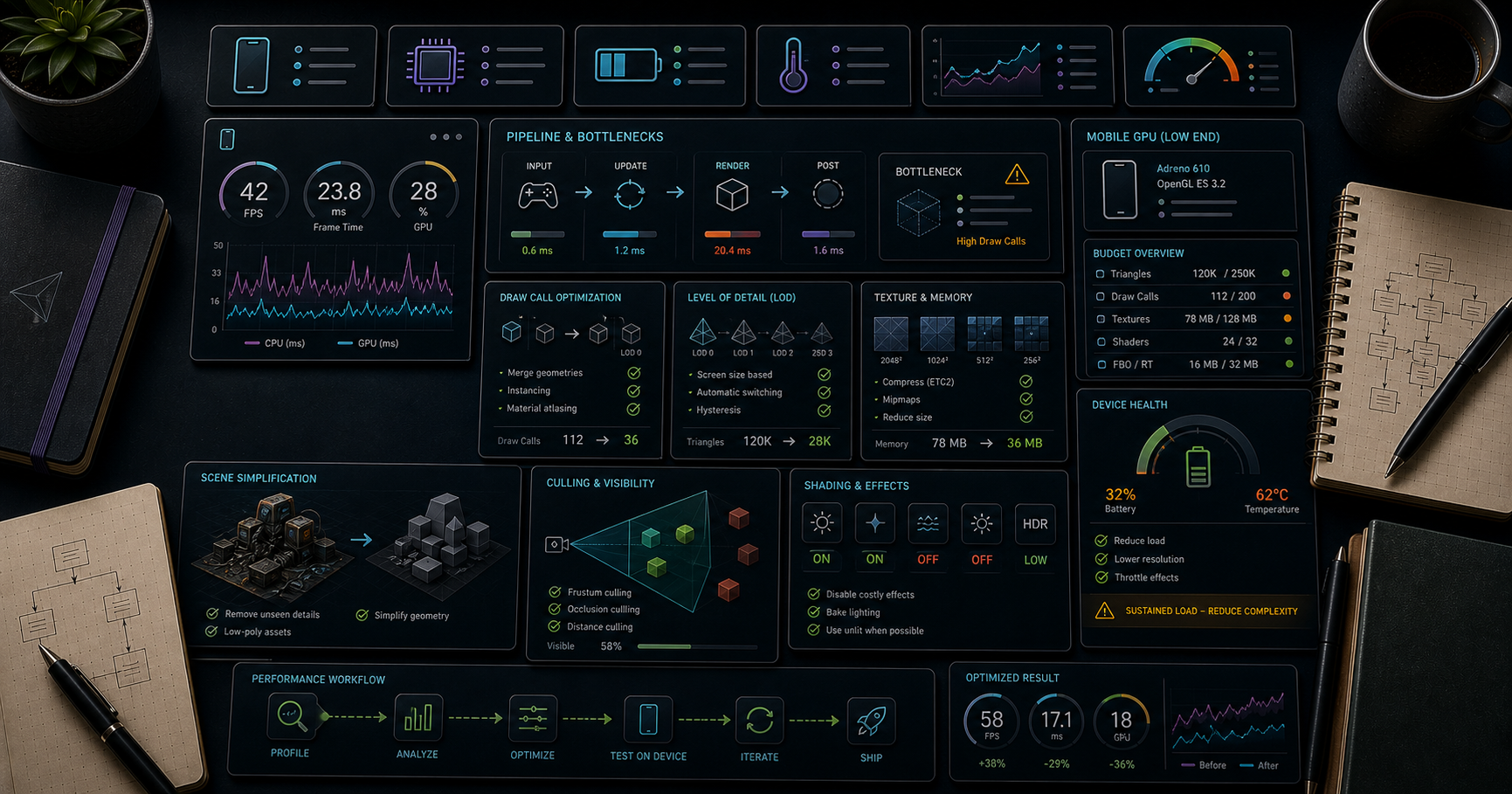
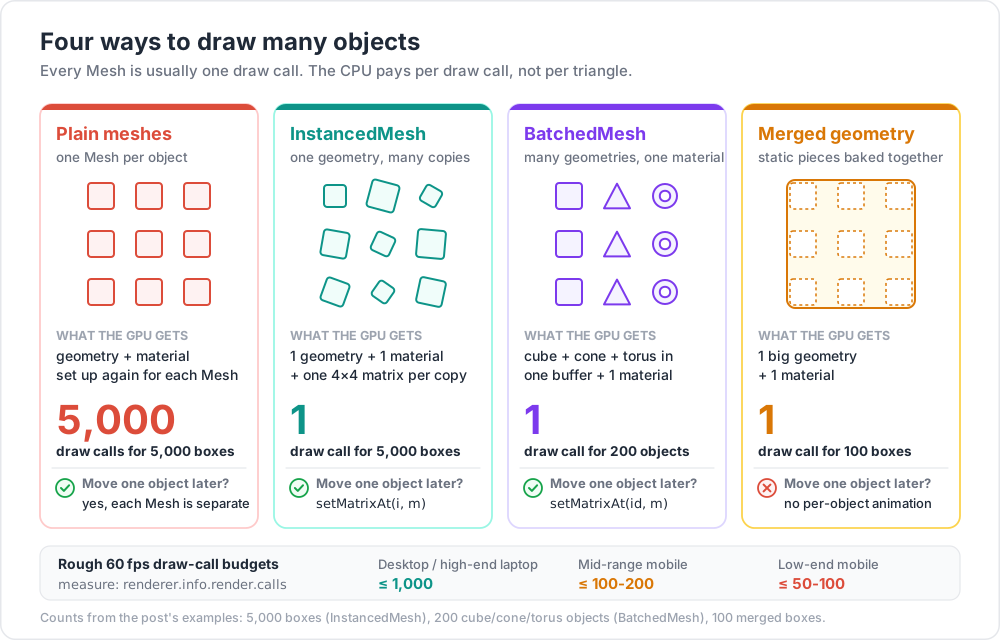
The single biggest performance trick in real-time 3D is don't issue one draw call per object. The CPU side of WebGL/WebGPU spends most of its budget setting up state for each draw call; reducing 9,000 draw calls to 300 takes a slideshow back to 60 fps without changing visual quality. This post covers the four standard tools — InstancedMesh (the "clone trick" for many copies of one shape), BatchedMesh (many different shapes, one material), geometry merging (one giant mesh), and LOD (less detail for distant objects) — and the draw-call budget rules to know when to reach for each.
Series map: 00 Foundations → 01 Geometry & Materials → 02 Cameras & Controls → 03 Lighting & Shadows → 04 Textures & PBR → 05 Asset Pipeline → 06 Animation → 07 Instancing & Batching (this post) → 08 Low-End Perf → 09 Shaders → 10 Post-Processing → 11 Physics → 12 R3F → 13 AI 3D.
Learning Outcome
- Recognise the draw-call budget and how to measure it.
- Use
InstancedMeshto render N copies of one geometry with per-instance transforms + colours. - Use
BatchedMesh(since r156) when geometries differ but the material is shared. - Merge static geometries into one with
BufferGeometryUtils.mergeGeometries. - Use
LOD(Level of Detail) so distant objects render simplified versions. - Pick the right tool for "10,000 trees", "1,000 unique buildings", "a city of 50,000 windows".
Chapter 1 — The draw-call budget
Every Mesh in the scene typically produces one draw call. Each draw call has CPU overhead: bind shader, set uniforms, set attribute pointers, issue the GPU command. Modern GPUs draw millions of triangles per frame easily; CPUs choke on thousands of draw calls per frame.
Rough targets for 60 fps:
| Device | Safe draw-call count |
|---|---|
| Desktop / high-end laptop | ≤ 1,000 |
| Mid-range mobile (mid-2020s) | ≤ 100-200 |
| Low-end mobile / older hardware | ≤ 50-100 |
Triangle counts matter much less than draw-call counts. 1 mesh with 500k triangles renders fine; 5,000 meshes with 100 triangles each will not.
Measure with renderer.info
1
2
3
console.log(renderer.info.render);
// { frame: ..., calls: 87, triangles: 152340, points: 0, lines: 0 }
If calls ≫ 200 and the scene is laggy, the problem is the draw-call count, not GPU rasterisation. The fix is one of the patterns in this post.
Chapter 2 — InstancedMesh — the "clone trick"
InstancedMesh draws N copies of one geometry with one material in one draw call, each copy with its own 4×4 matrix (transform) and optionally its own colour.
This is the answer to "I have 10,000 trees / rocks / windows / grass blades / particles".
1
2
3
4
5
6
7
8
9
10
11
12
13
14
15
16
17
18
19
20
21
22
23
24
25
import * as THREE from 'three';
const COUNT = 5000;
const geo = new THREE.BoxGeometry(0.4, 0.4, 0.4);
const mat = new THREE.MeshStandardMaterial({ color: 0x88aa66 });
const mesh = new THREE.InstancedMesh(geo, mat, COUNT);
const dummy = new THREE.Object3D(); // reusable for matrix math
for (let i = 0; i < COUNT; i++) {
dummy.position.set(
(Math.random() - 0.5) * 200,
0,
(Math.random() - 0.5) * 200
);
dummy.rotation.y = Math.random() * Math.PI * 2;
dummy.scale.setScalar(0.5 + Math.random() * 1.5);
dummy.updateMatrix();
mesh.setMatrixAt(i, dummy.matrix);
}
mesh.instanceMatrix.needsUpdate = true;
mesh.castShadow = true;
mesh.receiveShadow = true;
scene.add(mesh);
That entire scene = 1 draw call regardless of COUNT.
Per-instance colour
1
2
3
4
5
6
7
const color = new THREE.Color();
for (let i = 0; i < COUNT; i++) {
color.setHSL(Math.random(), 0.5, 0.6);
mesh.setColorAt(i, color);
}
mesh.instanceColor.needsUpdate = true;
The material respects per-instance colour automatically.
Animating instances
1
2
3
4
5
6
7
8
9
10
11
renderer.setAnimationLoop(() => {
const t = clock.getElapsedTime();
for (let i = 0; i < COUNT; i++) {
dummy.position.y = Math.sin(t + i * 0.1) * 0.5;
dummy.updateMatrix();
mesh.setMatrixAt(i, dummy.matrix);
}
mesh.instanceMatrix.needsUpdate = true;
renderer.render(scene, camera);
});
Reading/writing every instance every frame is fine up to ~10k instances on the main thread. For 100k+ instances, move the update to a Web Worker or use a vertex shader (Post 09) that computes positions from a base attribute + instance id.
Per-instance picking + visibility
1
2
3
4
5
6
7
8
9
10
const hits = raycaster.intersectObject(mesh);
if (hits.length) {
const i = hits[0].instanceId; // which instance was clicked
// hide it:
dummy.scale.setScalar(0);
dummy.updateMatrix();
mesh.setMatrixAt(i, dummy.matrix);
mesh.instanceMatrix.needsUpdate = true;
}
(Three.js doesn't have first-class per-instance visibility; scale = 0 is the common trick.)
Chapter 3 — BatchedMesh — many shapes, one material
InstancedMesh requires every instance to share the same geometry. BatchedMesh (added in r156) lifts that restriction — many different geometries can be rendered in one draw call as long as they share a material.
Use when: a city of unique buildings, a furniture catalogue, a forest with several tree species.
1
2
3
4
5
6
7
8
9
10
11
12
13
14
15
16
17
18
19
20
21
22
23
24
25
26
27
28
29
30
31
import * as THREE from 'three';
const SHARED = new THREE.MeshStandardMaterial({ color: 0xcccccc });
const batch = new THREE.BatchedMesh(
/* maxInstanceCount */ 200,
/* maxVertexCount */ 200_000,
/* maxIndexCount */ 600_000,
SHARED
);
const cube = new THREE.BoxGeometry(1, 1, 1);
const cone = new THREE.ConeGeometry(0.5, 1, 16);
const torus = new THREE.TorusGeometry(0.5, 0.2, 12, 24);
const cubeId = batch.addGeometry(cube);
const coneId = batch.addGeometry(cone);
const torusId = batch.addGeometry(torus);
for (let i = 0; i < 200; i++) {
const id = batch.addInstance([cubeId, coneId, torusId][i % 3]);
const m = new THREE.Matrix4().compose(
new THREE.Vector3((i - 100) * 1.5, 0, 0),
new THREE.Quaternion(),
new THREE.Vector3(1, 1, 1)
);
batch.setMatrixAt(id, m);
}
scene.add(batch);
200 different-shape objects, 1 draw call. The original cube/cone/torus geometries are merged into the batch's internal buffer.
When BatchedMesh underperforms
The current Three.js BatchedMesh emulates instancing via multiDraw rather than multiDraw*Instanced. For workloads of "many copies of the same geometry", InstancedMesh is faster. For "many different geometries, same material", BatchedMesh wins.
Decision:
- All instances identical geometry → InstancedMesh.
- Different geometries, same material → BatchedMesh.
- Different materials → can't batch directly; merge materials (Chapter 6) or accept separate draw calls.
Chapter 4 — Geometry merging (one big mesh)
For static scenery where you don't need per-object updates, merge geometries into a single big mesh:
1
2
3
4
5
6
7
8
9
10
11
12
13
14
15
import { BufferGeometryUtils } from 'three/addons/utils/BufferGeometryUtils.js';
const pieces = [];
for (let i = 0; i < 100; i++) {
const g = new THREE.BoxGeometry(1, 1, 1);
g.translate(Math.random() * 50, 0, Math.random() * 50);
pieces.push(g);
}
const merged = BufferGeometryUtils.mergeGeometries(pieces);
const mesh = new THREE.Mesh(merged, new THREE.MeshStandardMaterial({ color: 0xaaaaaa }));
scene.add(mesh);
pieces.forEach((g) => g.dispose());
1 draw call, fully baked. No per-object animation possible — to move one cube, you'd modify the whole merged geometry. Use for static decoration (walls, ground details, fixed environment).
Multi-material merge
1
2
3
const merged = BufferGeometryUtils.mergeGeometries(pieces, /* useGroups */ true);
const mesh = new THREE.Mesh(merged, [matA, matB, matC]);
Groups define which sub-range uses which material — still one geometry but multiple draw calls (one per group). Useful for merging objects that genuinely need different materials while keeping vertex data shared.
Chapter 5 — LOD (Level of Detail)
A model 100 m away doesn't need 50k triangles. LOD swaps to a simpler version automatically:
1
2
3
4
5
6
7
const lod = new THREE.LOD();
lod.addLevel(highDetailMesh, 0); // < 10 m
lod.addLevel(midDetailMesh, 10); // 10-30 m
lod.addLevel(lowDetailMesh, 30); // 30-100 m
lod.addLevel(impostorMesh, 100); // > 100 m (often a billboard)
scene.add(lod);
Each tier is a different mesh (different geometry). Three.js picks based on camera distance per frame.
Generate LODs
- Manual in Blender (decimate modifier).
- gltf-transform simplify with
--ratio 0.5etc. - meshoptimizer has automatic LOD generation; some glTF pipelines run it server-side.
Impostor billboards
For very distant objects: replace the 3D model with a Sprite (textured 2D billboard) of a pre-rendered angle. Used heavily in open-world games for forests / cities.
Chapter 6 — Merging materials with a texture atlas
To batch objects that look different (different colours, different decals), pack their textures into a single atlas + remap UVs. Then they share one material → can be merged or instanced.
Tools: Blender bake to atlas; gltf-transform dedup; manual UV editing.
This combination — atlas + InstancedMesh — is how you draw a forest with many different leaf colours in 1 draw call.
Chapter 7 — Frustum culling + occlusion culling
Three.js culls per-mesh: meshes whose bounding sphere is outside the camera frustum are skipped.
1
2
mesh.frustumCulled = true; // default
For InstancedMesh and BatchedMesh, frustum culling tests the entire batch's bounding sphere — if any part is in view, the whole batch renders. To get per-instance culling, you have two choices:
- Manual chunking — split a 10k-instance forest into 100 chunks of 100 instances. Each chunk has its own InstancedMesh with a tighter bounding sphere.
- GPU culling with
BatchedMesh.setVisibleAt(i, bool)— newer Three.js supports per-instance visibility for BatchedMesh.
For occlusion culling (skipping objects hidden by walls), Three.js doesn't ship native support. Libraries like three-mesh-bvh can accelerate visibility queries; production engines often use a custom hierarchical-Z buffer approach.
Chapter 8 — Putting it together — recipes
| Scenario | Pattern |
|---|---|
| 10,000 grass blades | InstancedMesh + vertex shader to animate sway |
| Forest of 3 tree species | BatchedMesh, or 3 InstancedMeshes (one per species) |
| City of 1,000 unique buildings | BatchedMesh with one shared atlas material |
| Static room (walls, floor, props) | merge geometries into one mesh per material |
| Open-world terrain | LOD with 4-5 levels + impostor billboards for distant chunks |
| Particle system | InstancedMesh or Points with custom shader |
| Skinned crowd (many animated characters) | InstancedMesh + GPU-skinning shader (advanced) |
Chapter 9 — Hidden cost: tools that hurt batching
| Thing | Cost |
|---|---|
| Different materials | breaks batching — each material is a separate draw call |
castShadow = true per mesh |
doubles the draw calls (one for camera, one for shadow camera) |
| Transparency | each transparent mesh sorted + drawn separately |
| Postprocess passes | each pass = full-screen draw |
| Per-instance materials | impossible — instances share material |
Plan visual variation that doesn't break batching: per-instance colour, texture atlas, vertex-shader-driven variation rather than separate materials.
Chapter 10 — Profiling tools
| Tool | What |
|---|---|
renderer.info |
numerical counters per frame (calls, triangles, programs) |
| stats-gl | overlay (FPS, CPU ms, GPU ms) |
| r3f-perf (R3F) | in-scene perf overlay with breakdown by mesh |
| Spector.js | full WebGL frame capture; see every command |
| Chrome DevTools Performance panel | flame graph of JS + GPU |
| WebGPU Inspector | (extension) frame capture for WebGPU |
The workflow: notice slow framerate → check calls in renderer.info → if high, apply the patterns in this post → re-measure.
Practice Exercises
Exercise 1 — 10,000 cubes — naive vs instanced
Render 10,000 cubes as individual new THREE.Mesh(...). Note the FPS and renderer.info.calls. Replace with an InstancedMesh. Compare.
Exercise 2 — Animated InstancedMesh
The 10,000 cubes from Exercise 1: animate their Y positions with a sin wave per-instance. Confirm framerate stays high.
Exercise 3 — BatchedMesh zoo
Build a BatchedMesh holding 100 mixed shapes (cube, cone, sphere, torus) all using the same material. Confirm 1 draw call.
Exercise 4 — LOD swap
Take any character model. Generate 3 LODs (high/mid/low) — use the decimate modifier in Blender or just three boxes for the placeholder. Wire up THREE.LOD. Walk away from the model in OrbitControls; watch the swap.
Exercise 5 — Per-instance click + hide
Implement Chapter 2's per-instance picking. Click an instance → scale to 0. Bonus: animate the scale to 0 with a tween.
Exercise 6 — Chunked InstancedMesh
For a 200×200 forest, split into 10×10 chunks of 20×20 trees. Each chunk = one InstancedMesh. Confirm frustum culling now skips chunks behind the camera.
Cheat-sheet
| What | How |
|---|---|
| Draw-call target | < 100 mobile, < 1000 desktop |
| Measure | renderer.info.render.calls |
| One geo many copies | new THREE.InstancedMesh(geo, mat, N) |
| Set instance transform | setMatrixAt(i, matrix) + instanceMatrix.needsUpdate = true |
| Per-instance colour | setColorAt(i, color) + instanceColor.needsUpdate = true |
| Per-instance pick | raycaster.intersectObject(mesh) → hit.instanceId |
| Different geos same material | BatchedMesh |
| Static scenery | BufferGeometryUtils.mergeGeometries(arr) |
| Distance-based detail | THREE.LOD with multiple addLevel(mesh, dist) |
| Atlas trick | one material across many "different-looking" objects |
| Frustum cull a forest | split into chunks |
| Batched shadows | mesh.castShadow = true still works for instanced/batched |
| Profile | stats-gl + Spector.js |
What's next
Post 08 focuses on squeezing Three.js onto low-end and mobile devices — pixel-ratio capping, texture/triangle budgets, on-demand rendering, shader-cost awareness, and the diagnostic flow for "my scene runs at 12 fps on a phone".
References
- Three.js docs — InstancedMesh
- Three.js docs — BatchedMesh
- Three.js docs — LOD
- InstancedMesh vs BatchedMesh (forum)
- BatchedMesh deep-dive (Wael Yasmina)
- 100 Three.js Tips That Actually Improve Performance (2026)
- @three.ez/batched-mesh-extensions — community helpers
Note: this post is in progress. Planned additions: GPU-skinned crowd implementation; baking animations into a texture; impostor billboard pipeline; comparison benchmarks (10k instances on desktop vs phone).