MongoDB Course — 26 · OpenTelemetry Observability — Traces, Metrics, Logs, Correlation
When a request is slow, "is it Mongo?" is the question that wastes the most production time. OpenTelemetry (OTel) makes the answer obvious — every Mongo operation becomes a span attached to the request trace, with query shape, duration, target collection, and the surrounding service spans on the same timeline. Plus metrics (Mongo + driver pool + service) + logs (correlated by trace ID). This post covers wiring OTel into Node + Python services using the MongoDB drivers, picking a backend (Tempo / Datadog / Honeycomb / Atlas), instrumenting custom spans, and the dashboards + alerts worth building.
Series map: 24 Kafka + Debezium → 25 Testing → 26 OpenTelemetry (this post) → 27 Geo → 28 Time-series extreme → 29 K8s + mongosync + cost.
Learning Outcome
- Wire OpenTelemetry into Node + Python services.
- Auto-instrument the MongoDB driver (spans per operation).
- Add custom spans + attributes for app-specific context.
- Export traces to OTLP collector → backend (Tempo / Datadog / Honeycomb / SigNoz / etc.).
- Correlate Mongo slow-query log with trace IDs.
- Pick the metrics + alerts that catch real production problems.
Chapter 1 — The three signals
- Traces — per-request span tree. The "why is this endpoint slow?" answer.
- Metrics — aggregated counters / histograms. The "is the system healthy?" answer.
- Logs — discrete events. The "what exactly happened?" answer.
OTel unifies them with shared resource attributes (service.name, service.version) and trace context. A log line emitted inside a request carries the trace ID; click the trace → see logs from every span.
For MongoDB specifically:
- Each Mongo operation = a span (auto-instrumented). Includes operation name (
find,aggregate), namespace (shop.orders), command summary, duration. - Driver pool metrics (connections active / idle / wait time).
- Server-side: ship slow-query log to logs backend; correlate by
commentfield.
Chapter 2 — Node — auto-instrument + custom spans
1
2
3
4
5
6
npm install @opentelemetry/api @opentelemetry/sdk-node \
@opentelemetry/auto-instrumentations-node \
@opentelemetry/exporter-trace-otlp-http \
@opentelemetry/resources \
@opentelemetry/semantic-conventions
1
2
3
4
5
6
7
8
9
10
11
12
13
14
15
16
17
18
19
20
21
22
23
24
// telemetry.ts — load BEFORE any app code
import { NodeSDK } from '@opentelemetry/sdk-node';
import { getNodeAutoInstrumentations } from '@opentelemetry/auto-instrumentations-node';
import { OTLPTraceExporter } from '@opentelemetry/exporter-trace-otlp-http';
import { Resource } from '@opentelemetry/resources';
import { SemanticResourceAttributes } from '@opentelemetry/semantic-conventions';
const sdk = new NodeSDK({
resource: new Resource({
[SemanticResourceAttributes.SERVICE_NAME]: 'shop-api',
[SemanticResourceAttributes.SERVICE_VERSION]: process.env.GIT_SHA ?? 'dev',
[SemanticResourceAttributes.DEPLOYMENT_ENVIRONMENT]: process.env.NODE_ENV ?? 'dev',
}),
traceExporter: new OTLPTraceExporter({
url: process.env.OTEL_EXPORTER_OTLP_ENDPOINT ?? 'http://localhost:4318/v1/traces',
}),
instrumentations: [getNodeAutoInstrumentations({
'@opentelemetry/instrumentation-fs': { enabled: false },
})],
});
sdk.start();
process.on('SIGTERM', () => sdk.shutdown());
1
2
node -r ./telemetry.ts src/server.ts
The auto-instrumentation set includes:
- HTTP server / client (Express / Fastify / undici).
mongodbdriver — every command becomes a span.mongoose— additional spans for find / save / etc.pg,mysql2,redis— for polyglot services.
The Mongo span carries:
1
2
3
4
5
6
7
8
9
name: mongodb.find
attributes:
db.system: "mongodb"
db.name: "shop"
db.mongodb.collection: "orders"
db.operation: "find"
db.statement: "{ user_id: 1, status: 'paid' }" // optional; can be disabled
net.peer.name: "cluster0.mongo.net"
Custom span around business logic:
1
2
3
4
5
6
7
8
9
10
11
12
13
14
15
16
17
18
19
20
21
22
import { trace } from '@opentelemetry/api';
const tracer = trace.getTracer('shop');
async function placeOrder(input) {
return tracer.startActiveSpan('placeOrder', async (span) => {
span.setAttribute('user.id', input.user_id);
span.setAttribute('items.count', input.items.length);
try {
const result = await db.collection('orders').insertOne({ ... });
span.setAttribute('order.id', result.insertedId.toString());
return result;
} catch (err) {
span.recordException(err);
span.setStatus({ code: 2 /* ERROR */ });
throw err;
} finally {
span.end();
}
});
}
Now in the trace UI:
1
2
3
4
5
6
7
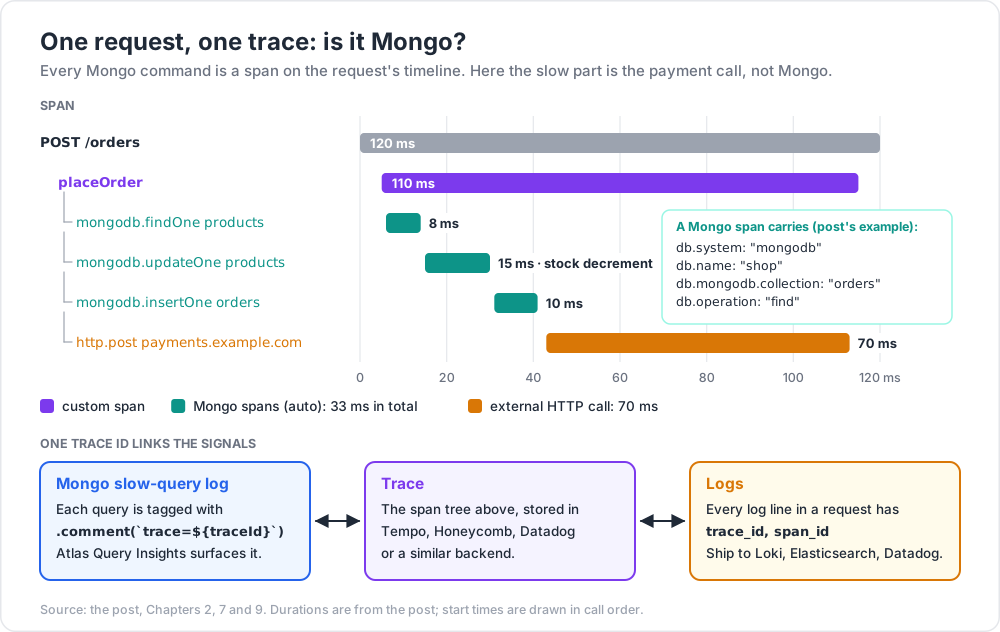
POST /orders 120 ms
├─ placeOrder 110 ms
│ ├─ mongodb.findOne products 8 ms
│ ├─ mongodb.updateOne products 15 ms (stock decrement)
│ ├─ mongodb.insertOne orders 10 ms
│ └─ http.post payments.example.com 70 ms
Eye-level: the slow span is the external HTTP call, not Mongo.
Chapter 3 — Python — auto-instrument + custom spans
1
2
3
4
5
pip install opentelemetry-api opentelemetry-sdk \
opentelemetry-exporter-otlp \
opentelemetry-instrumentation-pymongo \
opentelemetry-instrumentation-fastapi
1
2
3
4
5
6
7
8
9
10
11
12
13
14
15
16
17
18
# telemetry.py
from opentelemetry import trace
from opentelemetry.sdk.resources import Resource
from opentelemetry.sdk.trace import TracerProvider
from opentelemetry.sdk.trace.export import BatchSpanProcessor
from opentelemetry.exporter.otlp.proto.http.trace_exporter import OTLPSpanExporter
from opentelemetry.instrumentation.pymongo import PymongoInstrumentor
from opentelemetry.instrumentation.fastapi import FastAPIInstrumentor
def init_telemetry(app):
resource = Resource.create({"service.name": "shop-api"})
provider = TracerProvider(resource=resource)
provider.add_span_processor(BatchSpanProcessor(OTLPSpanExporter()))
trace.set_tracer_provider(provider)
PymongoInstrumentor().instrument()
FastAPIInstrumentor.instrument_app(app)
1
2
3
4
from fastapi import FastAPI
app = FastAPI()
init_telemetry(app)
Custom span:
1
2
3
4
5
6
7
8
9
10
tracer = trace.get_tracer("shop")
@app.post("/orders")
async def create_order(input: OrderIn):
with tracer.start_as_current_span("placeOrder") as span:
span.set_attribute("user.id", input.user_id)
result = await db.orders.insert_one(input.dict())
span.set_attribute("order.id", str(result.inserted_id))
return {"id": str(result.inserted_id)}
Same shape as Node. For Beanie / Motor, the PymongoInstrumentor covers them (they wrap Motor which wraps pymongo).
Chapter 4 — Backend choice
| Backend | Hosted / Self | Notes |
|---|---|---|
| Tempo + Grafana | self-hosted | OSS, scales, Grafana ecosystem |
| Jaeger | self-hosted | OSS classic; simpler than Tempo |
| Datadog | hosted | enterprise-grade, expensive |
| Honeycomb | hosted | strong query model, generous free tier |
| New Relic | hosted | broad APM |
| SigNoz | self / hosted | OSS-first, OTel native |
| Atlas | hosted (Mongo Inc.) | Atlas has its own performance + query insights — pair, don't replace |
| AWS X-Ray | hosted | AWS native; OTel exporter exists |
OpenTelemetry's value: write instrumentation once, swap backend by changing exporter URL. No vendor lock.
For new projects in 2026, Tempo + Grafana (self-hosted) or Honeycomb (hosted) are common picks.
Chapter 5 — OTel Collector
The OTel Collector is a separate process (one per host or one per cluster) that receives OTLP from your services + exports to one or more backends. Decouples app from backend, allows sampling / filtering / batching centrally.
1
2
3
4
5
6
7
8
9
10
11
12
13
14
15
16
17
18
19
20
21
22
23
24
25
26
27
28
29
# collector.yaml
receivers:
otlp:
protocols:
http: {}
grpc: {}
processors:
batch: {}
memory_limiter: { limit_mib: 400 }
exporters:
otlp/tempo:
endpoint: tempo:4317
tls: { insecure: true }
prometheusremotewrite:
endpoint: http://prom:9090/api/v1/write
service:
pipelines:
traces:
receivers: [otlp]
processors: [memory_limiter, batch]
exporters: [otlp/tempo]
metrics:
receivers: [otlp]
processors: [memory_limiter, batch]
exporters: [prometheusremotewrite]
Apps point at the collector; collector handles fan-out. Easy to add a second backend, swap, or test.
Chapter 6 — Metrics worth tracking
App-level (from your service):
- request rate per endpoint
- latency histogram per endpoint (p50 / p95 / p99)
- error rate per endpoint
- queue depth if you have a worker
MongoDB driver-side (auto-collected by recent OTel instrumentations):
- command duration histogram (per operation, per collection)
- connection pool —
connections.in_use,connections.idle,connections.wait_time_ms
MongoDB server-side (via Atlas metrics / Prometheus exporter on self-hosted):
- ops per second (insert/query/update/delete)
- connection count
- replication lag
- oplog window
- cache hit ratio
- ticket usage
- queue depth
Alert on:
| Metric | Threshold |
|---|---|
| p99 latency on a key endpoint | > 500 ms for 5 min |
| 5xx error rate | > 1 % for 5 min |
| Mongo command p99 | > 200 ms for 10 min |
| Connection pool wait | any > 0 sustained |
| Replication lag | > 60 s |
| Atlas tier connection count | > 80 % limit |
OpsManager FTDC cursorTimeoutMs |
spikes |
Chapter 7 — Correlating with the slow-query log
Production trick: tag every query with the trace ID.
1
2
3
4
5
6
7
8
9
import { trace, context } from '@opentelemetry/api';
const traceId = trace.getActiveSpan()?.spanContext().traceId ?? 'no-trace';
await db.collection('orders').find({ user_id: id })
.comment(`trace=${traceId}`)
.maxTimeMS(500)
.toArray();
The query lands in the slow-query log (Post 14) with the trace ID. Atlas Query Insights surfaces both. Click a slow query → search your traces backend for that ID → see the full request context.
Bidirectional debugging:
- Slow trace? → drill into Mongo span → see full command + duration.
- Slow query in Atlas? → look up the trace ID in your tracing backend → see who called it + with what request.
Chapter 8 — Sampling — keep cost in check
Sending every span to a backend costs money + storage. Sample:
- Head sampling: probability decision at the start of each trace (e.g., 10 %). Cheap, simple, loses interesting slow traces randomly.
- Tail sampling (in the Collector): all spans buffered briefly; sample by outcome — keep all errors + slow + a small % of normal. Cheaper + smarter.
- Always sample errors + traces from
/adminendpoints.
1
2
3
4
5
6
7
8
9
# tail-sampling in the Collector
processors:
tail_sampling:
decision_wait: 30s
policies:
- { name: errors, type: status_code, status_code: { status_codes: [ERROR] } }
- { name: slow, type: latency, latency: { threshold_ms: 1000 } }
- { name: default, type: probabilistic, probabilistic: { sampling_percentage: 5 } }
Hosted backends (Datadog, Honeycomb) have their own sampling controls.
Chapter 9 — Logs correlated with traces
1
2
3
4
5
6
7
8
9
10
11
12
13
14
15
16
import pino from 'pino';
import { context, trace } from '@opentelemetry/api';
const baseLogger = pino();
export function log() {
const span = trace.getSpan(context.active());
const sc = span?.spanContext();
return baseLogger.child({
trace_id: sc?.traceId,
span_id: sc?.spanId,
});
}
log().info({ user_id: 42 }, 'creating order');
Every log line carries the current trace ID. Ship to Loki / Elasticsearch / Datadog. From a slow trace → search logs for that trace_id → see what the code was doing + any warnings.
OTel logs API (@opentelemetry/api-logs) is GA in 2026 — even cleaner than Pino's trace fields. Pick whichever your stack uses.
Chapter 10 — Atlas-specific signals
Atlas surfaces native:
- Performance Advisor — index suggestions from real slow queries.
- Query Insights — slow query shapes grouped + sampled.
- Real-Time Performance Panel — live ops + metrics.
- Alerts — configurable on every metric.
- Cluster events log — failovers, config changes.
Pair with OTel: app traces on your tracing backend; cluster-level metrics + slow queries on Atlas. Trace ID in query comment ties them together.
Atlas + Datadog integration ships pre-built dashboards if Datadog is your tracing backend — saves dashboard-building time.
Chapter 11 — Common pitfalls
| Pitfall | Cause | Fix |
|---|---|---|
| Spans missing | telemetry init AFTER app code starts | init telemetry first |
db.statement leaks sensitive data |
full command logged | disable enhancedDatabaseReporting or scrub attributes |
Trace context lost across setImmediate / queue |
manual async handoff loses context | use context.with(ctx, fn) |
| Backend bill spike | sampling 100 % at high QPS | head + tail sample |
| Logs don't carry trace ID | logger not enriched | inject trace ID per log call |
| Slow query log + traces don't tie up | no comment with trace ID |
add it on every query |
| Driver pool metric absent | instrumentation version old | upgrade |
| Cross-service trace breaks | propagation header missing | use auto-instrumented HTTP clients |
| OTel performance overhead | always-on with no batching | BatchSpanProcessor + reasonable export interval |
Practice Exercises
Exercise 1 — Hello OTel
In a Node or Python service, install OTel + run a local Jaeger / Tempo + see your first trace.
Exercise 2 — Auto-instrument Mongo
Confirm every Mongo operation appears as its own span attached to your request trace.
Exercise 3 — Custom span
Wrap a business operation (placeOrder) with a custom span + attributes. Verify in the trace UI.
Exercise 4 — Trace ID in queries
Add a .comment(trace=${traceId}) to every Mongo query. Make a slow query; find it via Atlas slow-query log; follow the trace ID back to the trace.
Exercise 5 — Sampling
Set head sampling to 10 %. Verify spans drop proportionally. Switch to tail sampling in the Collector keeping 100 % of errors.
Exercise 6 — Logs correlation
Add Pino with trace ID enrichment. Confirm a log line written inside a request carries the right trace_id.
Cheat-sheet
| What | How |
|---|---|
| SDK | OTel SDK + Auto-Instrumentations for your language |
| Mongo spans | auto-instrumented via the driver |
| Custom span | tracer.startActiveSpan(name, fn) |
| Backend | Tempo + Grafana / Honeycomb / Datadog / SigNoz |
| Collector | OTel Collector for fan-out, sampling, transformations |
| Metrics | request rate + latency + error rate per endpoint; Mongo pool waits |
| Correlation | .comment(\trace=${traceId}`)` on Mongo queries |
| Logs | Pino / structlog + trace_id enrichment |
| Sampling | head 1-10 % + tail keep-errors + keep-slow |
| Disable PII | enhancedDatabaseReporting: false |
| Alerts | latency p99, error rate, pool wait, replication lag |
| Atlas pair | Atlas Performance Advisor + Query Insights complement OTel |
What's next
Post 27 is the geospatial deep dive — 2dsphere indexes, GeoJSON, $near / $geoWithin / $geoIntersects, geofencing, distance calculations, sharding by region.
References
- OpenTelemetry docs
- OTel Node auto-instrumentations
- OTel Python pymongo instrumentation
- OTel Collector docs
- Atlas Datadog integration
- Honeycomb OpenTelemetry guides
Note: this post is in progress. Planned additions: distributed-trace through Kafka events; SLO + error-budget burn-rate alerts; eBPF instrumentation overview.