PostgreSQL Course — 07 · Operations, Backup, Replication and Security
Everything in the previous six posts assumed a database that is up, reachable, and holding correct data. This post is about keeping that true. It covers the write-ahead log that underpins both durability and replication, backup strategies from a logical dump to point-in-time recovery, streaming and logical replication with the failover hazards they bring, why PostgreSQL's process-per-connection model makes a pooler near-mandatory, the security surface from pg_hba.conf to row-level security, and the monitoring that tells you any of this is going wrong before a user does. It closes the base PostgreSQL course.
Series map: 00 Foundations & Setup → 01 SQL Fundamentals & Data Types → 02 Joins, Aggregation & Window Functions → 03 Indexes & the Query Planner → 04 Query Optimization & Statistics → 05 Transactions, MVCC, Isolation & Locking → 06 Schema Design, Normalization & JSONB → 07 Operations, Backup, Replication & Security (this post) → (future: extensions, full-text search, pgvector, partitioning at scale, tuning, PL/pgSQL, ORMs, managed PostgreSQL).
Learning Outcome
- Explain what the WAL is, why full page writes exist, and what a checkpoint does.
- Choose between logical dumps, physical base backups, and continuous archiving, and perform a point-in-time recovery.
- Set up streaming replication with a replication slot, and monitor lag correctly.
- Explain the split-brain hazard and why automatic failover needs fencing.
- Use logical replication, including for a near-zero-downtime major version upgrade.
- Configure PgBouncer in transaction mode and list exactly what breaks there.
- Grant privileges correctly, write a row-level security policy, and configure
pg_hba.confwithscram-sha-256and TLS. - Name the handful of PostgreSQL metrics worth alerting on and where each comes from.
Chapter 1 — The write-ahead log
Terminology
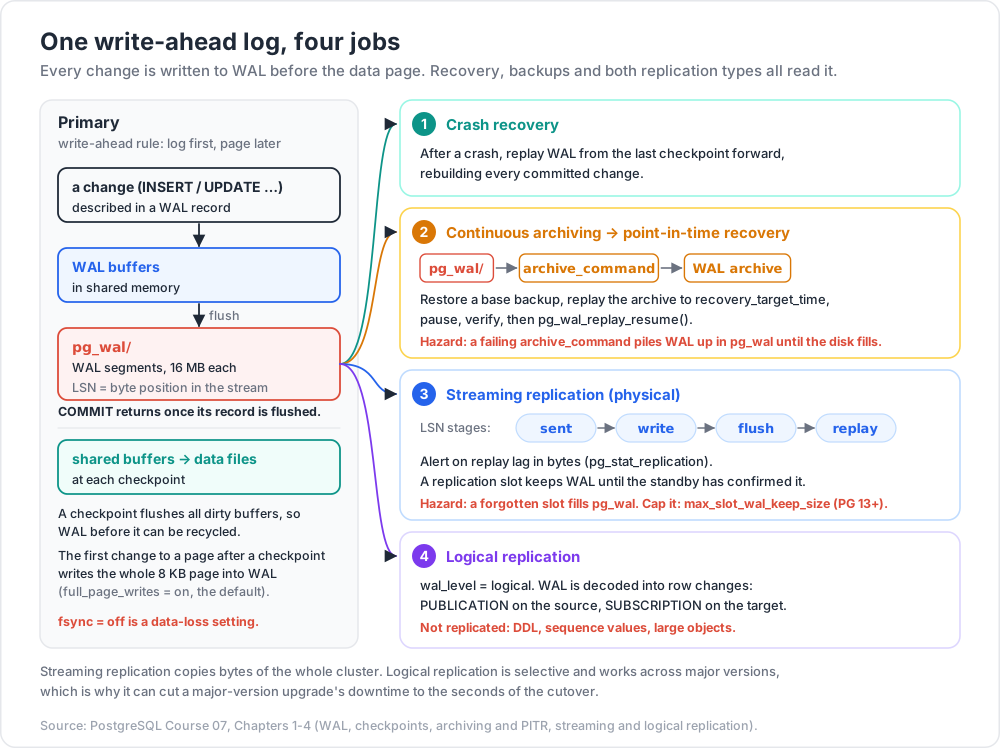
- WAL — the write-ahead log. Every change to a data page is described in a WAL record that is flushed to durable storage before the page itself is written.
- LSN — Log Sequence Number, a monotonically increasing byte position in the WAL stream (
0/16B3748). The universal currency of replication and recovery. - WAL segment — a WAL file, 16 MB by default.
- Checkpoint — a point at which all dirty shared buffers are flushed to the data files, allowing WAL before that point to be recycled.
- Full page write — the first change to a page after a checkpoint writes the entire 8 KB page into the WAL, not just the delta.
The write-ahead rule is what makes crash recovery possible: after a crash, PostgreSQL replays WAL from the last checkpoint forward, reconstructing every committed change. COMMIT returns only once the commit record is durably flushed — this is exactly the D in ACID, and it is why fsync = off is a data-loss setting, not a performance setting.
Full page writes
Operating systems and storage do not guarantee that an 8 KB page write is atomic. A crash mid-write can leave a torn page: half old, half new — a page WAL deltas cannot be applied to, because the base is corrupt. full_page_writes = on (the default) solves this by writing a complete image of the page the first time it is modified after each checkpoint, giving recovery a known-good base to replay from.
The cost is WAL volume, and it is the reason WAL generation spikes immediately after every checkpoint. It is also the reason random-write workloads (see UUIDv4 keys in post 06) generate far more WAL than sequential ones: they touch more distinct pages, so more of them need full images.
Checkpoints
| Parameter | Default | Effect |
|---|---|---|
checkpoint_timeout |
5min |
Maximum time between checkpoints. Commonly raised to 15min–30min. |
max_wal_size |
1GB |
Soft ceiling on WAL between checkpoints; exceeding it triggers one early. |
min_wal_size |
80MB |
WAL kept preallocated for recycling. |
checkpoint_completion_target |
0.9 |
Fraction of the interval over which the flush is spread. |
wal_compression |
off |
Compresses full-page images. Often a clear win on modern CPUs. |
Longer intervals mean fewer full page writes and less total I/O, but a longer crash-recovery time and larger I/O bursts. Set log_checkpoints = on (default since PostgreSQL 15) and watch for the phrase checkpoints are occurring too frequently in the log — that means max_wal_size is too small for the write rate.
synchronous_commit controls how much durability you pay for per transaction:
| Value | Guarantee | Risk on crash |
|---|---|---|
on (default) |
WAL flushed locally before COMMIT returns |
None |
remote_apply |
Flushed and applied on a synchronous standby | None; highest latency |
remote_write |
Written (not flushed) on the standby | Standby OS crash could lose it |
local |
Local flush only, ignoring synchronous standbys | Loss only if the primary is lost |
off |
COMMIT returns before the flush |
Up to wal_writer_delay × 3 of committed transactions lost — but never corruption |
synchronous_commit = off is a legitimate choice for a bulk load or an analytics table where losing the last 600 ms of transactions is acceptable. fsync = off never is.
Chapter 2 — Backups
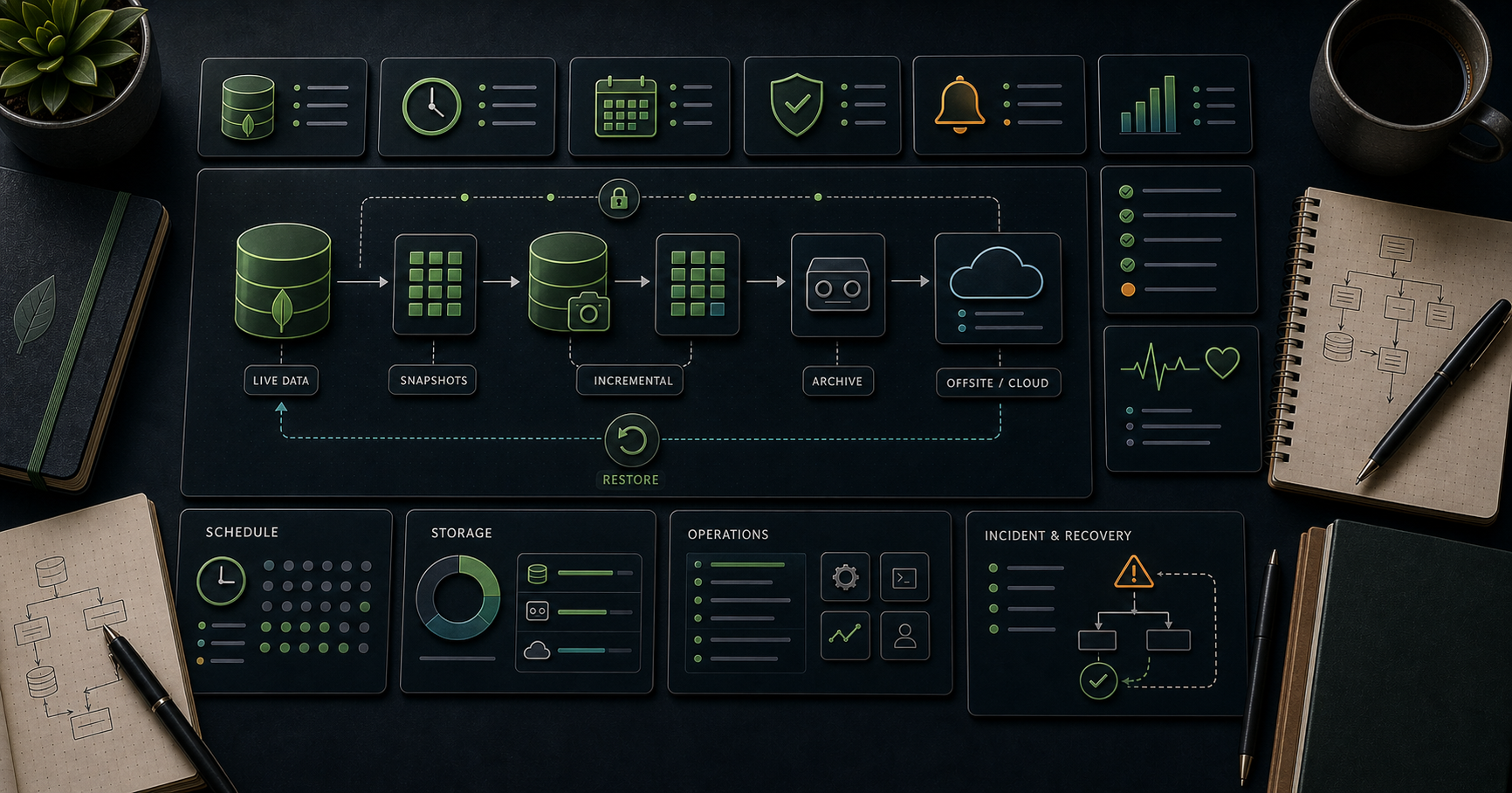
Three families, and you probably want two of them.
| Method | Granularity | Restore target | Cross-version | Cost |
|---|---|---|---|---|
pg_dump / pg_dumpall |
Logical (SQL or archive) | Any point you took a dump | Yes — restores into a newer major version | Slow on large databases; restore is slower still |
pg_basebackup |
Physical (whole cluster) | The moment the backup ended | No — same major version, same architecture | Fast; size of the data directory |
| Base backup + WAL archive | Physical + continuous | Any moment covered by the archive | No | Base backup plus ongoing WAL storage |
Logical dumps
1
2
3
4
5
6
7
8
9
10
11
12
13
14
# Custom format: compressed, parallel-restorable, selectively restorable. Prefer it.
pg_dump -Fc -Z 6 -d shop -f shop.dump
# Directory format allows a parallel dump as well
pg_dump -Fd -j 4 -d shop -f shop_dumpdir/
# Roles, tablespaces and other cluster-wide objects are NOT in pg_dump:
pg_dumpall --globals-only -f globals.sql
# Restore
createdb shop_restored
psql -d shop_restored -f globals.sql
pg_restore -d shop_restored -j 4 shop.dump
Properties to internalise: a pg_dump is a consistent snapshot (it runs in a REPEATABLE READ transaction), it does not block writers, but it does hold that snapshot for the whole run — which pins the vacuum horizon (post 05). It does not include statistics, so ANALYZE after restoring. And -Fc lets you restore one table out of a full dump, which plain SQL output does not.
Physical base backups
1
2
3
4
pg_basebackup -h primary.internal -U replicator \
-D /var/lib/postgresql/backup \
-X stream -c fast -P --checkpoint=fast
-X stream streams the WAL generated during the backup alongside it, so the result is self-consistent and immediately restorable. In PostgreSQL 15 the old exclusive backup mode was removed; the low-level API is now pg_backup_start() / pg_backup_stop() (renamed from pg_start_backup / pg_stop_backup).
Continuous archiving and point-in-time recovery
Configure the primary to hand every completed WAL segment to an archive:
1
2
3
4
5
6
# postgresql.conf
wal_level = replica
archive_mode = on
archive_command = 'test ! -f /wal_archive/%f && cp %p /wal_archive/%f'
archive_timeout = '5min' # force a segment switch so low-traffic gaps are bounded
The archive_command must return non-zero if it fails — PostgreSQL retries and keeps the segment until it succeeds. A command that silently succeeds while writing nowhere is the most common way a PITR setup turns out to be fiction.
Watch out: a failing
archive_commandmakes WAL accumulate inpg_waluntil the disk fills and the primary shuts down. Alert onpg_stat_archiver.last_failed_timeand onpg_waldirectory size.
Worked restore to a specific moment:
1
2
3
4
5
6
7
8
9
10
11
12
13
14
15
16
17
18
19
20
21
22
23
24
25
# 1. Stop the broken cluster. Do NOT delete the old data directory - move it aside.
sudo systemctl stop postgresql
sudo mv /var/lib/postgresql/17/main /var/lib/postgresql/17/main.broken
# 2. Restore the most recent base backup taken BEFORE the target time.
sudo -u postgres tar -xzf /backups/base_2026-06-01.tar.gz \
-C /var/lib/postgresql/17/main
# 3. Point recovery at the archive and name the target.
sudo -u postgres tee -a /var/lib/postgresql/17/main/postgresql.auto.conf <<'EOF'
restore_command = 'cp /wal_archive/%f %p'
recovery_target_time = '2026-06-02 09:14:00+09'
recovery_target_action = 'pause'
EOF
# 4. Signal recovery mode (PostgreSQL 12+ uses a signal file, not recovery.conf).
sudo -u postgres touch /var/lib/postgresql/17/main/recovery.signal
# 5. Start. It replays WAL to the target and pauses.
sudo systemctl start postgresql
# 6. Verify the data is what you expect, THEN release recovery.
psql -c "SELECT count(*) FROM orders WHERE ordered_at < '2026-06-02 09:14+09';"
psql -c "SELECT pg_wal_replay_resume();" -- promotes the cluster to normal operation
Recovery targets available: recovery_target_time, recovery_target_lsn, recovery_target_xid, recovery_target_name (set beforehand with pg_create_restore_point('before_migration')), and recovery_target = 'immediate'. recovery_target_action = 'pause' is the safe default — it gives you a chance to check before the timeline advances irreversibly.
In production, use a purpose-built tool rather than hand-rolled scripts: pgBackRest, Barman, or WAL-G all handle retention, parallel compression, encryption, incremental backups, and — critically — verification.
An untested backup is not a backup
The only evidence a backup works is a restore that produced a working database. Practices worth enforcing:
- A scheduled automated restore into a scratch environment, at least weekly, that runs a real query afterwards and fails loudly if it does not.
- Record and track the restore time, not just the backup time. Your RTO is a measured number or it is a hope.
- Keep at least one copy off the machine, off the account, and immutable. Backups on the same volume protect against nothing that actually happens.
- Practise the restore under time pressure once, with the runbook, before you need it.
Chapter 3 — Streaming replication
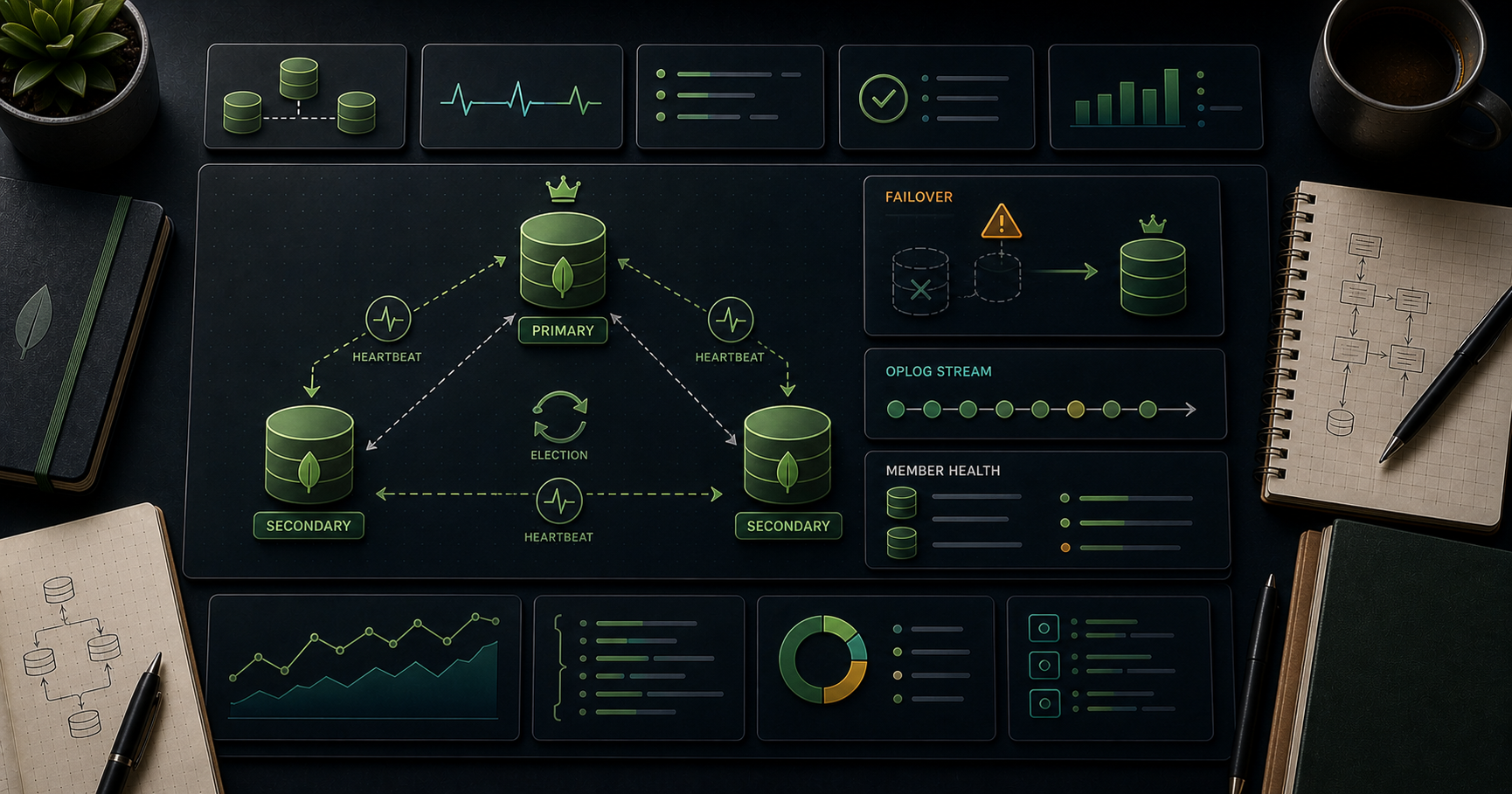
A standby connects to the primary over the replication protocol, receives WAL as it is generated, and replays it continuously. It is physical, byte-for-byte identical replication of the whole cluster.
Setup
On the primary:
1
2
3
4
5
wal_level = replica # or logical, if you also want logical replication
max_wal_senders = 10
max_replication_slots = 10
hot_standby = on # standby setting, but set it in the shared config
1
2
3
4
CREATE ROLE replicator WITH REPLICATION LOGIN PASSWORD '...';
-- pg_hba.conf: host replication replicator 10.0.0.0/8 scram-sha-256
SELECT * FROM pg_create_physical_replication_slot('standby_1');
On the standby:
1
2
3
4
5
pg_basebackup -h primary.internal -U replicator -D /var/lib/postgresql/17/main \
-X stream -R -S standby_1 -P
# -R writes primary_conninfo and creates standby.signal automatically
# -S binds it to the replication slot
Replication slots
A slot makes the primary retain WAL until the standby has confirmed consuming it. That removes the classic failure where a standby falls behind, the primary recycles the WAL it still needed, and the standby is permanently broken.
The slot's danger is symmetrical: a forgotten or dropped standby leaves an active slot, the primary retains WAL forever, and pg_wal fills the disk. Bound it:
1
2
max_slot_wal_keep_size = '64GB' # PostgreSQL 13+: invalidate the slot rather than die
1
2
3
4
5
-- Audit slots regularly; anything inactive with a growing lag is a disk-space incident
SELECT slot_name, slot_type, active,
pg_size_pretty(pg_wal_lsn_diff(pg_current_wal_lsn(), restart_lsn)) AS retained
FROM pg_replication_slots;
Synchronous vs asynchronous
Asynchronous (the default) means COMMIT returns as soon as the primary has flushed locally. A primary failure can lose the last few transactions. Synchronous replication waits for a standby:
1
2
3
synchronous_standby_names = 'ANY 1 (standby_1, standby_2)'
synchronous_commit = on
The trade is unambiguous: synchronous replication buys zero data loss on failover and costs one network round trip on every commit. Configure ANY 1 (a, b) rather than a single named standby — with one synchronous standby and no alternative, losing that standby stalls every commit on the primary.
Hot standby and read scaling
hot_standby = on lets the standby serve read-only queries. Two conflicts follow:
- A long query on the standby can be cancelled when WAL replay needs to remove rows it is reading (
max_standby_streaming_delay, default 30 s, controls how long replay waits first). hot_standby_feedback = ontells the primary to hold back vacuum for the standby's oldest snapshot, which prevents those cancellations — and reintroduces the long-transaction bloat problem from post 05, now caused remotely.
Pick one deliberately. Analytics standby: hot_standby_feedback = on and accept the bloat. Failover-only standby: leave it off.
Monitoring lag
1
2
3
4
5
6
7
8
9
10
11
12
13
-- On the primary: per-standby byte lag at each stage
SELECT client_addr, application_name, state, sync_state,
pg_size_pretty(pg_wal_lsn_diff(sent_lsn, write_lsn)) AS write_lag_bytes,
pg_size_pretty(pg_wal_lsn_diff(sent_lsn, flush_lsn)) AS flush_lag_bytes,
pg_size_pretty(pg_wal_lsn_diff(sent_lsn, replay_lsn)) AS replay_lag_bytes,
write_lag, flush_lag, replay_lag -- as time intervals
FROM pg_stat_replication;
-- On the standby: time lag, and whether the stream is alive
SELECT now() - pg_last_xact_replay_timestamp() AS replay_delay,
pg_is_in_recovery() AS is_standby,
pg_last_wal_receive_lsn(), pg_last_wal_replay_lsn();
Alert on replay lag in bytes, not on the time figure alone: on an idle primary, now() - pg_last_xact_replay_timestamp() grows simply because nothing has been committed, which produces false alarms.
Failover and split brain
Promotion itself is trivial:
1
2
3
pg_ctl promote -D /var/lib/postgresql/17/main
# or: SELECT pg_promote();
The danger is split brain: the old primary is not actually dead — it was unreachable — and it keeps accepting writes while the new primary also accepts writes. Two divergent timelines, both containing real customer data, and no automatic way to merge them.
Automatic failover therefore requires more than a health check:
- Fencing / STONITH — make certain the old primary cannot accept writes: kill the instance, revoke its network path, or detach its storage.
- Quorum — the decision to promote must be made by a majority of an odd-numbered set of observers, not by one watcher that may itself be the partitioned party.
- A single write endpoint — clients must reach the primary through a VIP, a proxy, or
target_session_attrs=read-writein a multi-host connection string, so promotion actually redirects them.
Use Patroni (with etcd/Consul/Kubernetes for consensus) or repmgr. Hand-rolled failover scripts are the classic source of split-brain incidents, and pg_rewind — which can resynchronise a diverged old primary — only helps if the divergence is small and wal_log_hints or data checksums were enabled beforehand.
Chapter 4 — Logical replication
Streaming replication copies bytes. Logical replication decodes the WAL into row-level changes and applies them as ordinary inserts, updates and deletes on the subscriber. That makes it selective and cross-version.
1
2
3
4
5
6
7
8
9
10
11
12
13
-- Publisher (needs wal_level = logical)
CREATE PUBLICATION shop_pub FOR TABLE orders, order_lines, customers;
-- or: CREATE PUBLICATION all_pub FOR ALL TABLES;
-- Subscriber
CREATE SUBSCRIPTION shop_sub
CONNECTION 'host=primary.internal dbname=shop user=replicator password=...'
PUBLICATION shop_pub;
-- Monitor
SELECT * FROM pg_stat_subscription;
SELECT * FROM pg_replication_slots WHERE slot_type = 'logical';
What it can do that physical replication cannot: replicate a subset of tables, replicate between different major versions, replicate into a differently-indexed target, filter rows (WHERE clauses on publications, PostgreSQL 15+) and columns (15+), and support two-way or many-to-one topologies.
What it does not do, and these bite:
- DDL is not replicated. Schema changes must be applied on both sides, subscriber first for additive changes.
- Sequence values are not replicated (through PostgreSQL 18). At cutover you must advance every sequence on the subscriber manually with
setval(). - Every replicated table needs a replica identity — a primary key, or
REPLICA IDENTITY FULL(which makes updates and deletes far more expensive), otherwise updates and deletes cannot be applied. - Large objects are not replicated. Truncate is (11+), but only for tables in the publication.
Major-version upgrade via logical replication
This is logical replication's most valuable use, because it reduces the downtime of a major upgrade from "however long pg_upgrade takes" to "however long a DNS or proxy switch takes".
- Build a new cluster on the target major version, restore the schema only (
pg_dump --schema-only). - Create a publication on the old cluster and a subscription on the new one. Initial data sync copies existing rows, then streaming catches up.
- Wait until
pg_stat_subscriptionshows negligible lag. Verify row counts on both sides. - Stop application writes (this is the entire downtime window).
- Confirm zero lag, advance all sequences with
setval(), then repoint the application at the new cluster. - Drop the subscription. Keep the old cluster shut down but intact for a rollback window.
Compare with pg_upgrade:
pg_upgrade |
Logical replication | |
|---|---|---|
| Downtime | Minutes to hours; --link/--clone makes it minutes |
Seconds — the cutover only |
| Extra disk | None with --link |
A full second copy of the data |
| Rollback | Hard once --link has been used |
Easy — the old cluster is untouched and still running |
| Complexity | One command plus a post-upgrade ANALYZE |
Sequences, DDL freeze, and verification to manage |
| Extension/index caveats | Before PostgreSQL 18, statistics are not carried over; 18+ keeps them except extended statistics. ANALYZE right after either way |
Target can even be re-indexed differently |
pg_upgrade --link is right for a small database with an acceptable maintenance window. Logical replication is right when downtime is measured in seconds and you want a live rollback path.
Chapter 5 — Connection pooling
PostgreSQL forks one operating-system process per connection. Each backend carries its own memory (work_mem allocations, catalogue caches, prepared statement plans), typically several megabytes at rest and much more under load. Consequences:
- Establishing a connection costs a
fork()plus catalogue loading — milliseconds, which is enormous compared to a 0.3 ms query. - Idle connections are not free; they hold memory and appear in every snapshot computation.
- Throughput peaks at a fairly small number of active backends — roughly in the neighbourhood of the core count plus effective spindle count — and declines beyond it as lock contention and context switching dominate. Raising
max_connectionsto 2000 does not raise throughput; it lowers it.
This is why a pooler is near-mandatory for any application with more than a handful of application servers, and why serverless platforms that open a connection per request need one absolutely.
PgBouncer modes
1
2
3
4
5
6
7
8
9
10
11
12
13
14
[databases]
shop = host=127.0.0.1 port=5432 dbname=shop
[pgbouncer]
listen_addr = 0.0.0.0
listen_port = 6432
auth_type = scram-sha-256
auth_file = /etc/pgbouncer/userlist.txt
pool_mode = transaction
default_pool_size = 20 # server connections per (database, user)
max_client_conn = 5000 # client connections accepted
reserve_pool_size = 5
server_idle_timeout = 600
| Mode | A server connection is returned to the pool | Multiplexing | Use for |
|---|---|---|---|
session |
When the client disconnects | None — 1:1 while connected | Legacy apps that depend on session state |
transaction |
At the end of each transaction | High — the reason to use PgBouncer | Almost all web applications |
statement |
After every statement | Highest | Only for autocommit-only, single-statement workloads |
What breaks in transaction mode
Your session may be a different backend for every transaction. Anything that lives in a session rather than a transaction is therefore unsafe:
| Feature | Status in transaction mode |
|---|---|
SET / SET SESSION outside a transaction |
Broken — lands on an arbitrary backend. Use SET LOCAL inside the transaction. |
Session-level advisory locks (pg_advisory_lock) |
Broken — the unlock may run on a different backend. Use pg_advisory_xact_lock. |
LISTEN / NOTIFY |
Broken — LISTEN needs a persistent session. Keep a direct connection for it. |
| Session-level prepared statements | Historically broken. PgBouncer 1.21+ supports protocol-level prepared statements in transaction mode via max_prepared_statements; enable it and match the driver's behaviour. |
WITH HOLD cursors |
Broken — they outlive the transaction. |
| Temporary tables | Broken — session-scoped. |
Sequence currval() across transactions |
Broken. Use RETURNING instead. |
SET ROLE for row-level security |
Only safe as SET LOCAL ROLE inside the transaction. |
Common pitfall: ORMs and drivers frequently use server-side prepared statements by default (psycopg3's prepare threshold, JDBC's
prepareThreshold, Prisma's behaviour). Either enablemax_prepared_statementsin PgBouncer or turn prepared statements off in the driver. Silently mismatched configuration produces intermittentprepared statement "S_1" does not existerrors under load and nowhere else.
Sizing: total server connections across all poolers should stay comfortably under max_connections. A common shape is max_connections = 200 on the server, default_pool_size = 20 per pooler instance, and thousands of client connections above that. Alternatives worth knowing: Odyssey (multi-threaded), pgcat (pooling plus load balancing and sharding), and the pooler built into most managed platforms.
Chapter 6 — Security
Roles and privileges
PostgreSQL has one concept — the role — that plays the part of both user and group. LOGIN is just an attribute.
1
2
3
4
5
6
7
8
9
10
11
12
13
14
15
16
17
-- Group roles carry the privileges; login roles inherit them.
CREATE ROLE app_read NOLOGIN;
CREATE ROLE app_write NOLOGIN;
CREATE ROLE app_svc LOGIN PASSWORD '...' IN ROLE app_write;
GRANT CONNECT ON DATABASE shop TO app_read;
GRANT USAGE ON SCHEMA public TO app_read;
GRANT SELECT ON ALL TABLES IN SCHEMA public TO app_read;
GRANT INSERT, UPDATE, DELETE ON ALL TABLES IN SCHEMA public TO app_write;
GRANT app_read TO app_write;
-- ALL TABLES applies only to tables that exist NOW. For future ones:
ALTER DEFAULT PRIVILEGES IN SCHEMA public
GRANT SELECT ON TABLES TO app_read;
ALTER DEFAULT PRIVILEGES IN SCHEMA public
GRANT USAGE, SELECT ON SEQUENCES TO app_write;
ALTER DEFAULT PRIVILEGES applies to objects created by the role that runs it. Run it as the role that owns your migrations, or specify FOR ROLE migrator, or the next table created will silently be inaccessible.
Baseline hardening:
- The application never connects as a superuser, and never as the schema owner. A compromised application should not be able to
DROP TABLE. - Revoke the default public access: since PostgreSQL 15 the
publicschema no longer grantsCREATEtoPUBLIC, but on older clusters runREVOKE CREATE ON SCHEMA public FROM PUBLIC;. REVOKE ALL ON DATABASE shop FROM PUBLIC;then grantCONNECTexplicitly.- Separate roles for migrations (DDL), the application (DML), read replicas/analytics (
SELECTonly), and backups (pg_read_all_data, a predefined role since PostgreSQL 14).
Row-level security
RLS makes the database itself filter rows per user — the multi-tenancy control that cannot be forgotten by an application developer.
1
2
3
4
5
6
7
8
9
10
11
12
13
14
15
16
17
18
19
20
21
CREATE TABLE documents (
id bigint GENERATED ALWAYS AS IDENTITY PRIMARY KEY,
tenant_id bigint NOT NULL,
owner text NOT NULL,
body text
);
ALTER TABLE documents ENABLE ROW LEVEL SECURITY;
ALTER TABLE documents FORCE ROW LEVEL SECURITY; -- applies to the table owner too
-- Read policy: only rows for the tenant in the current session setting
CREATE POLICY tenant_read ON documents
FOR SELECT
USING (tenant_id = current_setting('app.tenant_id')::bigint);
-- Write policy: cannot insert or move a row into another tenant
CREATE POLICY tenant_write ON documents
FOR ALL
USING (tenant_id = current_setting('app.tenant_id')::bigint)
WITH CHECK (tenant_id = current_setting('app.tenant_id')::bigint);
The application sets the tenant at the start of each transaction:
1
2
3
4
5
BEGIN;
SET LOCAL app.tenant_id = '4711'; -- LOCAL: reverts at commit, pooler-safe
SELECT * FROM documents; -- only tenant 4711's rows exist, as far as this query knows
COMMIT;
Four things to get right:
USINGfilters what is visible;WITH CHECKconstrains what may be written. OmitWITH CHECKand a tenant can insert rows belonging to another tenant that it then cannot see.- Without
FORCE ROW LEVEL SECURITY, the table owner bypasses all policies. Superusers and roles withBYPASSRLSalways bypass them. - Use
SET LOCAL, neverSET, when a pooler is in front (Chapter 5). A leakedapp.tenant_idon a reused backend is a cross-tenant data leak. - Index the policy column. Every query now carries
tenant_id = ..., so(tenant_id, ...)should lead your indexes.
pg_hba.conf and authentication
pg_hba.conf is evaluated top to bottom, first match wins. The most common misconfiguration is a broad early rule shadowing the strict rule below it.
1
2
3
4
5
6
7
# TYPE DATABASE USER ADDRESS METHOD
local all postgres peer
host shop app_svc 10.0.1.0/24 scram-sha-256
hostssl shop app_svc 0.0.0.0/0 scram-sha-256 clientcert=verify-ca
host replication replicator 10.0.0.0/8 scram-sha-256
host all all 0.0.0.0/0 reject
| Method | Verdict |
|---|---|
scram-sha-256 |
The correct default. Set password_encryption = 'scram-sha-256' (the default since PostgreSQL 14) and reset every password so the stored verifier is upgraded. |
md5 |
Deprecated and weak. Migrate off it. |
trust |
No authentication at all. Never outside a throwaway container. |
peer / ident |
OS-user based; fine for local admin access. |
cert |
TLS client certificates. Strong, operationally heavy. |
ldap / gss / sspi |
Enterprise directory integration. |
Reload after editing: SELECT pg_reload_conf(); — no restart needed. Inspect the effective rules with SELECT * FROM pg_hba_file_rules;, which also reports parse errors.
TLS
1
2
3
4
5
ssl = on
ssl_cert_file = '/etc/ssl/certs/server.crt'
ssl_key_file = '/etc/ssl/private/server.key'
ssl_min_protocol_version = 'TLSv1.2'
Server-side ssl = on only permits TLS. The client decides whether to require it, and the default (sslmode=prefer) silently falls back to plaintext. Force it from the client, and use verify-full so the certificate is actually checked against the hostname:
1
2
postgresql://app_svc@db.internal:5432/shop?sslmode=verify-full&sslrootcert=/etc/ssl/ca.pem
Use hostssl (not host) lines in pg_hba.conf for anything crossing a network boundary, so the server rejects plaintext rather than trusting the client to ask.
Secrets
- Never in the repository, never in a connection string in application source, never in a shell history.
- Use the platform's secret manager (AWS Secrets Manager, GCP Secret Manager, Vault, Kubernetes secrets with encryption at rest) and inject at runtime.
- Prefer short-lived credentials where the platform offers them — IAM authentication on RDS/Cloud SQL issues a token valid for minutes rather than a static password.
~/.pgpass(mode0600) for operator tooling; environment variables for containers; never a command-line-Wpassword argument, which lands in the process list.- Rotate on a schedule, and make the rotation a tested procedure rather than a theoretical one.
Chapter 7 — Monitoring and alerting
The views that matter
| View | Tells you |
|---|---|
pg_stat_activity |
What every backend is doing right now: state, wait_event_type, xact_start, query |
pg_stat_database |
Per database: commits, rollbacks, blks_hit/blks_read, deadlocks, temp_files, conflicts |
pg_stat_user_tables |
Per table: seq vs index scans, n_dead_tup, last (auto)vacuum and analyze |
pg_stat_user_indexes |
Per index: idx_scan — zero means an unused index costing write throughput |
pg_stat_statements |
Query-level aggregate cost. The starting point of tuning (post 04) |
pg_stat_replication |
Per-standby lag at each stage |
pg_stat_archiver |
WAL archiving success and failure counts |
pg_stat_checkpointer |
Checkpoint counts (PostgreSQL 17+; pg_stat_bgwriter before 17) — a high num_requested vs num_timed ratio (checkpoints_req vs checkpoints_timed before 17) means max_wal_size is too small |
pg_stat_io |
Per-backend-type I/O breakdown (PostgreSQL 16+) |
pg_locks |
Lock waits and blocking chains |
1
2
3
4
5
6
7
8
9
10
11
-- Blocking chains: who is stuck behind whom, right now
SELECT blocked.pid AS blocked_pid,
blocked.query AS blocked_query,
blocking.pid AS blocking_pid,
blocking.query AS blocking_query,
now() - blocked.query_start AS blocked_for
FROM pg_stat_activity blocked
JOIN LATERAL unnest(pg_blocking_pids(blocked.pid)) AS b(pid) ON true
JOIN pg_stat_activity blocking ON blocking.pid = b.pid
WHERE cardinality(pg_blocking_pids(blocked.pid)) > 0;
Logging
1
2
3
4
5
6
7
8
9
log_min_duration_statement = 500 # log every statement over 500 ms, with parameters
log_checkpoints = on
log_lock_waits = on # logs waits exceeding deadlock_timeout
log_temp_files = 0 # every temp file - finds work_mem problems
log_autovacuum_min_duration = 1000
log_connections = on
log_disconnections = on
log_line_prefix = '%m [%p] %q%u@%d app=%a '
log_min_duration_statement complements pg_stat_statements rather than duplicating it: pg_stat_statements gives aggregates with normalised text, the log gives individual slow executions with their actual parameter values — which is what you need to reproduce a plan.
For heavier sampling use auto_explain with auto_explain.log_min_duration and auto_explain.log_analyze (understanding that log_analyze adds real overhead), which captures the actual plan of slow statements as they happen.
What to alert on
| Signal | Source | Why it wakes someone |
|---|---|---|
| Replication replay lag over threshold (bytes) | pg_stat_replication |
Failover would lose data; read replicas serve stale results |
| Inactive replication slot with growing retention | pg_replication_slots |
Primary's pg_wal will fill the disk |
| WAL archiver failures | pg_stat_archiver.last_failed_time |
PITR is silently broken and disk will fill |
Transaction ID age approaching autovacuum_freeze_max_age |
age(datfrozenxid) |
Cluster will refuse writes (post 05) |
| Disk usage on the data and WAL volumes | OS | A full volume shuts PostgreSQL down |
Connections near max_connections |
pg_stat_activity count |
New connections will be refused |
Longest transaction / longest idle in transaction |
pg_stat_activity |
Blocks vacuum cluster-wide; blocks DDL |
| Deadlocks per interval | pg_stat_database.deadlocks |
A lock-ordering bug shipped |
| Cache hit ratio falling sharply | pg_stat_database |
Working set outgrew memory; investigate, do not alert on a fixed number |
| p99 query latency, and error rate by SQLSTATE | Application / pg_stat_statements |
The signal your users actually feel |
| Backup job success, and last successful restore test | Backup tool | The only proof the backup exists |
Alert on things that are actionable and that precede user-visible failure. Cache hit ratio, transactions per second and index counts are dashboard metrics, not pager metrics.
Practice Exercises
Exercise 1 — Full PITR drill
Set up continuous archiving on a scratch cluster. Take a base backup, insert recognisable data, note the wall-clock time, then DROP TABLE something important. Restore to one minute before the drop and prove the table is back.
Solution
1
2
3
4
5
6
7
8
9
10
11
12
13
14
15
16
17
18
19
20
# Before: archive_mode = on, archive_command set, wal_level = replica
pg_basebackup -D /backups/base -X stream -c fast -P
psql -c "INSERT INTO audit(note) VALUES ('marker before drop');"
psql -c "SELECT now();" # -> 2026-06-02 09:13:22+09
psql -c "DROP TABLE orders;" # the accident
# Restore
systemctl stop postgresql
mv /var/lib/postgresql/17/main /var/lib/postgresql/17/main.broken
cp -a /backups/base /var/lib/postgresql/17/main
cat >> /var/lib/postgresql/17/main/postgresql.auto.conf <<'EOF'
restore_command = 'cp /wal_archive/%f %p'
recovery_target_time = '2026-06-02 09:13:22+09'
recovery_target_action = 'pause'
EOF
touch /var/lib/postgresql/17/main/recovery.signal
systemctl start postgresql
psql -c "SELECT count(*) FROM orders;" # verify, THEN:
psql -c "SELECT pg_wal_replay_resume();"
Exercise 2 — Streaming replication with a slot
Build a primary and one standby with a physical replication slot. Write continuously on the primary and read on the standby. Then stop the standby for ten minutes and show, from pg_replication_slots, exactly how much WAL the primary retained on its behalf.
Exercise 3 — Break the slot deliberately
Set max_slot_wal_keep_size to a small value, stop the standby, and generate enough WAL to exceed it. Observe the slot becoming lost and the standby failing to resume. Explain in two sentences why this outcome is preferable to the primary filling its disk.
Exercise 4 — Transaction pooling failures
Put PgBouncer in pool_mode = transaction in front of a test database. Reproduce three distinct failures: a SET outside a transaction that does not stick, a session advisory lock that is never released, and a prepared-statement error. Then fix each one.
Solution
1
2
3
4
5
6
7
8
9
10
11
-- 1. Session SET does not stick -> use SET LOCAL inside the transaction
BEGIN; SET LOCAL app.tenant_id = '42'; SELECT current_setting('app.tenant_id'); COMMIT;
-- 2. Session advisory lock leaks -> use the transaction-scoped variant
BEGIN; SELECT pg_advisory_xact_lock(42); /* work */ COMMIT; -- released at COMMIT
-- 3. Prepared statements: either enable protocol-level support in PgBouncer
-- max_prepared_statements = 200
-- or disable them in the driver, e.g. psycopg3:
-- conn.prepare_threshold = None
Exercise 5 — Row-level security
Create a two-tenant documents table with RLS. Show that a query with app.tenant_id = '1' cannot see tenant 2's rows, that FORCE ROW LEVEL SECURITY also constrains the owner, and that omitting WITH CHECK lets a tenant insert a row it then cannot read back.
Solution
1
2
3
4
5
6
7
8
9
10
11
12
13
14
15
16
ALTER TABLE documents ENABLE ROW LEVEL SECURITY;
ALTER TABLE documents FORCE ROW LEVEL SECURITY;
CREATE POLICY tenant_all ON documents
FOR ALL
USING (tenant_id = current_setting('app.tenant_id')::bigint)
WITH CHECK (tenant_id = current_setting('app.tenant_id')::bigint);
BEGIN; SET LOCAL app.tenant_id = '1';
SELECT count(*) FROM documents; -- tenant 1 only
INSERT INTO documents(tenant_id, owner, body) VALUES (2, 'x', 'y');
-- ERROR: new row violates row-level security policy for table "documents"
COMMIT;
CREATE INDEX ON documents (tenant_id, id); -- the policy predicate needs an index
Exercise 6 — Audit pg_hba.conf
Take a default pg_hba.conf and harden it: no trust, scram-sha-256 everywhere, hostssl for anything non-local, a dedicated replication line, and an explicit reject at the end. Verify with pg_hba_file_rules and confirm a plaintext connection is refused.
Exercise 7 — Design the alert set
For a two-node cluster with nightly base backups and continuous archiving, write out every alert you would configure: the metric, its source query, the threshold, and the first three steps of the runbook for each. Deliberately include no alert that is not actionable.
Cheat-sheet
| What | How |
|---|---|
| Logical dump (best format) | pg_dump -Fc -d db -f db.dump |
| Roles and globals | pg_dumpall --globals-only -f globals.sql |
| Parallel restore | pg_restore -d db -j 4 db.dump |
| Physical base backup | pg_basebackup -D dir -X stream -c fast -P |
| Enable archiving | archive_mode = on + a failing-on-error archive_command |
| Recovery target | recovery_target_time + recovery.signal (PG 12+) |
| Pause before committing to recovery | recovery_target_action = 'pause', then pg_wal_replay_resume() |
| Create a physical slot | SELECT pg_create_physical_replication_slot('standby_1'); |
| Standby from scratch | pg_basebackup -R -S standby_1 -X stream |
| Cap slot WAL retention | max_slot_wal_keep_size = '64GB' (PG 13+) |
| Synchronous replication | synchronous_standby_names = 'ANY 1 (a, b)' |
| Replication lag (primary) | pg_stat_replication — replay_lsn diff and replay_lag |
| Replication lag (standby) | now() - pg_last_xact_replay_timestamp() |
| Promote a standby | pg_ctl promote or SELECT pg_promote(); |
| Avoid split brain | quorum + fencing (Patroni / repmgr), single write endpoint |
| Logical replication | CREATE PUBLICATION / CREATE SUBSCRIPTION, wal_level = logical |
| Near-zero-downtime major upgrade | logical replication + sequence setval() at cutover |
| Fast in-place major upgrade | pg_upgrade --link, then ANALYZE |
| Pooling mode for web apps | PgBouncer pool_mode = transaction |
| Pooler-safe session settings | SET LOCAL, pg_advisory_xact_lock |
| Future-table grants | ALTER DEFAULT PRIVILEGES IN SCHEMA ... GRANT ... |
| Row-level security | ENABLE + FORCE ROW LEVEL SECURITY + policy with USING and WITH CHECK |
| Auth method | scram-sha-256; check with pg_hba_file_rules |
| Force TLS from the client | sslmode=verify-full&sslrootcert=... |
| Log slow statements | log_min_duration_statement = 500 |
| Who is blocking whom | pg_blocking_pids(pid) joined to pg_stat_activity |
| Wraparound margin | SELECT datname, age(datfrozenxid) FROM pg_database; |
| Proof a backup works | a scheduled automated restore that runs a query and fails loudly |
Course base complete — what's next
You now have the base PostgreSQL course end to end: installation and the client, SQL and the type system, joins and window functions, indexes and the planner, cost-based optimization and statistics, MVCC and concurrency control, schema design and JSONB, and the operational layer that keeps all of it running. That is the working knowledge behind most day-to-day PostgreSQL engineering, and enough to be the person on a team who can answer "why is this slow" and "can we restore that".
The remaining posts go deeper into specialisations, each of which is a topic in its own right.
Planned future posts (extensions):
- PostgreSQL 08: the extensions ecosystem — PostGIS, pgvector, TimescaleDB, pg_cron, pg_partman, and how to evaluate an extension before depending on it
- PostgreSQL 09: full-text search deep dive —
tsvector/tsquery, dictionaries and stemming, ranking, GIN vs GiST, trigram fuzzy matching, and where a dedicated search engine becomes the better answer - PostgreSQL 10: pgvector and RAG on PostgreSQL — embeddings, HNSW and IVFFlat indexes, hybrid search, and a production build (cross-reference
mongo_22_rag_production_buildfor the Atlas Vector Search equivalent) - PostgreSQL 11: partitioning and time-series at scale — pg_partman, retention and rollup strategies, TimescaleDB hypertables and compression
- PostgreSQL 12: performance tuning deep dive —
postgresql.conffrom first principles, kernel settings (huge pages,vm.overcommit, I/O schedulers), filesystem and storage choices, and benchmarking withpgbench - PostgreSQL 13: PL/pgSQL, triggers, and stored procedures — when server-side logic is right, when it is a maintenance trap, and testing it with pgTAP
- PostgreSQL 14: ORMs and drivers — psycopg3, SQLAlchemy 2.0, Prisma, Drizzle: pooling behaviour, prepared statements, migration tooling, and the N+1 patterns each one encourages
- PostgreSQL 15: managed PostgreSQL — RDS and Aurora, Cloud SQL, Neon, Supabase: what each takes over, what each takes away, and cost models (cross-reference the AWS series, particularly
aws_04_managed_data)
References
- Write-Ahead Logging
- Backup and Restore
- Continuous Archiving and Point-in-Time Recovery
- High Availability, Load Balancing, and Replication
- Logical Replication
pg_upgrade- Client Authentication —
pg_hba.conf - Row Security Policies
- Secure TCP/IP Connections with SSL
- The Cumulative Statistics System
- PgBouncer documentation
- Patroni · pgBackRest · Barman
Note: this post is in progress. Planned additions: a Patroni-on-Kubernetes walkthrough, a worked
pg_rewindrecovery of a diverged old primary, and a cost/behaviour comparison of pgBackRest, Barman and WAL-G on the same dataset.