MongoDB Course — 13 · Security — Auth, RBAC, TLS, KMS, CSFLE, Queryable Encryption
A leaky MongoDB is one of the worst possible operational mistakes — open instances on the public internet are ransomwared within hours. This post is the production security checklist: auth (SCRAM / x.509 / LDAP / Kerberos / AWS IAM), RBAC (built-in + custom roles), network isolation, TLS in transit, encryption at rest, Client-Side Field-Level Encryption (CSFLE), and the newer Queryable Encryption that keeps data encrypted on the server and still queryable.
Series map: 00 Foundations → … → 12 Change Streams → 13 Security (this post) → 14 Backup & Ops → … → 17 Drivers & Case Studies.
Learning Outcome
- Enable authentication + create roles + users with least privilege.
- Use TLS in transit + encryption at rest.
- Apply network isolation (Atlas private endpoint / VPC peering / IP allowlist).
- Use Client-Side Field-Level Encryption for sensitive fields.
- Use Queryable Encryption when encrypted data must still be searchable.
- Audit access via the audit log.
- Apply the production-hardening checklist.
Chapter 1 — Auth — the basics
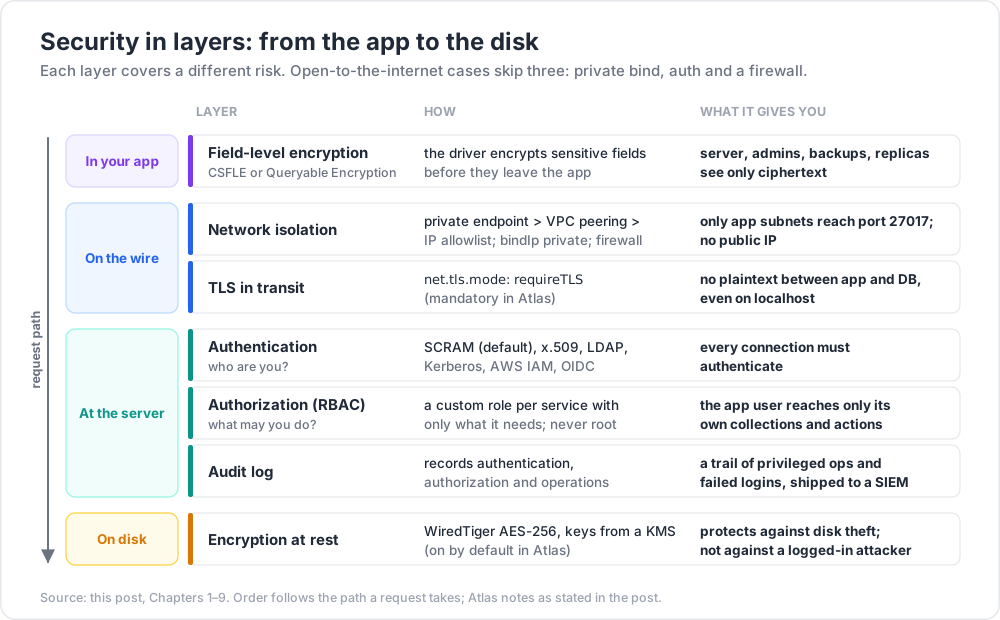
Every production cluster runs with auth enabled. Self-hosted:
1
2
3
4
# /etc/mongod.conf
security:
authorization: enabled
Or mongod --auth. Restart, then create the first admin (the localhost exception allows this on a freshly-secured instance):
1
2
3
4
5
6
7
use admin
db.createUser({
user: "admin",
pwd: passwordPrompt(),
roles: [{ role: "root", db: "admin" }]
})
After that, every connection must authenticate:
1
2
mongodb://admin:pw@localhost:27017/?authSource=admin
Atlas: auth is mandatory; you can't disable it.
Chapter 2 — Authentication mechanisms
| Mechanism | Use |
|---|---|
| SCRAM (SCRAM-SHA-256) | default; username + password |
| x.509 client certificate | mutual TLS — preferred for service-to-DB inside private networks |
| LDAP (Enterprise / Atlas) | central directory |
| Kerberos (Enterprise) | Active Directory environments |
| AWS IAM (Atlas only) | service authenticates using its IAM role — no password to leak |
| OIDC (Atlas, 7.0+) | federate to Auth0, Okta, etc. |
For Atlas in 2026, the modern stack is usually AWS IAM for AWS workloads + SCRAM for everything else, both gated behind a VPC endpoint.
Chapter 3 — RBAC — roles + users
1
2
3
4
5
6
7
8
9
10
11
12
13
14
15
16
17
18
19
db.createRole({
role: "app_orders_rw",
privileges: [
{ resource: { db: "shop", collection: "orders" },
actions: ["find", "insert", "update", "remove"] },
{ resource: { db: "shop", collection: "products" },
actions: ["find"] }
],
roles: []
})
db.createUser({
user: "app",
pwd: passwordPrompt(),
roles: [
{ role: "app_orders_rw", db: "shop" }
]
})
The user app can read+write orders and only read products. No access elsewhere.
Built-in roles (most-used)
| Role | Scope |
|---|---|
read, readWrite |
per database |
dbAdmin, dbOwner |
per database |
readAnyDatabase, readWriteAnyDatabase |
cluster-wide |
clusterAdmin, clusterMonitor, clusterManager |
cluster ops |
backup, restore |
for backup tools |
root |
superuser — keep one human emergency account; no app should use it |
Apps should never run as root. Define a custom role per service, granting only the collections + actions it needs.
Principle of least privilege
For a typical service:
- One read-write role on its own collections.
- One read-only role on shared / reference collections.
- No access elsewhere.
Even for an admin user, prefer dbOwner on the relevant DB rather than root.
Chapter 4 — TLS in transit
Every wire connection should be TLS-encrypted. Self-hosted:
1
2
3
4
5
6
net:
tls:
mode: requireTLS
certificateKeyFile: /etc/ssl/mongo.pem
CAFile: /etc/ssl/ca.pem
Client connection string:
1
2
mongodb+srv://...?tls=true
Atlas: TLS is mandatory + the cert is auto-managed. Connections without TLS are refused.
Disable plaintext / require TLS even for localhost — accidental cleartext on a shared host is a real risk.
Chapter 5 — Network isolation
Layer your defences:
- Atlas Private Endpoint (AWS PrivateLink / Azure Private Link / GCP Private Service Connect) — traffic stays on the cloud backbone; cluster has no public IP.
- VPC Peering — your VPC talks to the Atlas VPC over private addresses.
- IP allowlist — restrict which IPs can connect (a fallback, not a primary defence).
- Self-hosted — bind
mongodto private interface only (bindIp: 127.0.0.1,10.0.0.10); never0.0.0.0on public-internet hosts. - Firewall / Security Group — only your app subnets reach port 27017.
The infamous "unsecured Mongo on the internet" stories are always: default bind + no auth + no firewall. Avoid all three.
Chapter 6 — Encryption at rest
Self-hosted (Enterprise / Atlas):
- WiredTiger native encryption — AES-256 with keys from KMIP, Vault, Azure Key Vault, GCP KMS, AWS KMS, or a local keyfile.
- Atlas: enabled by default with customer-managed keys (CMK) optional on dedicated tiers.
Backups, snapshots, oplog files are all encrypted on disk.
Encryption at rest protects against disk theft. It does NOT protect against a logged-in attacker (they have the cluster's own decryption key, transparently). For that, you need field-level encryption (next).
Chapter 7 — Client-Side Field-Level Encryption (CSFLE)
Sensitive fields are encrypted by the driver before they leave the application. The server only ever sees ciphertext.
1
2
3
4
5
6
7
8
9
10
11
12
13
14
15
16
17
18
19
20
21
22
23
24
25
26
const { ClientEncryption } = require('mongodb');
// 1. set up the key vault (a special collection)
const keyVaultNamespace = "encryption.__keyVault";
// 2. config the client with CSFLE
const client = new MongoClient(uri, {
autoEncryption: {
keyVaultNamespace,
kmsProviders: { aws: { accessKeyId, secretAccessKey } },
schemaMap: {
"shop.users": {
bsonType: "object",
encryptMetadata: {
keyId: [/* dataKeyId */]
},
properties: {
ssn: { encrypt: { bsonType: "string", algorithm: "AEAD_AES_256_CBC_HMAC_SHA_512-Deterministic" } },
dob: { encrypt: { bsonType: "date", algorithm: "AEAD_AES_256_CBC_HMAC_SHA_512-Random" } },
email: { encrypt: { bsonType: "string", algorithm: "AEAD_AES_256_CBC_HMAC_SHA_512-Deterministic" } }
}
}
}
}
});
Algorithm matters:
- Deterministic — same plaintext → same ciphertext. Allows equality lookups (
find({ email: "x" })). - Random — same plaintext → different ciphertext each time. Hides distribution + frequency but no equality lookups.
The driver intercepts queries + writes, encrypts/decrypts as needed. Server, admins, backups, replicas all see ciphertext only.
Key Management: data keys are encrypted by a master key held in your KMS (AWS KMS, Azure Key Vault, GCP KMS, KMIP). The key vault collection stores encrypted data keys; the master key never leaves the KMS.
Constraints with CSFLE:
- Only equality queries on deterministically-encrypted fields.
- No range / sort / aggregation on encrypted fields.
- For "range queries on encrypted data" → use Queryable Encryption.
Chapter 8 — Queryable Encryption (GA in 7.0)
Queryable Encryption extends field-level encryption to support equality + range + prefix queries on encrypted data — without ever decrypting on the server.
1
2
3
4
5
6
7
8
9
10
11
12
13
14
schemaMap: {
"shop.users": {
bsonType: "object",
properties: {
email: { encrypt: { bsonType: "string", queries: { queryType: "equality" } } },
salary: { encrypt: { bsonType: "long", queries: { queryType: "range", min: 0, max: 1_000_000 } } }
}
}
}
// then:
db.users.find({ email: "ada@x" }) // equality on encrypted field — works
db.users.find({ salary: { $gte: 50000, $lt: 100000 } }) // range on encrypted field — works
Use cases:
- PII fields needing search (email lookup for password reset).
- Salaries, balances, ages — range queries while keeping plaintext invisible to DBAs.
- Compliance (HIPAA, GDPR) — data is encrypted to ops staff but still queryable to apps with the right key.
Caveats: slower than unencrypted queries; some index types unsupported; key management complexity. Plan carefully.
Atlas: Queryable Encryption is supported on dedicated tiers + recent Mongo versions.
Chapter 9 — Audit log
The audit log records authentication + authorization + operations.
Self-hosted (Enterprise):
1
2
3
4
5
6
auditLog:
destination: file
format: JSON
path: /var/log/mongodb/audit.log
filter: '{ atype: { $in: ["authenticate", "createCollection", "dropDatabase"] } }'
Atlas: audit logs available on dedicated tiers; shipped to S3, splunk, etc.
Standard ops to audit: privileged role grants, user creation, collection drops, failed logins, schema changes.
Chapter 10 — Secrets management
Never:
- Commit connection strings with passwords to git.
- Hardcode passwords in config files in the image.
- Print connection strings in logs.
Use:
- HashiCorp Vault, AWS Secrets Manager, Azure Key Vault, GCP Secret Manager.
- Kubernetes:
Secretresources mounted as env vars or files. - For AWS workloads → IAM auth to Atlas → no password to manage.
Rotate secrets quarterly. Automate via your secrets manager's rotation hooks.
Chapter 11 — Production-hardening checklist
- [ ] Auth enabled (
authorization: enabledor Atlas). - [ ] No
rootfor application users; least-privilege custom roles. - [ ] TLS in transit (Atlas: default; self-hosted:
requireTLS). - [ ] No public IPs / no
bindIp: 0.0.0.0on internet-facing hosts. - [ ] Atlas: private endpoint OR VPC peering; IP allowlist as backup.
- [ ] Encryption at rest enabled (default in Atlas).
- [ ] CSFLE / Queryable Encryption for highly sensitive fields.
- [ ] Secrets in a secrets manager, not in env / repo.
- [ ] Audit log capturing privileged ops + failed logins.
- [ ] Routine backups (Post 14) tested with restore drills.
- [ ] MFA on Atlas accounts; SSO for org access.
- [ ] Quarterly review of users, roles, IP allowlists, network rules.
- [ ] Version current; security patches applied within agreed SLA.
Chapter 12 — Common pitfalls
| Pitfall | Cause | Fix |
|---|---|---|
| Open Mongo on public IP | default install + no auth + no firewall | bind to private; auth; firewall |
App user has root |
"to make it easier" | refactor to least-privilege role |
| Password in connection string in git | unaware | secrets manager; pre-commit hook |
| Plaintext between app + DB | TLS not enforced | requireTLS |
| PII visible to DBAs | only encryption at rest | CSFLE / Queryable Encryption |
| Lost decryption key after team rotation | KMS keys not in central management | hold KMS keys in org-level KMS, not personal accounts |
| Auth allowed but no MFA on Atlas | account hijack risk | enforce org-wide MFA |
| No audit trail of privileged ops | no audit log enabled | enable + ship to SIEM |
| Backup files unencrypted | backup pipeline outside Atlas | encrypt backups; restrict access |
Practice Exercises
Exercise 1 — Enable auth
In a local Mongo, enable auth. Create admin user. Create per-DB user shop_app with readWrite on shop. Confirm shop_app can't access admin DB.
Exercise 2 — Custom role
Define a role orders_rw_products_ro: read+write on orders, read-only on products. Test.
Exercise 3 — TLS local
Generate a self-signed cert with openssl. Configure local mongod to require TLS. Connect with tls=true&tlsAllowInvalidCertificates=true.
Exercise 4 — Atlas private endpoint
Set up a free Atlas cluster + AWS PrivateLink endpoint. Connect from an EC2 in the same VPC. Confirm public IPs can't connect.
Exercise 5 — CSFLE PoC
Wire up CSFLE with a local KMS file (for dev only). Insert a user with ssn (deterministic) + dob (random). Query by ssn — works. Query dob range — fails (need Queryable Encryption).
Exercise 6 — Audit log
Enable audit log on local mongod. Trigger a failed login. Inspect the log entry.
Cheat-sheet
| What | How |
|---|---|
| Enable auth | security.authorization: enabled |
| Auth mechanism | SCRAM (default); x.509 / LDAP / Kerberos / AWS IAM / OIDC |
| Least privilege | custom role per service, narrow scope |
| TLS | net.tls.mode: requireTLS + cert |
| Bind interface | bindIp to private only |
| Atlas isolation | private endpoint > peering > IP allowlist |
| Encryption at rest | default in Atlas; WiredTiger encryption self-hosted |
| Field encryption (equality) | CSFLE deterministic |
| Field encryption (random / better security, no query) | CSFLE random |
| Field encryption + equality + range queryable | Queryable Encryption (7.0+) |
| KMS | AWS KMS / Azure KV / GCP KMS / KMIP; never local in prod |
| Secrets | Vault / AWS Secrets / K8s Secret |
| Audit | enable + ship to SIEM |
| MFA on Atlas | org-wide enforcement |
| Don't | root for apps; 0.0.0.0 bind; password in code |
What's next
Post 14 covers backup + ops — mongodump / mongorestore, BSON snapshots, oplog tailing, point-in-time recovery (PITR), Atlas continuous backup, monitoring (profiler, currentOp, server-status), capacity planning, restore drills.
References
- Security Checklist
- Role-Based Access Control
- TLS / SSL Configuration
- Client-Side Field Level Encryption
- Queryable Encryption
- Atlas Security
Note: this post is in progress. Planned additions: PCI / HIPAA pattern walkthrough; KMS key rotation procedure; OIDC + Okta wiring; egress lockdown patterns.