MongoDB Course — 14 · Backup, Restore, Ops Monitoring, Capacity Planning
A backup you never restored is a hope, not a backup. This post covers the operational reality of running MongoDB in production: backup mechanisms (mongodump, file-system snapshots, Atlas continuous backup), point-in-time recovery (PITR), the slow-query profiler + currentOp + killOp, the server-status metrics worth alerting on, the restore drill that turns hopes into backups, and capacity planning.
Series map: 00 Foundations → … → 13 Security → 14 Backup & Ops (this post) → 15 Performance Deep → 16 Atlas → 17 Drivers & Case Studies.
Learning Outcome
- Use
mongodump/mongorestorecorrectly + their limits. - Take consistent file-system snapshots (LVM, EBS, ZFS).
- Configure Atlas continuous backup + point-in-time recovery.
- Run a restore drill monthly + automate it.
- Use the profiler + slow-query log +
currentOp+killOp. - Monitor the metrics that matter + alert thresholds.
- Plan capacity by working-set + IOPS + connections.
Chapter 1 — Backup approaches
| Approach | What | Best for |
|---|---|---|
| mongodump / mongorestore | logical export of BSON | small DBs (< ~100 GB), dev exports, migrations |
| File-system snapshot (LVM, EBS, ZFS) | block-level snapshot of --dbpath |
medium-large DBs; consistent if journal included |
| Atlas Continuous Backup | Atlas-managed snapshot + oplog tailing | Atlas users; PITR included |
| Percona Backup for MongoDB | open-source PITR | self-hosted production |
Pick by scale + ops staff + Atlas vs self-hosted.
Chapter 2 — mongodump / mongorestore
1
2
3
4
5
6
7
8
mongodump --uri "mongodb+srv://user:pw@host/shop" # whole DB
mongodump --uri "..." --db shop --collection orders # one collection
mongodump --uri "..." --query '{ status: "paid" }' --db shop --collection orders # filtered
mongodump --uri "..." --gzip --archive=shop.archive.gz # single gzipped archive
mongorestore --uri "..." --gzip --archive=shop.archive.gz
mongorestore --uri "..." --db shop --drop dump/shop # restore dir
Pros: works against any version + cloud; portable file.
Cons:
- Slow for big DBs — serialises every doc through the driver.
- Not consistent across collections without
--oplog(replica-set source only). - No PITR by itself.
Use for: dev datasets, migrations between accounts/regions, ad-hoc collection-level export.
Consistent dump from a replica set
1
2
3
mongodump --uri "..." --oplog -o dump/
mongorestore --uri "..." --oplogReplay dump/
--oplog captures oplog events during the dump; --oplogReplay applies them on restore — gives a consistent snapshot across the whole DB.
Chapter 3 — File-system snapshots
For self-hosted production with bigger volumes, snapshot the data volume:
1
2
3
# AWS EBS — snapshot the data volume
aws ec2 create-snapshot --volume-id vol-XXXX --description "mongod nightly"
Steps for consistency:
- Ensure journaling enabled (default — yes).
- Take the snapshot while
mongodis running (the journal ensures consistency on restore). - Restore: attach snapshot to new instance,
mongod --dbpath /new-data.
For replica sets, snapshot a secondary to avoid impacting primary I/O. To get a strictly-consistent point-in-time, run db.fsyncLock() on the secondary first → snapshot → db.fsyncUnlock().
Throughput: snapshots are fast (block-level); restore time = mount + replication catch-up.
Chapter 4 — Point-in-Time Recovery (PITR)
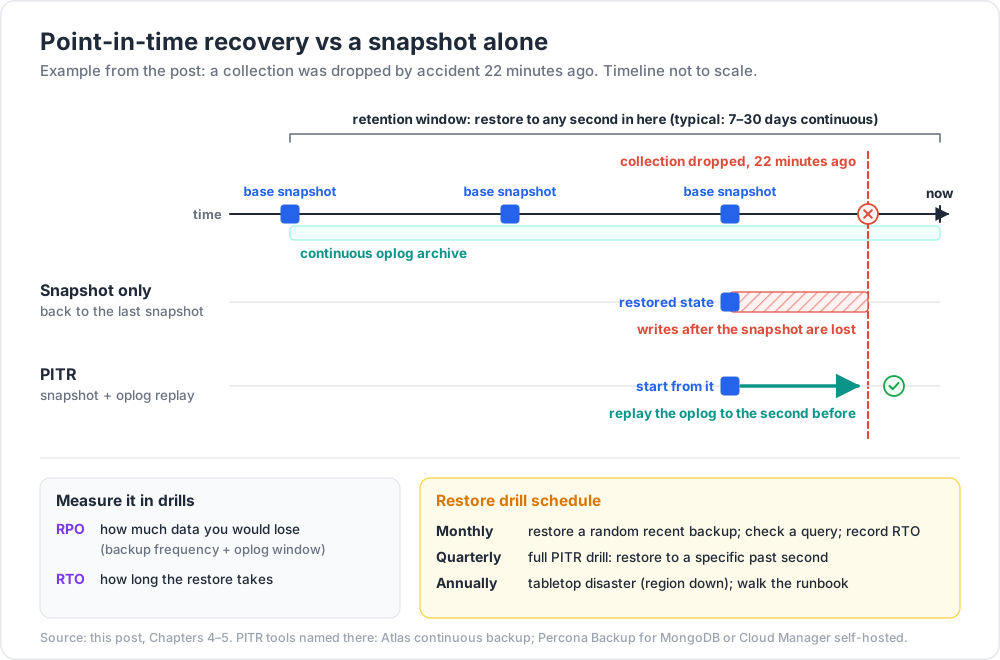
Snapshots give you "the state as of snapshot time". PITR lets you restore to any second within a retention window — recover from "we accidentally dropped this collection 22 minutes ago".
How it works
- A periodic base snapshot.
- Continuous oplog archiving between snapshots.
- Restore = base snapshot + replay oplog to the target second.
Atlas
Atlas continuous backup ships PITR by default on dedicated tiers. Restore via UI: pick a point in time, choose target (new cluster, in-place, or download).
Retention configurable (typical: 7-30 days continuous + monthly snapshots for longer retention).
Self-hosted
Use Percona Backup for MongoDB (PBM) or MongoDB Cloud Manager for PITR. Configure base snapshot + oplog archive to S3 / GCS / Azure Blob.
Chapter 5 — Restore drills
A backup is meaningless if you've never tested it. Schedule:
- Monthly: pick a random recent backup; restore to a temporary cluster; verify a small sanity-check query returns expected data. Record RTO (time taken).
- Quarterly: full PITR drill — restore a DB to a specific past second.
- Annually: tabletop disaster scenario (region down). Walk through your runbook.
Track:
- RTO (Recovery Time Objective) — how long restore takes.
- RPO (Recovery Point Objective) — how much data you'd lose (depends on backup frequency + oplog window).
Common surprises in first drills:
- Restored cluster's IAM / users are missing.
- App connection string still points at the old cluster.
- Restore is slower than expected because IOPS is limited on the target tier.
- Indexes rebuild in the background, performance is poor for hours.
Fix during the drill, not during an actual outage.
Chapter 6 — Profiler + slow-query log
Recap from Post 04 — enabling profiler:
1
2
db.setProfilingLevel(1, { slowms: 100 })
Captures every operation taking > 100 ms into db.system.profile. Query for analysis:
1
2
db.system.profile.find({ millis: { $gt: 100 } }).sort({ ts: -1 }).limit(20)
Production: keep slowms configured + ship logs to Datadog / Splunk / Loki for long-term analysis.
Atlas: Performance Advisor + Query Insights surface the same data + suggest indexes.
Chapter 7 — currentOp + killOp
1
2
3
4
5
6
db.currentOp() // all live ops
db.currentOp({ secs_running: { $gt: 5 } }) // long-running only
db.currentOp({ "command.comment": "dashboard" }) // tagged ops
db.killOp(opid) // kill it
Reactive triage during incidents. Tag every endpoint with .comment() (Post 02) so you can find its ops quickly.
For chronic offenders, find their query shape via profiler + fix the index (Post 04).
Chapter 8 — Server status — metrics that matter
1
2
db.serverStatus()
A massive JSON blob. Key metrics worth alerting on:
| Metric | Alert when | Why |
|---|---|---|
connections.current / max |
> 80 % | pool exhaustion incoming |
connections.totalCreated rate |
growing fast | possible client misuse |
opcounters.{insert,query,update,delete} rate |
sudden anomaly | traffic spike or stuck loop |
wiredTiger.cache.bytes currently in the cache vs configured |
near max + evictions high | working set > cache (Post 15) |
wiredTiger.concurrentTransactions.read/write.available |
near 0 | ticket exhaustion |
globalLock.activeClients.{readers,writers} |
sustained high | contention |
metrics.queryExecutor.scanned / scannedObjects |
growing per op | indexes not used well |
| Replication lag | > 60 s | secondary falling behind |
| Oplog window | < 4 h | resync risk if a secondary falls behind |
| Disk free | < 20 % | running out |
| CPU sustained > 80 % | undersized or runaway query |
Atlas dashboards surface all of these out of the box. Self-hosted: Prometheus + the MongoDB Prometheus exporter + Grafana is the standard stack.
Chapter 9 — Capacity planning
Plan four dimensions:
1. Working set vs RAM
The working set = hot indexes + frequently-accessed docs. Must fit in WiredTiger cache (default 50 % of RAM - 1 GB) for fast reads. If it doesn't, every query touches disk → latency 10-100× worse.
Estimate working set: cumulative size of indexes used in hot queries + ~5-10 % of frequently-accessed documents. If RAM < working set, scale up.
2. Storage IOPS
Random read IOPS = how many "miss the cache" queries per second you can serve.
- Atlas tiers have provisioned IOPS per disk type.
- AWS gp3: configurable up to 16k IOPS per volume.
- NVMe instance-store: 100k+ IOPS but ephemeral.
If IOPS is the bottleneck (visible as high disk queue depth + slow queries despite indexes), scale storage tier.
3. CPU
For pipelines + aggregations + many concurrent queries, CPU matters. Aggregation-heavy workloads peg CPU before disk.
4. Connections
App fleet × maxPoolSize ≤ tier connection limit (Post 08). Plan headroom for failover bursts.
Sizing decision tree
1
2
3
4
5
6
slow queries → check explain + indexes (Post 04)
slow despite indexes + cache full → scale up RAM
disk queue high → scale IOPS
CPU pegged → scale up cores OR shard (Post 11)
connection limit hit → fix client leaks OR scale tier
Chapter 10 — Atlas-specific ops tools
| Tool | What |
|---|---|
| Performance Advisor | suggests indexes from slow queries |
| Query Insights | groups slow queries by shape with example explains |
| Real-Time Performance Panel | live ops + metrics |
| Charts | dashboards on your data |
| Backup snapshots + PITR | one-click restore |
| Alerts | configurable on every metric |
| Online Archive | tier old data to cheap storage |
| Data Federation | query across Atlas + S3 in one go |
Use it. It saves hours of self-built tooling.
Chapter 11 — Disaster recovery patterns
| Scenario | Strategy |
|---|---|
| Accidental drop | restore from snapshot or PITR to the second before |
| Region outage | Atlas multi-region cluster auto-fails over to surviving region |
| Logical corruption (bug wrote bad data for hours) | PITR to before the bad write |
| Ransomware on self-hosted | offsite, immutable, encrypted backups |
| Account compromise (Atlas) | MFA + SSO + delete-protected backup snapshots + IAM-only access |
Test these scenarios — RTO + RPO aren't real until you've measured them.
Chapter 12 — Common pitfalls
| Pitfall | Cause | Fix |
|---|---|---|
| Backup never restored | "we have backups" complacency | monthly restore drill |
mongodump chosen for huge DB |
slow + no PITR | use Atlas backup or PBM |
| Snapshot taken without journal | inconsistent restore | journaling on (default); snapshot while running OK |
| Lost the connection string after restore | restored cluster has new IDs | scripted restore including app reconfig |
| Profiler off in production | "performance overhead" myth | enable with slowms: 100, overhead is minor |
| Metrics not alerted | reactive ops | dashboards + alerts on the table in Ch 8 |
| Working set > RAM | growth wasn't planned | scale tier; add indexes; archive old data |
| Atlas tier connection limit hit | client leaks | Post 08 |
| Restore is super slow | restore tier too small | provision IOPS on restore target |
| Backups not encrypted at rest | self-hosted pipeline | encrypt the backup bucket |
Practice Exercises
Exercise 1 — mongodump round-trip
Dump shop to an archive. Restore into a fresh local instance. Verify document counts match.
Exercise 2 — Filtered dump
Dump only orders with status: "paid". Restore as orders_paid_only in a fresh DB.
Exercise 3 — Atlas restore drill
(Atlas user.) Take a snapshot. Restore to a new cluster. Document RTO + verify a sanity-check query.
Exercise 4 — Profiler
Enable profiler at slowms: 100. Run various queries. Find top 5 slowest by shape via system.profile.
Exercise 5 — Alerts
In Atlas (or self-hosted Prometheus), configure alerts for: connection limit 80 %, replication lag > 60 s, oplog window < 4 h.
Exercise 6 — Capacity audit
For your cluster, estimate working-set size, check it against RAM, check connection usage vs limit. Document one action item to address the tightest constraint.
Cheat-sheet
| What | How |
|---|---|
| Logical dump | mongodump --uri --gzip --archive=f.gz |
| Logical restore | mongorestore --uri --gzip --archive=f.gz |
| Consistent across DB | add --oplog / --oplogReplay |
| FS snapshot (self-hosted) | EBS/LVM snapshot + journaling on |
| PITR | Atlas continuous backup; PBM for self-hosted |
| Restore drill | monthly minimum |
| RTO / RPO | measure + document |
| Profiler | db.setProfilingLevel(1, { slowms: 100 }) |
| Long-running | db.currentOp({ secs_running: { $gt: 5 } }) |
| Kill op | db.killOp(opid) |
| Server metrics | db.serverStatus() |
| Working set sizing | hot indexes + ~5-10 % hot docs ≤ WT cache |
| WT cache default | 50 % RAM − 1 GB |
| Atlas advisor | suggested indexes from slow queries |
| Multi-region cluster | for region-outage DR |
| Atlas alerts | connection 80 %, lag 60 s, oplog 4 h, disk 20 % |
What's next
Post 15 covers performance deep — WiredTiger cache, compression options, document-level locking + MVCC, large-doc + array-growth pitfalls, GridFS, ticket exhaustion, hot key patterns, and the in-depth profiling toolkit.
References
- Backup Methods
mongodumpmongorestore- Atlas Backup
- Percona Backup for MongoDB
- Server Status
- Database Profiler
Note: this post is in progress. Planned additions: actual PBM walkthrough; SLO templates per workload class; runbook templates for top 5 incidents; cost trade-offs continuous-backup vs daily snapshot.