MongoDB Course — 11 · Sharding — mongos, Shard Keys, Chunks, Balancer, Resharding
A single replica set scales reads (Post 10) and stores as much data as fits on one machine. To scale writes and store more data than one machine can hold, MongoDB shards — partitions a collection across multiple replica sets ("shards") by a chosen shard key. Get the shard key right and the cluster scales linearly. Get it wrong and you get hot shards, jumbo chunks, scatter-gather queries, and an expensive resharding project. This post covers the architecture, the shard-key decision (the most important one), ranged vs hashed sharding, chunks + balancer, zones, resharding (5.0+), and query targeting vs scatter-gather.
Series map: 00 Foundations → … → 10 Replica Sets → 11 Sharding (this post) → 12 Change Streams → … → 17 Drivers & Case Studies.
Learning Outcome
- Explain
mongos, config servers, shards. - Choose a shard key by cardinality, frequency, monotonicity.
- Pick between ranged and hashed sharding.
- Read chunk + balancer state; understand jumbo chunks.
- Use zone sharding for region pinning / tiered storage.
- Recognise when to use resharding (5.0+).
- Recognise query targeting vs scatter-gather.
Chapter 1 — Sharded-cluster architecture
1
2
3
4
5
6
7
8
9
10
11
Application
│
▼
mongos (router; one or many)
│
├── Config Servers (replica set holding cluster metadata)
│
├── Shard 1 (replica set)
├── Shard 2 (replica set)
└── Shard N (replica set)
mongos— stateless router. Clients connect to it. Routes operations to the right shard(s) by reading metadata.- Config servers — a dedicated replica set storing the chunk map, shard list, indexes metadata.
- Shards — each shard is itself a full replica set (HA at the shard level).
Atlas: when you scale a cluster to "sharded", it builds all of this for you.
Chapter 2 — Sharding a database + collection
1
2
3
4
5
6
7
8
sh.enableSharding("shop") // turn on sharding for the DB
db.orders.createIndex({ user_id: 1, at: -1 }) // shard key must have a supporting index
sh.shardCollection("shop.orders", { user_id: 1, at: -1 })
// or hashed:
sh.shardCollection("shop.events", { device_id: "hashed" })
Once sharded, the chunk map ranges are built on the shard key.
What gets sharded
- Per collection. Different collections can have different shard keys (or none).
- Some collections often stay unsharded — small, infrequently-written ones.
Chapter 3 — Shard key — the most important decision
A shard key is one or more fields whose value decides which shard each document lives on.
Three properties to evaluate
| Property | Good | Bad |
|---|---|---|
| Cardinality | many distinct values | few values |
| Frequency | values appear with similar frequency | one value dominates |
| Monotonicity | random-looking distribution | always-increasing (_id, timestamps) |
Why each matters
- Low cardinality — too few values to spread across many shards. A
{ status: 1 }shard key over["open", "closed"]gives 2 chunks max; can't scale beyond 2 shards. - Skewed frequency — one tenant or one product dominates → one shard takes all writes (hot shard).
- Monotonic key (auto-increment ID, timestamp) → all new writes hit the chunk holding the max value → that chunk's shard becomes hot.
The ideal
A field that's:
- many distinct values,
- writes spread evenly,
- frequently appears in queries' filters so
mongoscan route to one shard.
Common shard-key choices
| Workload | Good shard key |
|---|---|
| Multi-tenant SaaS | { tenant_id: 1, _id: 1 } (tenant-aware queries route to one shard) |
| User-centric (orders per user) | { user_id: 1, _id: 1 } |
| IoT telemetry, write-heavy | { device_id: "hashed" } (even distribution) |
| Time-series append | hashed on device_id + ranged on time secondary; OR native time-series collection |
| Geo-partitioned | { region: 1, _id: 1 } + zone sharding |
A compound shard key ({ tenant_id: 1, _id: 1 }) gives tenant-aware routing (tenant_id used by queries) while keeping cardinality high (via _id tiebreaker).
Chapter 4 — Ranged vs hashed sharding
Ranged (default)
Documents with shard-key values in a range live on the same chunk.
1
2
sh.shardCollection("shop.orders", { user_id: 1 })
- Pro: range queries on the shard key only hit shards in that range.
- Con: monotonic inserts hot-spot the max-range chunk.
Hashed
The shard key is hashed before placement.
1
2
3
db.events.createIndex({ device_id: "hashed" })
sh.shardCollection("shop.events", { device_id: "hashed" })
- Pro: writes always spread evenly across shards, even for monotonic / sequential keys.
- Con: range queries on the shard key become scatter-gather (visit every shard).
Modern compound hashed (4.4+):
1
2
sh.shardCollection("shop.events", { device_id: "hashed", at: 1 })
Hashed on device_id, ranged on at as secondary — combines distribution + time-range-by-device queries.
Chapter 5 — Chunks + the balancer
A chunk is a range of shard-key values. Each chunk lives entirely on one shard. Chunk size defaults to 128 MB in modern versions.
The balancer is a background process on the primary config server that moves chunks between shards to keep distribution roughly even. Runs continuously; can be scheduled to a window:
1
2
3
4
5
6
7
8
sh.setBalancerState(true)
sh.getBalancerState()
sh.isBalancerRunning()
// run only during off-hours
sh.startBalancer()
sh.stopBalancer()
Inspect chunk distribution:
1
2
3
4
sh.status()
db.adminCommand({ getShardMap: 1 })
db.printShardingStatus()
Jumbo chunks
A chunk exceeding the chunk size that can't be split (because all its documents have the same shard-key value) is called jumbo and is marked unmovable. The balancer skips it.
Cause: too few distinct values for the shard key (low cardinality) — usually a sign the shard key was wrong.
Fix: re-shard the collection (Chapter 7); or pre-split with care.
Chapter 6 — Zones (formerly tags)
Pin specific shard-key ranges to specific shards. Used for:
- Region pinning — APAC users on APAC shards (low-latency reads + compliance).
- Tiered storage — recent data on SSD shards, archive on cheap shards.
1
2
3
4
5
6
7
8
9
10
11
12
13
14
sh.addShardTag("shard0001", "apac")
sh.addShardTag("shard0002", "emea")
sh.addTagRange("shop.users",
{ region: "apac", _id: MinKey },
{ region: "apac", _id: MaxKey },
"apac"
)
sh.addTagRange("shop.users",
{ region: "emea", _id: MinKey },
{ region: "emea", _id: MaxKey },
"emea"
)
The balancer respects zones — chunks in a tagged range move only to shards with the matching tag.
Chapter 7 — Resharding (5.0+)
Pre-5.0, changing a shard key meant dumping the collection, dropping, and reinserting under a new shard key — multi-hour outage for big collections.
5.0+ introduced online resharding:
1
2
sh.reshardCollection("shop.orders", { tenant_id: 1, _id: 1 })
The new shard key is computed; chunks rebalance in the background; clients keep reading + writing throughout. Final cutover is brief.
Constraints:
- Disk + I/O cost is high; plan for a slower-than-usual period.
- Some prerequisites on indexes + collection size.
- The new shard key must have an index.
This dramatically lowered the cost of "I chose the wrong shard key" — but a good initial choice still saves time + money.
Chapter 8 — Query targeting vs scatter-gather
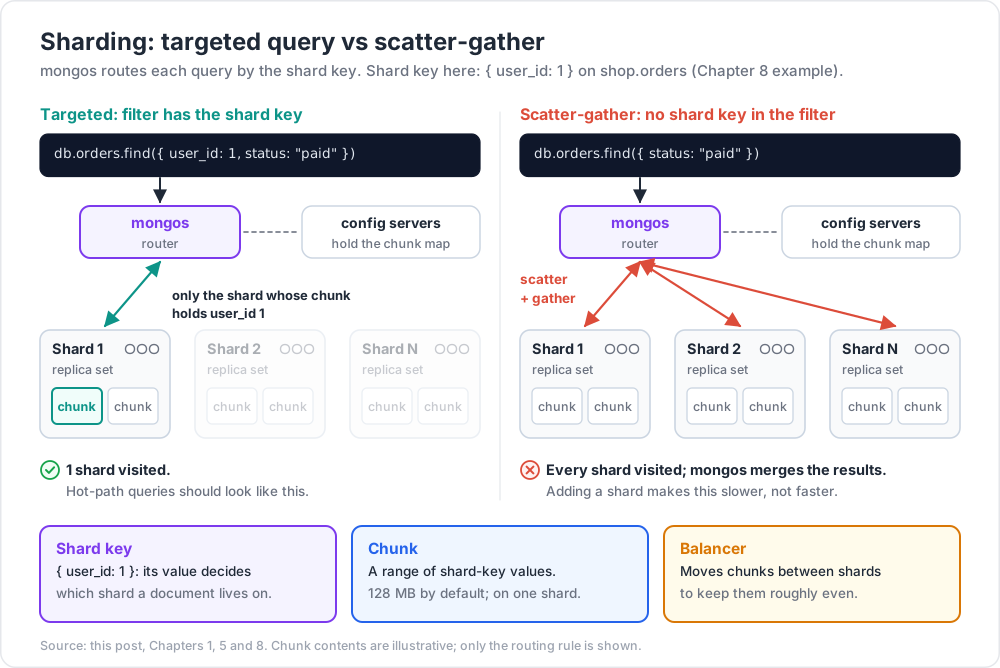
When a query includes the shard key, mongos can route to one (or few) specific shards. Otherwise it has to ask every shard ("scatter") and merge results ("gather").
1
2
3
4
5
6
// includes shard key → routed to one shard
db.orders.find({ user_id: 1, status: "paid" })
// no shard key → scatter-gather to ALL shards
db.orders.find({ status: "paid" })
Scatter-gather scales poorly as the cluster grows — adding a shard makes scatter-gather queries slower, not faster.
Check with explain (sharded version):
1
2
3
db.orders.find({ ... }).explain("executionStats")
// look at "shards" array; one entry per shard visited
Trick: the hot path of every endpoint should include the shard key in its filter. Reports + admin queries can scatter-gather. Plan your access patterns accordingly when picking a shard key.
Chapter 9 — Aggregation + sharding
Most aggregation stages run per shard, then mongos merges. Some stages must run after the merge ($group, final $sort, $lookup against an unsharded collection).
Implications:
$matchearly — lets shards drop docs before pulling them to mongos.$lookupforeign collection should be unsharded (sharded$lookupworks but is slower).$out/$mergeto a sharded target — supported since 4.4 / 5.0.
explain shows the split between $shards stages and $mergerPart stages.
Chapter 10 — Operational toolkit
1
2
3
4
5
6
7
8
9
10
11
12
sh.status() // global view
sh.status({ verbose: true }) // chunk-level detail
sh.getBalancerState()
sh.disableBalancing("shop.orders") // for one collection
sh.enableBalancing("shop.orders")
db.printShardingStatus()
db.adminCommand({ balancerCollectionStatus: "shop.orders" })
db.adminCommand({ moveChunk: "shop.orders", find: { user_id: 5 }, to: "shard0002" })
db.adminCommand({ splitFind: "shop.orders", find: { user_id: 5 } })
Day-to-day you rarely touch chunk movement manually — the balancer handles it.
Atlas
Atlas surfaces sharding as a cluster tier upgrade. You pick a shard key in the UI; resharding is a one-click operation. Connection string remains mongodb+srv:// — mongos routing is invisible to clients.
Chapter 11 — When to shard (and when not)
Shard when
- Single replica set's CPU / disk / RAM is the bottleneck and vertical scaling is exhausted.
- Working-set (hot indexes + frequently-accessed docs) exceeds RAM, even at maximum instance size.
- Write throughput needed exceeds what one primary can sustain.
- Data set exceeds biggest available single-instance storage.
- Regulatory / latency requirement to keep data in specific regions.
Don't shard when
- Single replica set still handles your load (most apps' entire lifecycle).
- Working-set fits in RAM on a larger instance.
- Sharding overhead (extra hops via
mongos, complexity, cost) doesn't pay back.
Vertical scaling beats horizontal scaling until you have no choice — modern Atlas tiers go to many TB of RAM. Most apps never shard.
Chapter 12 — Common pitfalls
| Pitfall | Cause | Fix |
|---|---|---|
| Hot shard | monotonic shard key (timestamp, ObjectId) | hashed shard key; or compound with prefix |
| Jumbo chunks | low-cardinality shard key | reshard with a higher-cardinality key |
| Scatter-gather everywhere | queries don't include the shard key | redesign queries or shard key |
| Balancer always lagging | huge writes vs slow disks | scale up shard members, larger chunk size |
| Adding a shard didn't help | scatter-gather queries — more shards = more work | shard-key-aware queries |
| Cross-shard transactions slow | spans multiple shards | shard-key alignment |
Cross-shard $lookup slow |
foreign collection sharded | denormalise (Post 07) or unshard the lookup target |
| Old "I picked wrong shard key" pre-5.0 outage | locked into bad design | use resharding (5.0+) |
Practice Exercises
Exercise 1 — Local sharded cluster (Docker)
Use docker-compose or Atlas free tier (sharded preview if available) to set up a 2-shard cluster. Insert 100k docs, shard the collection on a chosen key, observe chunks split.
Exercise 2 — Shard-key analysis
For the orders collection (your e-commerce model), brainstorm 3 shard keys and rate each on cardinality / frequency / monotonicity. Choose the best.
Exercise 3 — Hashed vs ranged
Same workload (10k inserts of { device_id, at, value }), once with ranged shard key on at, once with hashed on device_id. Compare write distribution per shard (via sh.status()).
Exercise 4 — Zone sharding
Add tags apac + emea to two shards. Insert users with region: apac | emea. Confirm sh.status() shows the zoning + chunks land on the correct shard.
Exercise 5 — Scatter-gather
Run find({ user_id: 1 }) and find({ status: "paid" }) on a sharded collection where shard key is { user_id: 1 }. Use explain to see "shards" list — one vs all.
Exercise 6 — Reshard
(Atlas / 5.0+ only.) Initiate a resharding from { user_id: 1 } to { tenant_id: 1, user_id: 1 }. Watch the operation progress.
Cheat-sheet
| What | How |
|---|---|
| Enable DB sharding | sh.enableSharding("db") |
| Shard a collection | sh.shardCollection("db.coll", { key: 1 }) |
| Hashed | sh.shardCollection("db.coll", { key: "hashed" }) |
| Compound hashed | { x: "hashed", y: 1 } |
| Shard-key tests | high cardinality, even frequency, non-monotonic |
| Chunk size default | 128 MB |
| Jumbo chunk | low-cardinality bucket; can't split |
| Zones | addShardTag + addTagRange |
| Balancer | runs by default; sh.setBalancerState(false) to pause |
| Resharding | sh.reshardCollection (5.0+) |
| Query routing | include shard key → one shard; else scatter-gather |
$lookup foreign |
prefer unsharded |
mongos count |
scale horizontally (each is stateless) |
| When to shard | only when vertical scaling exhausted |
What's next
Post 12 covers change streams — MongoDB's built-in change-data-capture API for real-time event handling, cache invalidation, audit logs, and cross-database sync.
References
Note: this post is in progress. Planned additions: chunk balancing internals, multi-region writes with primary-per-zone, cost modelling sharded vs scaled-up.