Java Development [Basic] Part 2 — GUI, Events, Functional, Collections, Streams
Part 1 covered Java's language core through threads. Part 2 picks up with the application-level toolkit: a graphical user interface (JavaFX), event handling, the functional programming features added in Java 8 (lambdas, method references, functional interfaces), the Collections framework (the standard data structures), and the Stream API (declarative bulk operations). Together they cover most of what real Java apps build on top of the basics.
Learning Outcome
- Build a basic JavaFX window with controls and a layout container.
- Hook up event handlers (button clicks, key presses, observable property changes).
- Write lambdas and method references; use the standard functional interfaces.
- Choose between
ArrayList,LinkedList,HashMap,TreeMap,HashSet,TreeSet,ArrayDeque,PriorityQueue. - Use the Stream API for
map / filter / reduce, grouping, sorting, and parallel processing. - Combine functional + streams + collections into clean data pipelines.
Chapter 10 — Graphical User Interface (JavaFX)
Terminology
- Stage — a top-level window.
- Scene — the content of a stage; holds a scene graph.
- Node — anything in the scene graph (controls, shapes, layouts).
- Layout (Pane) — a Node that arranges children (
VBox,HBox,GridPane,BorderPane,StackPane). - Control — interactive widget (
Button,Label,TextField,TableView, etc.).
JavaFX is the modern Java GUI (since 2008); Swing is the older one but still around in some enterprise code. Pick JavaFX for new work.
Setup
JavaFX is no longer bundled with the JDK. Add it via:
- Maven / Gradle dependency —
org.openjfx:javafx-controls:21. - Or download the SDK from openjfx.io and run with
--module-path <sdk>/lib --add-modules javafx.controls.
Minimal app
1
2
3
4
5
6
7
8
9
10
11
12
13
14
15
16
17
18
19
20
21
22
23
24
25
26
27
28
29
import javafx.application.Application;
import javafx.scene.Scene;
import javafx.scene.control.Button;
import javafx.scene.control.Label;
import javafx.scene.layout.VBox;
import javafx.stage.Stage;
public class App extends Application {
@Override
public void start(Stage stage) {
Label label = new Label("Count: 0");
Button btn = new Button("+1");
int[] count = { 0 };
btn.setOnAction(e -> {
count[0]++;
label.setText("Count: " + count[0]);
});
VBox root = new VBox(10, label, btn);
root.setStyle("-fx-padding: 20;");
stage.setScene(new Scene(root, 200, 120));
stage.setTitle("Counter");
stage.show();
}
public static void main(String[] args) { launch(args); }
}
Common layouts
| Layout | Behaviour |
|---|---|
VBox |
children stacked vertically |
HBox |
children in a row |
GridPane |
row/col grid (CSS-Grid-like) |
BorderPane |
top / bottom / left / right / centre regions |
StackPane |
stacks children on top of each other |
FlowPane |
wraps children left-to-right |
AnchorPane |
pin children to edges |
Common controls
Label, Button, TextField, PasswordField, TextArea, CheckBox, RadioButton, ComboBox, ListView, TableView, TreeView, MenuBar, Slider, ProgressBar, WebView, Canvas.
Styling
Style with CSS — JavaFX uses a CSS variant where selectors look like normal CSS but properties are prefixed with -fx-:
1
2
3
.button { -fx-background-color: #4080ff; -fx-text-fill: white; -fx-padding: 6 12; }
.button:hover { -fx-background-color: #3070ee; }
Attach with scene.getStylesheets().add(getClass().getResource("/style.css").toExternalForm());.
FXML (separate UI from logic)
For non-trivial apps, define the UI in FXML (an XML markup), edit visually in Scene Builder, wire to a controller class via @FXML.
1
2
3
4
5
6
<!-- counter.fxml -->
<VBox xmlns:fx="http://javafx.com/fxml" fx:controller="com.example.CounterController" spacing="10">
<Label fx:id="label" text="Count: 0"/>
<Button fx:id="btn" text="+1" onAction="#onInc"/>
</VBox>
1
2
3
4
5
6
public class CounterController {
@FXML private Label label;
private int count = 0;
@FXML private void onInc() { label.setText("Count: " + (++count)); }
}
Chapter 11 — Events
Terminology
- Event — an object describing something that happened (
ActionEvent,MouseEvent,KeyEvent). - Event handler — a function (now usually a lambda) that runs in response.
- Observable property — a value that fires notifications when it changes (
ObservableValue<T>,Property<T>). - Binding — a derived observable computed from others.
Action + mouse + key
1
2
3
4
5
6
button.setOnAction(e -> System.out.println("clicked"));
node.setOnMouseClicked(e -> System.out.println(e.getX() + ", " + e.getY()));
scene.setOnKeyPressed(e -> {
if (e.getCode() == KeyCode.ESCAPE) stage.close();
});
Observable properties
1
2
3
4
5
6
TextField input = new TextField();
Label echo = new Label();
input.textProperty().addListener((obs, oldVal, newVal) -> {
echo.setText("typed: " + newVal);
});
Bindings (declarative)
1
2
3
4
5
6
7
8
9
10
11
12
13
14
15
// echo always equals input.text reversed
echo.textProperty().bind(
Bindings.createStringBinding(
() -> new StringBuilder(input.getText()).reverse().toString(),
input.textProperty()
)
);
// expression bindings
DoubleProperty a = new SimpleDoubleProperty(2);
DoubleProperty b = new SimpleDoubleProperty(3);
DoubleBinding sum = a.add(b); // sum updates when a or b changes
sum.addListener((o, ov, nv) -> System.out.println("sum = " + nv));
a.set(10); // prints sum = 13
Bindings keep UI state in sync with model state without manual wiring.
Threading rule
All scene-graph changes must happen on the JavaFX Application Thread. From a background thread, use:
1
2
Platform.runLater(() -> label.setText("done"));
For longer work, use a Task<T> which runs call() on a background thread and exposes succeeded/failed callbacks on the JavaFX thread.
Chapter 12 — Functional Programming (Java 8+)
Terminology
- Lambda expression — short anonymous function:
(a, b) -> a + b. - Method reference — shorthand for a lambda that just calls one method:
String::toUpperCase. - Functional interface — an interface with exactly one abstract method (SAM).
- Effectively final — a local variable that isn't reassigned — required to capture in a lambda.
Lambdas
1
2
3
4
5
Runnable r = () -> System.out.println("hi");
Comparator<String> byLen = (a, b) -> Integer.compare(a.length(), b.length());
button.setOnAction(e -> count++);
Method references
| Form | Example | Equivalent lambda |
|---|---|---|
| Static | Integer::parseInt |
s -> Integer.parseInt(s) |
| Instance of a class | String::toUpperCase |
s -> s.toUpperCase() |
| Instance of an object | System.out::println |
x -> System.out.println(x) |
| Constructor | ArrayList::new |
() -> new ArrayList<>() |
Standard functional interfaces (java.util.function)
| Interface | Signature | Use |
|---|---|---|
Function<T, R> |
R apply(T t) |
transform |
BiFunction<T, U, R> |
R apply(T t, U u) |
two args → result |
Predicate<T> |
boolean test(T t) |
filter |
Consumer<T> |
void accept(T t) |
side effect |
Supplier<T> |
T get() |
factory |
UnaryOperator<T> |
T apply(T t) |
same-type transform |
BinaryOperator<T> |
T apply(T a, T b) |
reduce step |
Specialised primitive versions exist (IntFunction, ToIntFunction, IntPredicate...) to avoid boxing in hot loops.
1
2
3
4
5
Function<String, Integer> len = String::length;
Predicate<Integer> positive = n -> n > 0;
Consumer<String> log = System.out::println;
Supplier<List<String>> newList = ArrayList::new;
Optional<T>
Wraps a possibly-absent value — preferable to returning null.
1
2
3
4
Optional<User> u = repo.findByEmail(email);
u.ifPresent(this::sendWelcome);
String name = u.map(User::getName).orElse("guest");
Chapter 13 — Collections
Terminology
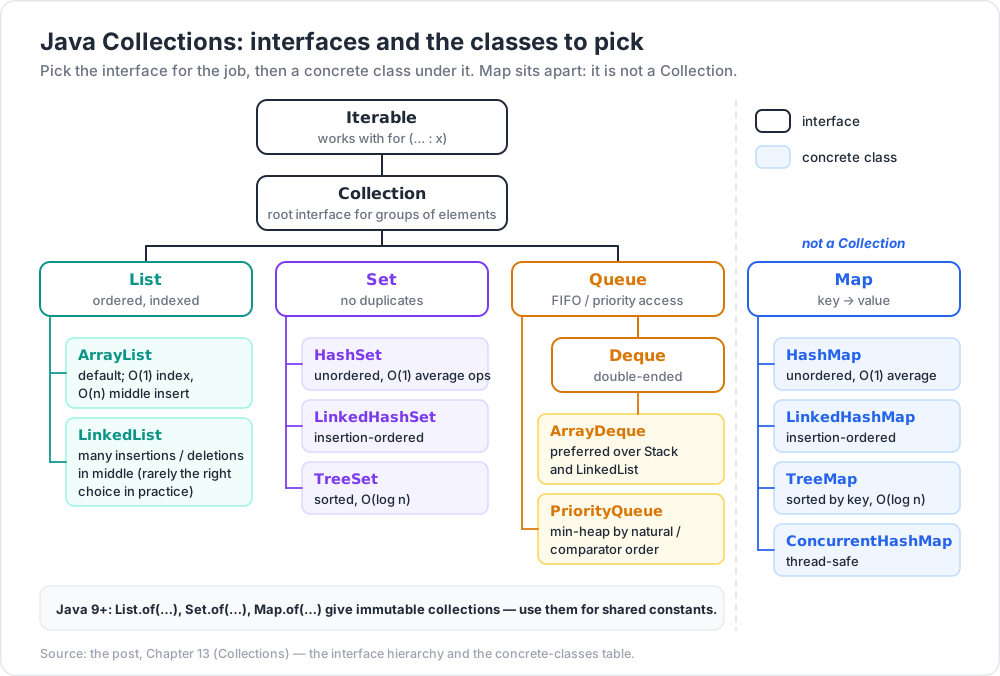
Collection<E>— root interface for groups of elements (List, Set, Queue).Map<K, V>— key-value lookups (not aCollection).Iterable<E>— anything iterable withfor (... : x).
The interface hierarchy
1
2
3
4
5
6
7
8
Iterable
Collection
List — ordered, indexed
Set — no duplicates
Queue — FIFO/priority access
Deque — double-ended
Map — key → value
Concrete classes
| Interface | Implementation | When |
|---|---|---|
List |
ArrayList |
default; O(1) index, O(n) middle insert |
List |
LinkedList |
many insertions / deletions in middle (rarely the right choice in practice) |
Set |
HashSet |
unordered, O(1) average ops |
Set |
LinkedHashSet |
insertion-ordered |
Set |
TreeSet |
sorted, O(log n) |
Map |
HashMap |
unordered, O(1) average |
Map |
LinkedHashMap |
insertion-ordered |
Map |
TreeMap |
sorted by key, O(log n) |
Map |
ConcurrentHashMap |
thread-safe |
Queue / Deque |
ArrayDeque |
preferred over Stack and LinkedList |
Queue |
PriorityQueue |
min-heap by natural / comparator order |
Common operations
1
2
3
4
5
6
7
8
9
10
11
12
13
14
15
16
17
18
19
List<Integer> xs = new ArrayList<>(List.of(3, 1, 4, 1, 5, 9, 2, 6));
xs.add(7);
xs.remove(Integer.valueOf(1)); // remove first 1 (note: remove(int) removes by index!)
xs.get(0);
xs.size();
xs.contains(4);
xs.indexOf(5);
Collections.sort(xs);
Collections.reverse(xs);
Map<String, Integer> ages = new HashMap<>();
ages.put("Ada", 30);
ages.getOrDefault("Bob", 0); // 0
ages.computeIfAbsent("Cy", k -> 25);
for (var e : ages.entrySet()) System.out.println(e.getKey() + "=" + e.getValue());
Set<String> tags = new HashSet<>(List.of("a", "b", "c"));
Factory + immutable collections (Java 9+)
1
2
3
4
List<Integer> nums = List.of(1, 2, 3); // immutable
Set<String> tags = Set.of("a", "b"); // immutable
Map<String, Integer> ages = Map.of("Ada", 30, "Bob", 25);
Use immutable factories for shared constants — safer + slightly faster.
Iteration
1
2
3
4
5
for (String s : list) { ... } // enhanced-for
list.forEach(System.out::println); // lambda
Iterator<String> it = list.iterator();
while (it.hasNext()) { var x = it.next(); ... }
Trick:
for-eachuses the iterator and so will throwConcurrentModificationExceptionif you mutate the collection inside the loop. UseIterator.remove()or iterate over a copy if you need to modify.
Chapter 14 — Stream API
A Stream is a sequence of elements supporting bulk operations. Streams don't store data — they consume from a source (collection, array, generator) and produce a result.
Pattern
1
2
source → intermediate operations (lazy) → terminal operation
Operations:
- Intermediate (return a new Stream):
filter,map,flatMap,sorted,distinct,limit,skip,peek. - Terminal (consume the stream):
collect,count,reduce,forEach,findFirst,findAny,anyMatch,allMatch,noneMatch,min,max,toArray,toList(Java 16+).
Examples
1
2
3
4
5
6
7
8
9
10
11
12
13
14
15
16
17
18
19
20
21
22
23
24
25
26
import java.util.*; import java.util.stream.*;
List<Integer> nums = List.of(1, 2, 3, 4, 5, 6, 7, 8, 9, 10);
// sum of squares of evens
int s = nums.stream()
.filter(n -> n % 2 == 0)
.mapToInt(n -> n * n)
.sum(); // 220
// count distinct words
long n = sentences.stream()
.flatMap(s -> Arrays.stream(s.split("\\W+")))
.map(String::toLowerCase)
.distinct()
.count();
// top 3 longest words
List<String> top3 = words.stream()
.sorted(Comparator.comparingInt(String::length).reversed())
.limit(3)
.toList();
// any negative?
boolean hasNeg = nums.stream().anyMatch(n -> n < 0);
Collectors (the secret weapon)
1
2
3
4
5
6
7
8
9
10
11
12
13
14
15
16
17
18
19
import static java.util.stream.Collectors.*;
// group orders by status
Map<Status, List<Order>> byStatus =
orders.stream().collect(groupingBy(Order::status));
// count orders per status
Map<Status, Long> count =
orders.stream().collect(groupingBy(Order::status, counting()));
// sum amount per status
Map<Status, Double> total =
orders.stream().collect(groupingBy(Order::status, summingDouble(Order::amount)));
// CSV
String csv = users.stream()
.map(User::getName)
.collect(joining(", ", "[", "]"));
Reduce
1
2
3
int total = nums.stream().reduce(0, Integer::sum);
Optional<Integer> max = nums.stream().reduce(Integer::max);
Parallel streams
1
2
long count = bigList.parallelStream().filter(this::expensive).count();
Easy parallelism. Works well for CPU-bound, side-effect-free work over large data. Don't blindly add parallel() to small lists or IO-bound work — overhead can outweigh the benefit. Measure.
Trick: the modern terminal
.toList()(Java 16+) replaces.collect(Collectors.toList())for the common case. Less typing; returns an unmodifiable list.
Chapter 15 — Putting it together
A small worked example tying chapters 12-14:
1
2
3
4
5
6
7
8
9
10
11
12
13
14
15
16
17
18
19
20
21
22
23
24
record Sale(String region, String product, double amount) {}
List<Sale> sales = List.of(
new Sale("APAC", "Apple", 120.0),
new Sale("APAC", "Banana", 80.0),
new Sale("EMEA", "Apple", 200.0),
new Sale("EMEA", "Cherry", 60.0),
new Sale("APAC", "Apple", 150.0)
);
// total per region
Map<String, Double> byRegion = sales.stream()
.collect(groupingBy(Sale::region, summingDouble(Sale::amount)));
// {APAC=350.0, EMEA=260.0}
// top product per region
Map<String, String> topProduct = sales.stream()
.collect(groupingBy(
Sale::region,
collectingAndThen(
maxBy(Comparator.comparingDouble(Sale::amount)),
o -> o.map(Sale::product).orElse(null))));
// {APAC=Apple, EMEA=Apple}
In a few declarative lines: grouping + aggregation + selection. Same logic in classic loops would be 30+ lines and harder to verify.
Practice Exercises
Exercise 1 — JavaFX counter (no FXML)
Build the counter app from Chapter 10. Add a "Reset" button and a TextField to set the starting value.
Exercise 2 — JavaFX with FXML
Re-do Exercise 1 using FXML + a controller class. Apply a small CSS file styling the button.
Exercise 3 — Functional refactor
Take a loop-heavy method you've written before (any chapter) and rewrite it using streams + collectors. Compare line count + readability.
Exercise 4 — Words frequency
Given a long string, return a Map<String, Long> of word → count, sorted descending by count, top 10.
Solution
1
2
3
4
5
6
7
8
9
Map<String, Long> top10 = Arrays.stream(text.toLowerCase().split("\\W+"))
.filter(s -> !s.isBlank())
.collect(groupingBy(Function.identity(), counting()))
.entrySet().stream()
.sorted(Map.Entry.<String, Long>comparingByValue().reversed())
.limit(10)
.collect(toMap(Map.Entry::getKey, Map.Entry::getValue,
(a, b) -> a, LinkedHashMap::new));
Exercise 5 — Group + summary
Given a List<Order> (id, customer, status, total), produce:
- count of orders per status,
- average total per customer,
- the customer with the highest single order.
Exercise 6 — Bound UI to model
JavaFX app: a Slider (0-100) and a Label. Bind the label to display the slider value with one decimal place, prefixed "Value: ". No event listeners — use Bindings.
Cheat-sheet
| What | How |
|---|---|
| JavaFX run | extends Application, Application.launch(args) |
| Layout | VBox, HBox, GridPane, BorderPane |
| Button click | btn.setOnAction(e -> ...) |
| Property listener | prop.addListener((o, ov, nv) -> ...) |
| Binding | Bindings.createStringBinding(...) or property .bind(...) |
| UI from BG thread | Platform.runLater(() -> ...) |
| Lambda | (a, b) -> a + b |
| Method ref | String::toUpperCase, System.out::println |
| Optional | Optional<T> + map, orElse, ifPresent |
| List | new ArrayList<>() / List.of(...) immutable |
| Map | new HashMap<>() / Map.of(...) immutable |
| Set | new HashSet<>() / Set.of(...) immutable |
| Stream filter+map+collect | stream().filter(p).map(f).toList() |
| Group by | Collectors.groupingBy(key) |
| Sum / count | summingInt, counting |
| Parallel | .parallelStream() (measure!) |
| Reduce | .reduce(identity, op) |
| Sort | .sorted(Comparator.comparing(...)) |
Where to next
- Build tools — Maven / Gradle (the toolchain for any non-trivial Java project).
- Spring Boot — the dominant Java framework for web/services in 2026.
- JDBC / JPA / Hibernate — database access.
- Modules (JPMS) — Java 9+ module system.
- Records + sealed types + pattern matching — modern data-modelling features.
- Structured concurrency — Java 21+ preview for safer concurrent code.
- Project Loom / virtual threads — covered briefly in Part 1; worth a deeper post.
References
- docs.oracle.com/en/java/javase/21/
- openjfx.io — JavaFX home.
- Gluon Scene Builder — visual FXML editor.
- Effective Java by Joshua Bloch — items on collections, streams, lambdas.
- Modern Java in Action by Urma / Fusco / Mycroft — the canonical functional/streams guide.
- dev.java tutorials — Oracle's official modern tutorials.
Note: this post is in progress. Planned additions: full JavaFX TableView walkthrough; Maven + Gradle quick-start; pattern-matching
switchexamples; structured concurrency intro.